Categories
Apple Security

WWDC24 – Reflections From Apple’s Event

Introduction

Apple have concluded their annual WWDC event and there was, as always, a lot to take in. For those short of time, the video above summarising 18 things is worth a watch and I’m going to attempt to unpack a few of the other features in more detail below in terms of their relevance for education or commercial customers. I’ll have separate sections for Apple’s take on Artificial Intelligence (they’re labelling it Apple Intelligence) as well as a section on Privacy and Security (given Apple’s historically strong focus in these areas) but first a few hyperlinks into the post below for quicker navigation:

With that done, I want to share a few key take away thoughts that have stuck out to me.

Firstly, it’s evident to me that Apple are looking to move their Vision Pro headset beyond a consumer product and into something targeted at Enterprise and Education customers as it will now have enrolment and MDM management features on par with other Apple devices. This is a logical extension for me given we have seen Microsoft attempt to do this with HoloLens 2 and Meta with the Oculus/Quest AR headsets as well. Whilst these devices remain expensive, the developer community will no doubt welcome the opportunity to build industry specific applications for the Vision Pro, and IT managers will feel more comfortable onboarding these onto their networks if they can be managed and updated centrally from their MDM of choice. I would not be surprised at all to see a world class educational app debut for the Vision Pro in the coming months, showcasing the best of the hardware and software that Apple have created.

Secondly, it’s evident Apple is continuing their long support of education with some additional features coming to SchoolWork and Assessment Mode. SchoolWork looks like it will benefit from the AI enhancements (see below for more) that are landing across many EduTech offerings now, allowing teachers to quickly see trends in student homework, set personalised practice sets and even auto-grade assessments more quickly. Assessment Mode has been extended and developers will now be able to leverage “multi app” functionality which will mean use of approved secondary apps to students during assessment e.g. calculator support, whilst the rest of the device is locked down for the test:

Whilst a native calculator app on the iPad has been a long time coming, this new one (AI powered) can be controlled via your MDM of choice during assessment mode. This means that ahead of high stakes assessment the more powerful features such as scientific mode and the newly announced “Math Notes” can be disabled if the teacher or school wishes.

Lastly, it appears that Apple are transitioning away from the terminology of “Apple ID” and moving to “Apple Accounts” – although the documentation does not appear to have caught up yet (Managed Apple IDs for Apple devices – Apple Support (AU)). There was a renewed push for Managed Apple Accounts at WWDC24 (What’s new in device management – WWDC24 – Videos – Apple Developer) and some announcements on how to migrate personal Apple ID/Accounts into a managed environment (more on this below).

I expect the ability to easily migrate personal Apple ID/Accounts that use an education/work email address into a managed Apple ID/Account will be a big deal for IT Admins who wish to control those more effectively.

As other commentators have pointed out, Apple waited a while to announce their take on AI and, when they did, used the phrase Apple Intelligence instead of Artificial Intelligence, so I’ll drop a few thoughts below.

Apple Intelligence (AI)

The Writing Tools (Rewrite / Proofreading) will be welcomed by teachers and students who struggle with formal writing and this highlights the speed with which Generative AI is being added into more products to accelerate content creation and improve readability (see here on other thoughts I’ve shared). There are, of course, some cautions that come with this: how do educators know how much of what a student writes is their own content vs AI generated? Are students grasping key concepts of punctuation or are they totally reliant on a tool to check / correct for them?

This touches on the larger question of the extent to which technology reduces the need for individuals to ‘know’ things (are times tables critical to memorise if you have access to a calculator all the time?) but also highlights the need for schools and organisations to have their own AI Policy of when and how to use AI tools (our engagements with customers show that over 75% of users are already leveraging AI in day to day work, even though less than 40% had an AI policy they were aware of).

Create a company / school AI policy is critical before large scale adoption of these tools.

Jamf have provided some good questions for educators to prompt critical thinking ahead of wide scale deployment and use of these tools:

  • How do tools like Math Notes and the handwriting enhancements impact on the purpose behind the deployment to have that broad impact on learning and teaching?
  • How do these enhancements, specifically Apple intelligence, lend themselves to a more personalized approach to learning for students?
  • How might the new AI features be supported where they can have a positive impact or be switched off if they provide too much assistance when the focus should be on the student’s own ability?
Education Takeaways from WWDC 2024 (jamf.com)

Beyond the Rewrite and Proofreading, I think it was the Math Notes that captured the most attention in the area of Apple Intelligence:

Again, the ability to see this as a gamechanger built into the device for a personalised tutor to help solve complex math equations may be something schools, students and parents wish to embrace. Certainly, other platforms have had similar functionality for a while (Math Assistant in OneNote) but the difference here is this is being made available in a native app on all Apple devices meaning there is no further action required for a student access it.

In the end, whilst adding a native calculator to iPad was long overdue, I’m pleased to see that Apple added considerably more functionality to it when they did eventually launch it and the Math Note is an excellent AI powered extension. Building on this, it’s great to see Apple’s “Smart Script” feature use AI to improve the legibility of handwriting, they describe it as:

With the power of Apple Pencil, Smart Script makes handwritten notes fluid, flexible, and easier to read, all while maintaining the look and feel of a user’s personal handwriting. Smart Script allows users to write quickly without sacrificing legibility by smoothing and straightening handwritten text in real time.

iPadOS 18 introduces powerful intelligence features and apps for Apple Pencil – Apple (NZ)

My handwriting is not amazing, and my son has dysgraphia meaning his handwriting is often slow, messy and at times difficult for others to read easily. Leveraging Smart Script with an Apple Pencil means notes written with Apple Markup (digital ink) can be automatically enhanced for legibility, spacing and even converted into typed text if required. From an accessibility perspective, this is something many students and educators will be keen to experience so that the best ideas of students are not ‘lost’ behind illegible handwriting.

Lastly, one of the other cool features announced at WWDC24 that will likely resonate with educators and students is some of the custom image generation functionality that is going to be built right into the device – Apple call this “Image Playground”. In a recent AI workshop I ran, I created a bunch of images generated by AI using a third party tool to add some pop and sizzle to my presentation and tweak the images specifically for the themes I was wanting to convey. Now, students and teachers will be able to do this directly from their Apple device which will:

  • Allow them to use hardware/software they’re already familiar with / own so it will be a quicker task to generate the images
  • Reduce the need for additional usernames/passwords on third party tools, thereby reducing complexity but also removing risk of student information being compromised if the third party had a security breach

With AI generated images I can see creative writing tasks flourishing as students are prompted and inspired with very bespoke images created for that specific writing task. It will also allow students to illustrate their writing with custom images that will not have any copyright concerns on them.

There were a lot of additional announcements of features in the Apple Intelligence section of WWDC24 which I won’t cover here, however I would make one final caution in this space. It’s evident that all vendors are going to be scouring the cloud and on-device content for ‘context’ to make their AI offerings very smart and useful – this is called ‘grounding’ in an AI context. In many cases this is very helpful and welcomed by the end user. However, It is worth considering when this could go wrong e.g. a teacher using their work iPad for personal usage as well, a student on a shared iPad getting contextual AI info based on the work of another student who used that iPad etc.

This is the world we will all need to navigate as to be effective, AI will need to “know” as much as possible about individuals to deliver the most value.

This seems like a good time to move to Security and Privacy Considerations.

Security & Privacy Considerations

One of the biggest announcements in my mind was the partnership between OpenAI and Apple. For those unaware, OpenAI is the company behind ChatGPT and also the underlying Large Language Models (LLM) that Microsoft rely on with their Copilot AI products. It is the ChatGPT functionality that powers both the Writing Tools and Image Playgrounds mentioned above and both OpenAI and Apple have been quick to talk up the privacy considerations here:

Privacy protections are built in when accessing ChatGPT within Siri and Writing Tools—requests are not stored by OpenAI, and users’ IP addresses are obscured. Users can also choose to connect their ChatGPT account, which means their data preferences will apply under ChatGPT’s policies.

OpenAI and Apple announce partnership | OpenAI

I’ve spoken with many businesses, schools and universities about the privacy features (or not) of various AI products and so it is good to see that Apple have proactively addressed this, stating that user requests will not be stored by OpenAI (and thus used to train the underlying LLM) and a further step being taken to obscure a user’s IP address making it harder (or perhaps impossible) for OpenAI to correlate queries for the same user.

These types of privacy considerations will be increasingly a ‘default consideration’ in education contexts I believe, as well as in other highly regulated industries. Again, a company / organization wide AI policy is critical here to guide users on when and how they can use AI in their work or studies. There has been some high profile criticism of this partnership, notably from Elon Musk (who may have some bias here given his own development of Grok AI on the Twitter/X platform):

For now, I think it would be prudent for education institutes and businesses to be keeping a close eye on developments in this space.

For me, the fact that Apple devices will prompt the user every time it will go to OpenAI/ChatGPT for help with a user query is a good level of transparency. It indicates to the user that Apple’s own onboard AI requires assistance or additional information to provide a good answer to the user and, at that point, the user can decide if they want their query to go to the internet.

Sam McNeill, Cyclone Technology Strategist and Apple Business Lead

Another important announcement from Apple was the enhanced and dedicated Passwords app with syncing across all devices. New Zealand’s CERT NZ highly recommend the use of Password Managers as part of their “Top 10 Critical Controls”

Even with multi-factor in place, a strong unique password is still important. Giving your people the tools to make this easy increases the likelihood of them using strong passwords that are different for each system. It also makes it easier to manage shared passwords such as your business’ social media accounts.

The important point of this control is that your organisation should be providing your staff with a password manager tool that works for them. Without the right tools, your staff won’t be able to make strong passwords.

CERT NZ’s Critical Controls | CERT NZ

For organisations prioritising security, this will be a welcome addition and for users with access to an iPhone, iPad or Mac device this will allow them stronger unique passwords for the various apps and services they use. Given Apple’s focus and investment in this area, as the The Verge has pointed out, users may have a higher degree of confidence in using this:

With the backing of Apple, it may seem like a safer option for people spooked by security breaches suffered by others like LastPass.

Apple’s standalone Passwords app syncs across iOS, iPad, Mac, and Windows – The Verge

I have been using DropBox.com’s Password Manager which is excellent and integrates nicely across my Apple devices and Edge browser extension, but will now seriously look at Apple’s Passwords app and see how it compares.

Another announcement from WWDC24 that enhances the privacy and security inside the Apple ecosystem is improvements to Platform SSO on macOS with announcements of IdP integration with FileVault unlock, and stronger security options where developers can sync more services back to the password managed by the Identity Provider. Here’s one example provided:

In this example, the policy states an attempt should be made to authenticate against an IdP before unlocking FileVault. However, a more restrictive policy is applied against the Screensaver unlock where an authentication is required and not just attempted.

Reducing the need for continuous entry of passwords to different platforms is important and more educational and commercial organisations will be looking to embrace Platform SSO as part of their Zero Trust approach (more on this here) – I’m personally really happy to see Apple’s increasing focus on this level of enterprise integration as it will help mainstream the adoption of macOS alongside Windows 11. Further evidence of embracing enterprise device management requirements and support for heavily regulated industries was Apple’s callout for the new external Disk Management Configuration policy, which will now allow configurability of mount policy to be defined as:

  • Allowed
  • Disallowed
  • Read Only

Finally, a comment on the updates to Apple Activation Lock – if you’re unfamiliar a device can be placed into Activation Lock to prevent an unauthorised user from accessing it (usually this is done when a device is lost or stolen). At WWDC24 Apple announced that organisation owned devices in Apple Business Manager or Apple School Manager can now turn off Activation Lock for these org-owned devices. I’d imagine this is a huge relief for schools where a teacher or student has placed a school owned device into Activation Lock based on their personal Apple ID/Account.

I have heard horror stories of schools trying to unlock a device they own when a teacher has left the employment of the school but have locked the device using their personal Apple ID/Account. Thankfully, with this update to ABM/ASM this will be a problem no longer.

Closing Thoughts

There is a lot to process here from WWDC24 and I am sure that over the coming weeks and months more insight and information will be released from Apple themselves and also from the developer community as they start to get hands on with these new features announced from Apple.

As always, education is a large winner here given they get access to industry leading technologies often at a fraction of the price of commercial orgs. However, if you work in a highly regulated industry you will no doubt welcome the continued focus on security and privacy alongside ever-expanding enterprise integration capabilities that Apple have announced at WWDC24.

Many people remain highly excited about the capabilities of Generative AI and Apple’s announcement of their take on GAI, named Apple Intelligence and powered (in part) by a new partnership with OpenAI’s ChatGPT means they are keeping abreast of their competitors in this space and like Microsoft have done with Copilot on Windows 11, it appears that Apple are keen to deeply integrate this into the hardware/OS experience for Apple users.

Categories
Apple Security

Friday Reflections: ‘Dodgy’ Content & Digital Citizenship – Sparking Knowledge Sharing & Best Practice Discussions Amongst IT Teams

I was doing my morning skim of the headlines before work this morning when I came across this article from The Post in New Zealand:

This was good timing as earlier this week I had attended an Apple reseller event where the topic and use cases for Managed Apple IDs was discussed at length and so I posted on an internal Teams chat whether this was a good example of where Managed Apple IDs may have prevented the cascading of bad decisions that led to students being exposed to inappropriate content:

So What Actually Happened?

It’s worth reading the article in full, but in case it’s removed or behind a paywall, a quick summary of the facts presented include:

  • The teacher had been responsible for the purchase, set up, maintenance and upgrade of school devices, and uploading photos from school events.
  • He had configured at least one of these iPads using his personal Apple ID, presumably so apps could be pushed out to the device(s) from the App Store
    • (worth noting this is not a compliant way for schools to use Apple App Store apps in a school context)
  • At some point, the teacher left the school and he later shared his login details when he was contacted by a primary school aged student using the device, who said the teacher’s password was required to remove his account.
    • A key reminder, that can not be overstated enough, is that you should never ever share your password in any situation as unforeseen outcomes can flow from this
  • The student must have entered the iCloud password onto the iPad which caused personal photographs and images on the former teacher’s iCloud account, including images of him and another teacher at the school “fully dressed and cuddling or sitting/lying close together” and memes with sexual statements, to sync to the iPad and be discovered by the students.
  • The students then spoke to the school Principal about the images.
    • Great to see the students doing the right thing and exercising commendable Digital Citizenship by alerting an adult when they encountered content online that made them feel uncomfortable.

Evidently, there was a litany of bad decisions related to the management of the school iPads made here, each compounding the other – NB this was not a school that our company managed/supported.

Helpful Internal Discussions Amongst The Team

One of the things I like about Microsoft Teams group chats is the speed and input that various team members can contribute to, allowing what I would describe as ‘ad hoc coaching’ – experienced team members reflecting on the incident above and sharing their insights from their experience. This allows rapid knowledge sharing and learning by the entire team and I’m going to share a few of these thoughts below:

Yikes what a situation. That’s a perfect example of why a school should be using an MDM for management of iPads. I bet the only reason that Apple ID was on the iPads would have been app deployment. Also super worrying the teacher just handed over his personal Apple ID credentials rather than removing the device from his iCloud account.

Comment 1

What I like about the above is the immediate recognition of the absence of ‘best practice’ when it comes to managing iPads – the use of an MDM (Jamf, Intune etc), as well as an accurate diagnose of why a school may be using a personal Apple ID – trying their best to deploy apps to iPads, likely unaware of how an MDM could support this task in a more time efficient and infinitely more secure method.

Additionally, it was pointed out that sharing of the password was never the right approach here (or anywhere!) and you can remove devices associated with your Apple ID – instructions here.

Geez. All good points above.

  1. An MDM could have prevented the need for an Apple ID on the device
  2. At the very least, why not a School Specific Apple ID?
  3. Why did the student “need the Apple ID” to access the iPad? Potentially teacher PD required on that one
  4. Good on the student for taking the matter to the principal
Comment 2

Like the first commenter, the second commenter immediately identified best practice that an MDM removes this risk and also suggests a ‘less bad’ option of using personal Apple IDs of possibly creating a school specific Apple ID for the management of these devices – some lateral thinking.

The third point made was a good one – why, precisely, was the student needing access to something requiring the Apple ID on the iPad? Were they trying to buy new apps for the device from the App Store – something that the school would normally like to prevent students from being able to do. The training of educators on best practice of management of iPads in the classroom extends to helping them understand what students should and should not be able to do on these great devices for learning – generally it would not be required for a student to be accessing the Apple ID functionality on a well managed and secured iPad.

Lastly, recognising the student did the right thing by talking to the Principal. It’s imperative that ‘the adults in the room’ reinforce good Digital Citizenship behaviour when they see it. It was through no fault of their own that the students were exposed to this content but the fact they made good decisions and informed an adult should be recognised and applauded.

Considering they are deploying apps with a single Apple ID they probably will not be registered to ASM so managed Apple ID wouldn’t come into affect. I believe most of our customers these days use ASM which we are encouraging heavily.

Comment 3

A third comment recognised the likely absence of Apple School Manager that would have solved for this issue, and the commenter has reinforced our company practice of strongly recommending ASM+MDM for the management of iPads.

The internal chat group then continued on in a more technical discussion of the pros/cons of Managed Apple ID in relation to the certificates associated with the Apple Push Notification Services in Apple School Manager (Establishing a certificate-based connection to APNs | Apple Developer Documentation).

Whilst most of the commenters were unconvinced by my initial ‘bait and switch’ comment of whether this news story was a good example where Managed Apple IDs would have ‘saved the day’, there was a general agreement that Managed Apple IDs could and should be used in relation to APNs

On the APNs issue – Cyclone’s standard is to ensure all APNs certificates are created using a Managed Apple ID. Any we find that are using a consumer Apple ID we go through a process with Apple to get the certificate migrated from the consumer ID to a newly created Managed Apple ID

APNs Comment 1

Again, this was a senior Apple engineer reinforcing for everyone on the chat group the company expectations for best practice when it comes to APNs using Managed Apple IDs – great learning.

Final Thoughts

For a random Friday morning, this ended up being a helpful discussion internally where various members of the team contributed expertise, knowledge and opinions related to a variety of topics:

  • Digital Citizenship
  • Teacher Professional Development
  • MDM and Apple School Managed best practice
  • Respective merits of Personal vs Managed Apple ID
  • Apple Push Notification configuration best practice
  • Real world examples/anecdotes to help educate potential customers on why managed services for school devices is a good idea.

Sparking these types of learning opportunities through the framing of a topical and real-world situation where things went wrong in a school (NB: this was not a school we manage/support) is a great way to focus a team discussion on how we can do things better and deliver a superior outcome for both our schools and the students they serve.

Categories
Microsoft365

Federated Authentication Links Apple School Manager With AzureAD

As I have blogged about many times before, identity is key to setting up a school successfully to enable seamless single sign on (SSO) into the wide variety of digital tools used in the modern classroom.

This morning the awesome David Colville (who largely authored this five part series on managing iPads with Intune) tipped me off to a new addition to Apple School Manager that allows for Federated Authentication of Managed Apple ID’s using Azure Active Directory (AzureAD).

Read the Apple documentation here.

As a starting point, you do need to understand what Federation means in this context, so a helpful explanation from Wikipedia is:

A federated identity in information technology is the means of linking a person’s electronic identity and attributes, stored across multiple distinct identity management systems.

Federated identity is related to single sign-on (SSO), in which a user’s single authentication ticket, or token, is trusted across multiple IT systems or even organizations. SSO is a subset of federated identity management, as it relates only to authentication and is understood on the level of technical interoperability and it would not be possible without some sort of federation

What does this actually mean?

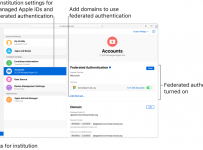
Apple Federated
Image credit.

As per the explanation from Apple’s documentation:

You use federated authentication to link Apple School Manager to your instance of Microsoft Azure Active Directory (AD). As a result, your users can leverage their Microsoft Azure AD user names and passwords as Managed Apple IDs. They can then use their Microsoft Azure AD credentials to sign in to their assigned iPad or Mac and even iCloud on the web. Students can also use it to sign in on Shared iPad.

Using SAML, students would be able to use their single username/password from AzureAD to authenticate against their Apple devices, making it simple for students and easy for IT staff to manage their identity.

According to the documentation, when you federate Apple School Manager with AzureAD, Managed Apple ID’s are created automatically allowing users to sign into their Apple devices with their school email address and password.

What Is Required To Federate?

There are four main steps to link Apple School Manager to Microsoft Azure AD:

  1. Start the federated authentication process.
  2. Connect to your identity provider by linking Apple School Manager to Microsoft Azure AD.
  3. Verify your Azure AD domain ownership.
  4. Turn on and test federated authentication.

The full technical step by step guide to configuring this is available on Apple’s documentation here and I encourage you to check it out.

My Thoughts:

I have been travelling extensively across Asia and New Zealand recently but the consistent conversation that emerges is the importance for schools to get their cloud identity sorted early on, to unlock the almost limitless resources available on the internet.

Increasingly, there is inter-operability between major cloud platforms through Federated Domains and Single Sign on. AzureAD is widely supported and provides a simple way for schools to access the resources they need.

Categories
Microsoft365 Windows 11

iOS Support Lands In Intune For Education

4Intune for Education is a school focused MDM (Mobile Device Management) tool that makes the set up, deployment and management of Windows 10 devices incredibly easy for schools and their IT partners. I’ve probably completed a few hundred demos of it we featured it in our Trial in a Box programme in May and June of 2018.

I’m super excited to see that now iOS support has been added to Intune for Education, allowing a “single pane of glass” for management of both Windows 10 and iOS devices for schools. This has been one of the most requested features from school leaders and IT partners over the last 12 months. The full version of Intune has supported iOS for a long time and I’ve previously written a five part blog post series showing how to set up and configure DEP, VPP and Custom Profiles for iPads. With this announcement, however, the interface has been simplified and the process made easier as it can all be done via the Intune for Education Portal here.

Get Started Instructions

I strongly encourage you to go to the above link to get started and read the instructions, but if you want to skip straight into your iOS Device Management in the Intune for Education Portal then click here.

1.png
Portal Configuration for iOS in Intune for Education

Note that the above screenshot (from the official documentation) shows all three sections configured and ready to “manage”. If you’re setting this up for the first time you will need to:

  1. Log into the Intune for Education Portal
  2. Select “Tenant Settings” on the left hand menu
  3. Click the new “iOS Device Management” settings (below the “General” menu)
  4. Click “Configure” for each of the three sections before you can start to manage your iOS devices.

Therefore, your screen will probably look more like this:

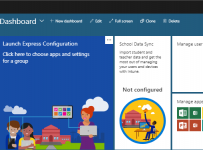
3.PNG
Note the “Configure” buttons in blue – once configured these will change to “Manage”

The overall instructions are pretty good and quick links include:

There is also detailed instructions on how to get iOS apps via VPP and some important reminders when it comes to free iOS apps. Even though you can add them directly to devices, it’s strongly recommended that you add them via the Apple School Manager and VPP because this will allow for silent installs of the apps being pushed to the devices (rather than prompting for an Apple ID on the device before installation).

Something to note: Intune for Education will only allow you to manage devices enrolled via Apple’s Device Enrollment Program (DEP). Whilst most schools are purchasing iPads from authorised Apple resellers, keep this restriction in mind when you’re planning a deployment and check that the iPads you have will be supported via DEP.

One of the nice features is when adding a free app from the iOS App Store you can search for apps directly from within the Intune for Education portal, meaning a teacher or IT manager does not need to leave the “single pane of glass” to add apps. A small, but super convenient, feature.

iOS Settings & Restrictions:

This is one of the key areas that is added to the standard Intune For Education console once iOS is configured and you can read the instructions for this here.

2.png
Note how the Win10 device settings have been collapsed at the top and iOS settings are visible

It’s worth noting that the Intune for Education for iOS is optimized around the functionality available in Apple School Manager and deployments into school scenarios. It does not add any additional features that are not already available in the full version of Intune. To that end, what I wrote about late last year still applies, however my hope is that now there is a specifically education focused version of Intune for Education with iOS management that some of these features will rapidly be added – watch this space for now.

My Point of View:

I see this as a critical step forward for Intune for Education. In my previous role as the Director of ICT at St Andrew’s College, I was constantly looking for tools and reporting that simplified the experience for my system administrators and seeking that elusive “single pane of glass” for reporting and administration.

The addition of iOS management to Intune for Education adds a critical step towards that (keep in mind the full version of Intune also supports Android and MacOS). With many schools running a mixed environment of both Windows 10 and iPad devices, this provides an even easier interface for the configuration, deployment and management of their devices – which can only be a good thing.