Can Schools Go Cloud? Debunking “same, same, but different”

WildRoseOne of the things I enjoy about the EdTech sector is the varied conversations I get to participate in that truly range from “the classroom to the cloud.”

This morning I read a case study from the Wild Rose School Division in Alberta, Canada that highlighted the success of moving from a centralized and locally maintained data center, to the Microsoft Azure Public Cloud.

It’s an instructive read (again, check the full case study here) because it mirrors the journey many schools and districts embark on, however it concludes with the less common final step of fully embracing the public cloud. This journey is often as follows:

  1. Decentralized hardware (storage, compute, networking) across a school or multiple schools in a district / cluster.
  2. Centralized hardware into a locally maintained data center – an attempt to rationalize the management, reduce costs and increase efficiencies.
  3. Off site infrastructure for backups / disaster recovery is required and implemented
  4. The realization that more money and expertise is required to maintain this infrastructure and that now the service is better than the decentralized approach in stage one, more consumption occurs requiring more investment.

Wild Rose contains 19 schools and around 4,800 students so it’s not the largest district but there is physical isolation for many of the schools. The key benefit was all schools had fiber internet access to the campus, opening up possibilities for infrastructure in the cloud.

 “We aggressively centralized and virtualized our entire core service catalog, including email, directory services, web servers, and more. We built a data center four times larger than we needed to handle projected future growth.”

Jaymon Lefebvre, Director of IT Services for Wild Rose School Division

As per my 4th point above, however, the schools learnt that demand grew to fill the capacity very rapidly, requiring more data centers to be built with increased expectations around up time.

“We realized that what we could do on-premises couldn’t compete with Azure and solutions like the Microsoft OneDrive storage platform. We chose to align our strategy with the Microsoft cloud roadmap”

Jaymon Lefebvre, Director of IT Services for Wild Rose School Division

Ultimately, this is the challenge for schools managing and maintaining their own hardware – it’s very hard to deliver services at the scale or reliability of the public cloud and the example of OneDrive from Jaymon above is a good example of this. I am active in a number of EdTech forums where IT administrators are realizing this challenge and rather than being threatened by it, are embracing the opportunities it provides. One of the most common conversation threads I’m seeing amongst school IT admins is migrating local, on-premise network file servers into the cloud – whether that be to OneDrive, SharePoint Online, or more recently, Microsoft Teams for Education. This is seen as the “low hanging fruit” and once time and effort is not required to manage this locally, IT admins can focus on delivering more value in other areas of the school.

The Payoff Going Cloud

The case study makes a few interesting observations around the benefits of going cloud, but the following is one of the key ones to me:

In the past, the IT team spent most of its time resolving problems and doing tedious network maintenance. Now that the infrastructure is in the cloud, staff can spend their time enhancing services and improving teacher and student experiences. Rather than resolving infrastructure scaling problems, they can focus on new opportunities and solving critical organizational challenges.

As a former IT Director in a K-12 school, this is what appeals to me. If the management of infrastructure, storage, backups and software delivery is no longer a core ‘day to day task’, time freed up allows greater focus on applying smarter IT solutions to solving those critical challenges for the organisation. This may be around deploying IoT to manage buildings in a smarter way, or deploying educational analytics like PowerBI to provide the key insights to improve the delivery of teaching and learning to boost student outcomes.

Another benefit, as identified in this case study, is the ability to align more closely with modern deployment and management approaches. Wild Rose has adopted:

  • Microsoft System Center Configuration Manager (SCCM)
  • Microsoft Intune
  • Windows 10
  • Microsoft Azure Active Directory Premium (AADP)

Cost Savings & Availability

No matter how much value a cloud solution may provide, the key question is always “but will save me money?” From Lefebvre:

“Our SLA for Azure has been 100 percent so far,” says Lefebvre. “That’s not 99.99999 percent, it is a full 100 percent, which is amazing. And there is no negative impact on performance having our applications in the cloud rather than on premises. On top of that, we used to spend about CAD$12,000 a year just to maintain our data center—that didn’t include capacity increases, electrical work, replacement hard drives, and lots of other costs. We now spend less than that for everything we get from Azure. More computing power, reduced maintenance requirements, terrific reliability… To us that feels like mission accomplished.”

My Perspective – same, same, but different

I talk to a lot of schools. Every school is usually quick to impress on me the uniqueness of their environment, their challenges, their solutions, their requirements. To a large extent, I accept that this is true when viewed from inside the organisation, however there are definitely some shared commonalities across the sector that would benefit from applying the value of public cloud like Azure.

This case study shows that Wild Rose had followed a very common trajectory (stages 1-4 at the top of this blog), however had the vision and leadership to find a more permanent solution to the growing complexity and costs associated with managing all of their infrastructure ‘in-house’. In my experience, schools are often not good at truly quantifying the cost of managing infrastructure. Things such as power consumption, cooling, security, hardware redundancy, and even staff salaries are rarely calculated into the true cost of delivering a solution. Using something like this free Azure Migration Cost Calculator is one way to get a more accurate indication of the cost of a cloud move.

It’s great to read case studies where institutions like Wild Rose has done the costings, tweaked their delivery focus and aligned their planning so that public cloud can be a viable option.

Dealing With Data Sovereignty: Why Government Agencies Must Use Cloud Services

One of the common objections I hear from schools around New Zealand when the topic of moving to the cloud comes up is “what about the security of my data? Who owns it if it is hosted overseas?”

Data sovereignty is a big deal and schools should definitely be thinking about these types of questions, however the New Zealand Government has significantly simplified this conversation by posting online about why Government Agencies must use cloud services:

Cabinet’s Cloud First policy requires agencies to adopt cloud services in preference to traditional IT systems because they are more cost effective, agile, are generally more secure, and provide greater choice.

Cabinet requires agencies to adopt cloud services

Cabinet requires agencies to:

  • adopt cloud services in preference to traditional IT systems
  • make adoption decisions on a case-by-case basis following a risk assessment 
  • only store data classified as RESTRICTED or below in a cloud service, whether it is hosted onshore or offshore

The last bullet point is especially important – it’s unlikely any schools store data at a security classification level higher than “RESTRICTED” – leaving only Confidential, Secret and Top Secret data not being permitted in the public cloud.

The Government requirement outlines the reasons why they mandate a cloud-first approach for agencies, with the value offering being:

The key benefits of cloud services for the Government are:

  • more cost-effective IT services
  • increased agility from quicker deployment times
  • greater choice
  • improved security.

From an Office Productivity perspective, the article also shows significant usage of Microsoft Office365 usage amongst Government agencies:

There is strong demand for adopting office productivity services, with over half of agency CIOs stating in our October 2016 survey their agencies intend to use these services within the next 12 months. Almost all of these agencies intend to use Microsoft’s Office 365, Skype, Azure Active Directory and Azure Services

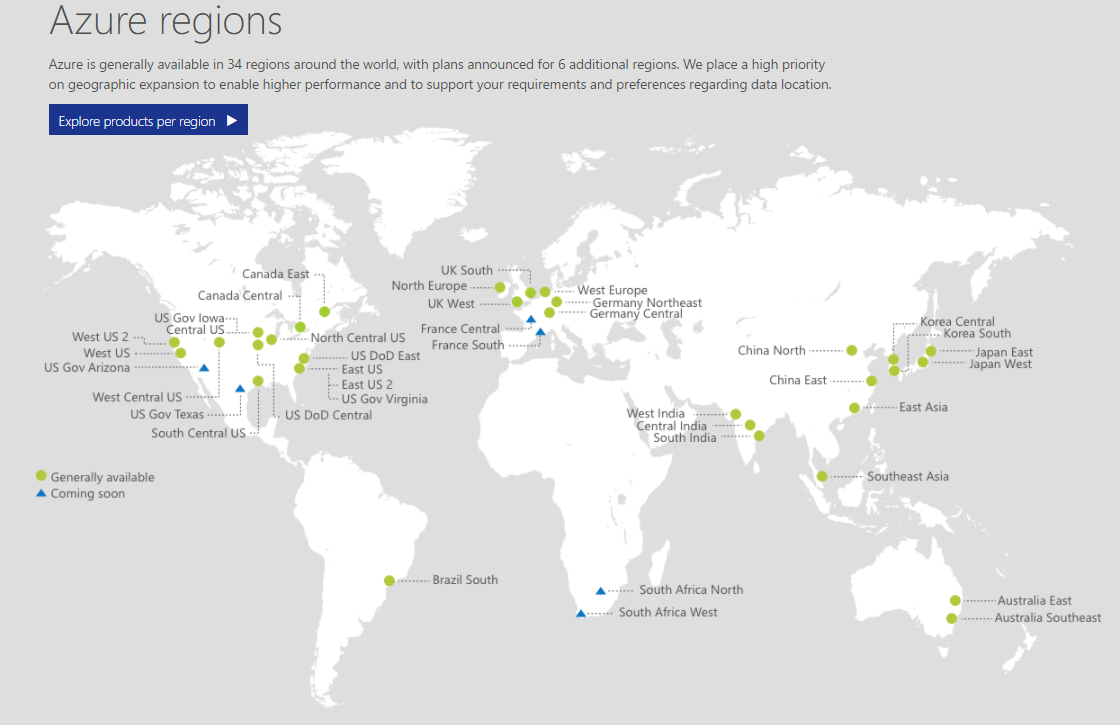
From a school leadership perspective, this mandate from the New Zealand government simplifies the decision making process somewhat, by effectively saying the public cloud offerings outside of New Zealand are acceptable for all data classified as RESTRICTED or below. The closest Azure data centers to New Zealand are located in Sydney and Melbourne respectively:

regions-map