Categories
General

Reflections on EduTechAU 2023 Day 1

I’ve been fortunate to attend EduTechAU 2023 in Melbourne, Australia this week and after a jam-packed Day 1, I thought I’d share some reflections in a quick blog. Here is the index if you want to jump around:

TLDR; Top of Mind

A great day 1 – it was nice to be not ‘working’ at an event like this given 7yrs at Microsoft I’d usually be presenting or on a vendor stand in the exhibitor hall. It was great to be able to attend sessions, wander the exhibitor hall and reconnect with various people I’ve met along my edutech journey (and make plenty of new ones).

The vibe at this event has been very positive and I think people are still enjoying being back in person after the COVID19 years of enforced event cancellation.

Unsurprisingly, the theme that was touched on at virtually every session was AI, and if you read through my notes below you’ll see this come through time and again. Most of the insights were not especially revelatory in this area, although there may be some new things I learn in day 2.

Google Partner Mixer Breakfast

An early rise with a 7am breakfast start. It was nice to connect with some other partners that are deep in the Google ecosystem, from OEM device manufacturers to SI partners deploying Google Workspace for Education and ChromeBooks into schools.

Kudos to Google for keeping their presentations pretty short and sweet and simply creating a venue for partners to mingle and connect. A great start to the day.

Ministerial Address – Vicki Ward

Vicki Ward from the Department of Education Victoria shared some opening thoughts. I was impressed with the level of investment that was happening. Some high level takeaways:

  • Victoria DoE is fully focused on STEM and helping students become equipped to combat environmental challenges
  • They have created 10x “Tech Schools” – start of the art campuses designed to help students tackle real world problems of now and the future.
  • Investing $116m more for 6 more Tech Schools
  • There will be 62K students in these schools.
  • Creating 6x specialist STEM centres for students to be able to attend and be inspired.
  • They have a focus on preparing students to connect with clean energy employers
  • $10m investment into hardware to help create clean energy solutions

I think it’s very clear where the focus of the DoE is.

Plenary – Richard Culatta, CEO of ISTE – Redesigning Learning In An AI Infused World

Richard gave a 20min plenary and asked some interesting questions and posed some challenges. He believes the “Digital Divide” is no longer between students that have access to technology and those that do not, but instead the divide is on how that tech is being used. He called this the passive vs active use of tech.

He referenced https://www.iste.org/AI as a great resource for AI content in education.

He said the focus to stop students cheating with AI is effective assessment (A theme that would be repeated throughout the day) – this reminded me of the vogue from a 7yrs ago to create “un-googlable questions”.

Richard shared five skills to talk about to prepare students for a future:

  1. Teach how AI really works
  2. Teach how to use AI for brainstorming
  3. Teach how to work on hybrid teams (not those just physically separated, but those that are using real people and AI assistants)
  4. Teach what should be considered as creation
  5. Teach how to be a better human (focusing on empathy, love, experiences)

Plenary – Lee Hicken, Microsoft AU CTO – Education In The Age Of AI, Making It Real

I’ve heard Lee present numerous times when I still worked at Microsoft and his session followed in that similar vein. For a non-educator, he did a reasonable job making AI education specific. He opened with a sci-fi quote:

Reality is that which, when you stop believing in it, doesn’t go away.

Philip K Dick

Lee’s idea with this quote is that just because you don’t believe something is not going to fundamentally change the world, does not mean that it is not actually going to do precisely that. In his view, AI will be that change.

He talked about the fact that change is often gradual, until it is immediate. He highlighted this through the wheel – stayed largely similar in use for 3000yrs in carts etc, and then boom, it was used in cars, 50yrs later it’s being used in cars on the moon.

Lee suggested AI is actually quite mundane – it’s inert until interacted with, but it’s great at doing the heavy lifting of boring, mundane tasks

He concluded with suggesting that teachers are the skilled professionals when it comes to education – AI will become the key tool of the profession.

Panel – AI In Education – What’s the Future Look Like?

This was actually a very interesting discussion with at times, quite conflicting views and approaches on AI (it was nice to see some honesty here that there is no ‘one size fits all’ approach.

Some comments collected from the speakers:

  • Mandy Connor – CEWA
    • Aware of the opportunities and challenges of AI, focused on enhancing the capacity and potential of teachers whilst minimising the negative aspects of AI
    • Informed by CEWA (Catholic) values, they want to continue to focus on what it means to be fully human.
    • AI needs to be used to drive good pedagogy, not just delivering content.
  • Penny Addison – DoE Victoria
    • Originally banned the use of ChatGPT whilst worked through their position on it – have since lifted that ban
    • Maintains a high threshold for the application of it – if there is child risk or potentially identifiable information then extreme care is required.
    • Schools need parental consent if going to be using it, but what does informed consent look like when the tool evolves so rapidly?
    • Felt that staff should be given an opportunity to explore this technology before deploying it into classrooms.
    • Felt that if you are teaching with AI you should be learning what AI is.
  • Jacqui Wilson – Queensland Curriculum and Assessment Authority
    • The underlying principles of AI are quite ubiquitous – strong focus on math and critical thinking as well as creativity.
    • Digital Literacy skills are still required – quality in equals quality out when using AI, and the opposite is true too.
    • Assessment Design is critical – when it’s deeply contextual and authentic, then this mitigates the risk of plagiarism
  • Michelle Michael – NSW DoE
    • Took a restrictive approach initially – teachers can access it, but it’s blocked for students.
    • Gave teachers time to evaluate the tool, understand safety and privacy, and figure out when it would be deployed and why it should be deployed.
    • The conservative approach of the DoE was largely because they understand the very high stakes associated with AI in education.

The session expanded to ask the panel how they thought AI would change or influence education in the future. The responses were mixed including:

  • It’s currently unproven in relation to actual outcomes and actual growth.
  • I’m quite pessimistic we will see this impact in the short/medium term.
  • Another panellist was more hopeful, but still pragmatic. Encouraged teachers to play with it in their own lives. Build teacher capability, rethink education in a world where AI exists.
  • Another person – quite positive about it. Deep knowledge resides with teacher and that will flow through into how the tools are used.
    • Lots of opportunities for teachers to build skills around this.
    • Need to focus on the assessment literacy of teachers and make sure teachers are creating valid and reliable assessment and can write it in a way that is contextualised and meaningful for students.

10 Things To Keep an Education CIDO Awake At Night – Josh Roberts NSW DoE

This was a session I was keen to attend from the perspective of my role as a Technology Strategist with Cyclone – I’m often asked about the critical things for IT leaders to be thinking about. The session largely confirmed by thinking and not too many surprises here:

  1. Cyber Security
    • The general low investment in IT/cybersecurity combined with the high levels of PII (Personally Identifiable Information) make them appealing targets for bad actors
    • Josh had enabled MFA for all DoE corporate staff and had worked through 100K teachers and growing. Currently not in place for students.
    • Don’t overlook patching and updating systems
    • Back up and test the backups and restores
    • Manage the cyber risk of third party vendors you’ve deployed – don’t assume they’re secure
    • Focus on training and cyber threat awareness with staff
  2. Information Privacy
    • Focus on legislative compliance, contractors need to sign NDA
    • Engages an external law firm to check over contracts and practice
    • Works closely with the Information and Privacy Commission of NSW
  3. Budget Constraints
    • Always challenging to manage budgets vs expectations.
    • Shifting from CapxEx to OpEx with growing number of SaaS offerings
    • Govt’s love predictable and fixed costs, but this is challenging now with many services being dynamic and consumption based which can lead to unpredictable spend (however this flexibility has allowed for rapid upscaling of services when required or the ability to respond to incidents quickly)
  4. Equitable Access to Technology
    • Aiming for a 1:6 ratio of device:student across the entire DoE
    • Tech removes barriers and enhances learning opportunities – this was shown throughout COVID19
    • interestingly, teachers in NSW are not given laptops
  5. Integration of Education Technology
    • Remains a challenging one – any new service is rigorously assessed and needs to have strong pedagogical value
    • DoE has created a universal resource hub of quality assured teaching resources to assist educators
    • A student learning library of content is also available and parents can access this too
    • When integrating new services think about scale – often demos look good, but when you go to implement into SSO and your IdP they do not work as advertised or on the scale you require at a DoE level
  6. Digital Maturity
    • When used well, technology is dynamic and immersive way of teaching.
    • Teachers can model these skills but only if they’re proficient in the technology themselves
    • A big focus for the DoE is how can technology reduce the administrative burden for teachers
    • The DoE has funded 1000 Digital Classroom Officers that support educators with use of technology in their classrooms
  7. Disaster Recovery & Business Continuity
    • All data is backed up to a DoE managed Data Centre – has proved invaluable in some situations where large scale data loss occurred e.g. Bushfires burning down schools
    • Always test your backups and ensure they can be restored
    • Test your recovery processes themselves to ensure there is no panic when required to do it for real
  8. Internet of Things
    • The reducing cost of IoT and the increased functionality means this is being used more and more
    • However, many IoT devices lack enterprise management functionality making them tricky to deploy securely.
    • It’s important for the DoE these can still be monitored and filter any content going through them
    • Use of network segmentation is important and don’t forget to apply updates to firmware/software on IoT devices
  9. Artificial Intelligence
    • NSW taking a conservative approach and recognises the duty of care they have to students and parents
    • They are involved in leading the national framework for generative AI in schools in AU
    • Focus on knowing where your data is going and not allowing PII to be shared
    • Question if schools are comfortable with the accuracy and bias of answers coming from AI
  10. Immersive Technologies
    • Ran out of time, but quick comment on VR/AR solutions and their role in edu

A lot of ground was covered in 20mins but it was good to see what was shared mostly aligned with my own thinking.

Apple Education Spotlight: Unlocking New Opportunities With Mac – Brett Moller St Andrew’s Anglican College

This session was a Q&A hosted by Apple featuring Brett Moller the Director of Knowledge Systems at St Andrew’s Anglican College on the Sunshine Coast, QLD. I’ve heard Brett speak before and enjoy his take on things – I actually met him earlier in the morning before the plenary sessions and had had a quick chat with him – a lovely guy.

Some key ideas he shared from his session revolved around the switch from Windows BYOD to Mac CYOD around two years ago on the back of a security incident.

  • Financial savings: IT Operational budget dropped by 6% and support tickets by 90% after switching to Mac two years ago
  • His belief is “problems are an opportunity to embrace”.
  • MDM of Jamf manages all devices
  • Brett spoke at length around TCO of Macs – said most schools look at two different devices and evaluate based on the price of the unit. It’s critical to evaluate the TCO which includes the cost of device, repairs, time out of class, learning outcomes and security.
    • You need to have the Principal, Business Manager, Finance Manager all on board to make a change like this.
  • Brett focused on calling their program CYOD (Choose your own device) rather than BYOD (Bring your own device)
    • He believes there are negative associations with BYOD especially around equity. Some students can afford better devices than others (honestly, this was an interesting take given the requirement was for all students to have a Mac of some kind….)
    • He chose to focus on the learning outcomes from the device and the security of them too.
  • For his own IT team, he hires for “mindset over skillset” – this resonated with me as I like to say “hire for attitude and train/backfill for talent if need be”. Attitude is everything.
  • He has not had to increase his staffing but been able to repurpose their focus now that they have reduced the support tickets associated with devices.
    • In my earlier conversation with him I asked about his team size – 5 team members and around 1450 students.
  • One interesting thing was he defied all conventional wisdom and switched students to Macs before he had switched teachers!
    • He indicated many admin staff still use Windows devices and recently he was queried by the Finance Manager why Windows laptops were costing more than the Macs that teachers were using.

Overall, it seems Brett has done a great job at the College and has a compelling story to tell.

How The Melbourne Business School Is Solving For The Future Of Learning Challenges Through A Beta Incubator – Ellen Sullivan and Nora Koslowski

This was an interesting session sharing on their 12 week incubator they created to drive innovating and making learning more hands on. It’s called MBS& and is focused on being a catalyst for trailblazers to solve the biggest learning problems and innovations that redefine how learning looks.

A big question being asked was what do we need to address learning whilst our sector changes very rapidly, what ideas can we launch, what ventures can we make and what partnerships can we go to market with?

  • Synthesised Insights from. the session:
    • Everyone said there was a strong desire for life long learning, but hard to make that real.
    • The need for more social, communal aspects to learning
    • A shared responsibility for funding the pursuit of learning
    • The need to connect learning and skills acquisition to a greater purpose
    • The need to understand what skills will be valued and required in the future.

Panel: Where To Next For Higher Education In Australia

This was a great session to finish Day 1 and focused around three core question being asked:

  • What are the greatest opportunities for the future of Higher Education in Australia?
    • Solving for the dual tensions of State/Federal funding. and outcomes – H.ed is a slave to two masters currently
    • The shift to online learning at scale – most Govt’s can not afford to build new universities at the rate of demand currently.
    • Between the 2015-2030 it was predicted demand for tertiary education would grow from 160m learners to 410m students. To keep up, this would require building 4 new university campuses containing 80,000 students every week for 15 years – it’s just impossible so online learning is required.
      • Even if they could physically build them, they could not train faculty fast enough.

On this point Ray Fleming replied to my Tweet saying India is building a university a week and still predicting to be short by 3.3m – see his video here:

  • What are the greatest challenges for the future of Higher Education in Australia?
    • One speaker felt that Universities were aiming too low in their growth predictions – their aspirations were not large enough. He felt that is bad because when this happens using the for profit sector gets involved to help scale and he believed education should should remain the primary realm of Govt and universities.
      • He said unis are stating they need grow at 5-15%, but in reality it is 100% if they are to meet demand.
    • Another felt the big challenge was the tertiary learning space was too vanilla – there was not enough diversity to support students with different interests and learning journeys.
      • This was liked to a reef ecosystem – you need diversity of marine life to keep the ecosystem healthy – it just can’t be a lot of whales there. They felt universities were all trying to be whales, and not have unique offerings for diverse learners.
    • The major challenge is funding the required expansion of higher education. Funding typically comes from three sources:
      • Govt’s put more money in
      • Students pay more
      • Unis cut cost of delivery
      • (or a combination of all three)
    • It’s unlikely the Govt will give more money and yet the biggest area of expansion into higher education is from under-served and disadvantaged communities so funding is always going to be a challenge.
  • If you had a magic wand and could change one thing in the sector what would it be?
    • Went back to the earlier comment about need for more diverse offerings in tertiary. Based on the Carnegie Classification, every AU university is a doctoral granting institution. By comparison, only 25% of universities in the US are like this.
    • “get amnesia” – forget what Unis were in the past, reimagine what they need to be for the future.
    • Change the mindset of faculty around the mindset that students are bringing to their learning. Most faculty teach as those students have a mindset that they want to become just like their lecturers. This is incorrect and faculty need to embrace the diversity of learners.

Some interesting thoughts! Bring on Day 2!

Video: Integrating Moodle LMS Into Microsoft Teams

The impact of COVID19 on the digitization of education is truly remarkable and, I believe, irreversible. Student expectations for course content to be delivered “on demand” and “just in time” via a variety of mediums has become the norm and many Universities and schools are struggling to keep up.

One trend I’ve observed is that with the proliferation of digital platforms, many educators and students are now struggling to understand what content goes where and how to streamline the entry points to accessing learning materials. This is a real and valid question, especially in light of the drive from many educational institutes to improve the equity of access to content and accommodating the varied learning needs of students. With a plethora of platforms deployed, it makes sense to being rationalization, both through improved security via Single Sign On (SSO) between them, but also simplifying the user experience (UX) by providing a common entry point to start learning and collaborating.

Microsoft LMS Integration Documentation

To this end, Microsoft has created a number of integrations between Microsoft Teams and popular Learning Management Systems (LMS). Linking directly to some of the documentation for this:

Moodle Integration Video

My colleague Lalit Mohan has created a great walkthrough video showing the tight integration of Moodle inside of Microsoft Teams. This has both the end user experience and the configuration required by an administrator:

The ease of a truly integrated experience between the real-time collaboration benefits of Microsoft Teams (and M365) with the LMS of Moodle natively accessible with one click is a powerful combination:

If you’re an organization that has deployed multiple platforms to meet the needs (and demands) of remote and hybrid learners and are now starting to return to a mixture of face to face and remote learning, it could be the right time to consider the rationalization and deeper integration of your learning platforms.

Seeing the ease of connecting Microsoft Teams with a variety of LMS could be the start of that journey for you.

Categories
Microsoft365 Windows 11

Empowering Students & Teachers To Self-Deploy Windows 10 Devices with AutoPilot & Intune

One of the most common discussions I have with education customers, both in K-12 and Higher Education, along with our partners, is around the easiest pathways to mass scale device deployments. As the COVID19 pandemic continues to impact schooling, many students are in remote/hybrid learning scenarios and require devices to support their learning. Consequently, traditional models of deployment need to be reconsidered as devices are often needing to be shipped directly to teachers and students who may be in various levels of lockdown, there may be a mixture of institution and personally only devices needing management and of course a pressing concern to ensure the devices are secure and compliant.

This graphic illustrates the changing approach to device deployment that many education institutes are facing

With that background, I was thrilled to see a recent LinkedIn post from my colleague Ovi Barceló Hernández where he shared a real life, very personal example of “practicing what you preach” as he recorded his 8yr old son unboxing and self-deploying his new school Windows 10 device:

As always, I encourage you to read the full original post, but the key take away was his 8yr old son could easily deploy his device for learning, straight from the sealed box from the manufacturer and within minutes end up with:

  • A full zero-touch deployment of Windows 10 EDU, already secured
  • A deployment of all the needed software (now we have Notepad ++, Minecraft: Education Edition, Scratch, Chrome, Lego WeDo, Paint.Net, VLC Player, 7-Zip, Publisher apps, and, of course M365 Apps)
  • A completely managed device, end to end, with full control on updates
  • All in a 4/128 device!! 78GB still available after everything I mentioned here.

Aside from dispelling myths around the challenges of deploying Windows in education, Ovi’s son was able to independently prepare his device for learning and gain new skills and a sense of ownership from being part of the preparation of his device for learning during this period of remote and hybrid teaching.

If you’re interested in learning more about how to do this, we have created interactive, click-through guided demos of many of the required tools, including the Windows for AutoPilot and Intune for Education platforms to enable this. I’ve collated all of these videos in this blog post here but will specifically link to:

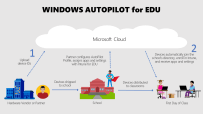
I particularly like the above video because it demonstrates genuine options around end user self-deployment allowing both schools and deployment IT partners to save money on what has historically been a costly and time/labour intensive part of the deployment process. This is outlined in the following infographic:

Understanding Windows AutoPilot for Edu and empowering students and teachers to self-deploy their own devices

If you are wondering what is required to achieve the same outcomes, the base line solutions to seamlessly allow end user self-deployment like Ovi’s son achieved would be:

Not Just For Education…

If you’re reading this and thinking this solution is just for education, then think again! It’s widely used in many organisations now and when I saw Ovi’s post above, it reminded me of one from my NZ based colleague Ben Brown when he posted the following question!

IT people, why are you still imaging devices?? 💻 A real world example of why autopilot + cloud ☁️managed devices just makes so much sense. Broken work laptop -> full work machine in <10 minutes 🎉

Ben Brown – LinkedIn

Being the talented individual he is, Ben created a time lapse of his re-deployment process from unboxing his new Surface, to deploying it via Windows AutoPilot and then submitting the return ticket for his broken device – all in under ten minutes!

Final Thoughts

These two examples are great because they’re real world examples of people who would likely both identify as “not super techy” IT Manager type individuals and yet, with the power of modern deployment technologies likes Windows AutoPilot and Intune, they were both able to quickly get themselves up and running with new devices in mere minutes.

It’s hard to overstate the importance of this empowering of end users to ‘own the process’ both in terms of building their confidence that they could redeploy their existing device if it needed a full reset if something went wrong, or in the case of Ben, deploy a brand new replacement device if something more serious had happened.

For education leaders, this should prove the point that the pathway forward for large scale deployment of Windows devices is a modern management approach, freeing the IT team up for more important functions to the organisation than simply touching every device to prepare it for end users. If you are an IT Admin in a school and would like to know more about how to implement this process yourself, then check this link which has all the documentation you need:

Link to documentation here

If you have questions on this, feel free to hit me up on Twitter or in the comments section below!

Categories
Microsoft365

Shared Channels for Microsoft Teams for Education – Initial Thoughts

(Embed should start at the 1:17 mark – if not, click here)

The above video (queued to start at the 1:17 mark where they start talking about Shared Channels) does a great job of calling out the new functionality in Microsoft Teams. Put simply, Shared Channels will provide a solution where an external user that is collaborating with someone will currently have to “change tenants” inside of Teams to communicate natively with each other. As the video suggests, this takes users ‘out of their flow’.

The solution is Shared Channels.

As the video indicates, this will give users the ability to create a dedicated channel inside of a ‘host Team’ where they can invite users external to their organization, with the result that for both the host tenant users and the guest/external invited users, the experience will appear as if they’re both working inside of their home Team tenant. This is a big game changer for education and there are a lot of scenarios where this would add value.

How Would Shared Channels Benefit Education?

This is far from an exhaustive list, but some ideas off the top of my head:

  • Teachers collaborating with each other across different schools
    • This is definitely one of the main scenarios I can see appealing to schools, as I’ve talked to numerous customers where they exist in a cluster or “community of learning” – a close, geographically neighboring group of schools, across the K-12 years, who want to be able to easily share information with each other.
    • Adding Shared Channels for various interest groups (literacy / numeracy / Gifted and Talented / Sports organization etc, would aid the flow of information tremendously.
    • Similarly, Professional Development across schools (and countries) is enabled through Shared Channels.
  • Students working securely / safely with each other across schools
    • Similar to teachers above, often students would like to work across schools in terms of projects and have all of their information secure in the one location. Teams provides an excellent way to achieve this, without needing to use external third party platforms, or remember different usernames/passwords for students and the various websites they may choose to use.
    • Given Teams is a truly unified communication platform, the ability for students to go from a chat, to a call to a video call with screen sharing, ensures that student collaboration is secure and easy.
  • External experts invited into a Team for a specific role/purpose
    • Another common request from teachers is the ability to bring an industry expert into their Team to give their students (or colleagues) access to expert knowledge is something that Shared Channels would enable.
    • This could happen on an ad-hoc or semi-permanent basis.
    • I was on a call with a Minister of Education from a country in APAC recently where he shared one of his key goals was to drive greater industry/schooling crossover to ensure that educators remain relevant in their fields and that educational institutes are bringing in the best talent for their students to learn from. Shared Channels facilitates this free exchange of knowledge easily and securely.
  • Sports Co-Ordination
    • For anyone that has ever worked in a school, they know there is a lot of co-curricular organization that takes place across schools. Enabling schools to have access to each other in a single, secure platform like Microsoft Teams where they can ask questions in real time, get access to schedules, draws, rules and other resources for sports would be awesome.
    • Given Teams allows for video calling, it would also be possible to host briefing / de-briefing ahead of seasons and ensure that all coordinators in schools would be able to be brought up to date with what they need to know. As these can be recorded and shared in the Channel, they become a bank of resources for anyone that missed the initial call
  • Streamlined Communication Across Multi-Tenant Ministries of Education
    • A number of Ministries / Districts of Education have configured individual tenants for each of the schools in their jurisdiction. However, they also want the ability to communicate easily to targeted audiences across all schools (in their own tenants).
    • For example, the Ministry/District wants to communicate to all Principals, or all Executive Officers, or all IT Administrators in schools. Creating a Shared Channel in the central Ministry / District ‘host’ tenant for each of the target audiences, would then allow them to easily communicate directly to all users. Significantly, those intended recipients of the memo would receive it inside of their own school’s tenant with no need to change tenants or platforms.
  • Research:
    • Many Higher Education customers and educators want to be able to do cross-organization research and collaboration and yet have very stringent requirements around where data is stored and how it can be secured. Shared Channels would allow for this easy, real time communication, whilst benefiting from all the industry leading retention policies that Microsoft 365 relies on.
Screenshot showing two users, in separate tenants, collaborating together in a single Shared Channel in Microsoft Teams.
  • External IT Support Partners
    • My colleague Tim Vergel de Dios suggested this one, whereby it would be helpful for a school/university’s external IT partner to have a Shared Channel for two way Teams communication to assist in problem resolution with the school.
  • Exchange Students / Teachers
    • Often, schools are reluctant to set up new account details for exchange students given the temporary nature of their residence at the exchange school. One solution would be to add them to the school in Shared Channels so that they can use their own school’s credentials to be members of the exchange school learning programs.
  • Professional Development Partners Communicating With Client Schools
    • This one came to me via the suggestion from Carmen Kenton, a PLD provider and MIE Fellow. The ability for a PLD provider to host a shared channel and then invite client schools / educators into that Shared Channel based off their own school’s credentials makes the secure sharing of content even easier.

Final Thoughts

I can’t wait to get my heads on Shared Channels in Teams as this looks like a super promising new feature that will solve the cross-organization collaboration requirements for education customers.

Once I get access to this I’ll update the blog with a new post to share my hands on experience.

Categories
Microsoft365 Windows 11

Guest Post: Digital Equity and the Role of Modern Device Management

Modern Management of devices in the education sector is a hot topic and I’ve been having plenty of conversations around this recently from discussions with various Ministries of Education, through to school leaders and of course education IT partners.

Everyone is attempting to bridge the digital divide and find the best way to leverage the power of the cloud to achieve a simple and consistent experience for teachers and students whilst reducing costs and time from an IT perspective. Over the weekend I came across this great article from David Wain from Data3 in Australia where he goes into detail showing how taking a modern management approach to devices can increase digital equity – a key goal for most Ministries of Education and individual Higher Education and K-12 institutes.

As always, I encourage you read the original article in its entirety, along with the accompanying blog post showing Data3’s approach to Modern Management which included this excellent 2minute video overview:

My Key Takeaways From David’s Post On Modern Management

For those that are time poor, here’s my personal top of mind points from the post:

  • COVID19 has accelerated and highlighted the digital inequality in the education system, prompting a number of responses from various layers of Government, including mobile internet provisioning and supplying of devices for remote learning
  • Modern management can lower the bar for schools and communities to gain access to the crucial technology tools and systems to support modern learning.
    • It also means that the time currently spent managing traditionally complex ICT environments can be better spent supporting teaching and learning efforts.
  • In a modern management scenario, devices can be automatically provisioned at school or at home, with the right applications, security, policy and data storage requirements as part of a consistent ‘out of the box’ experience.
  • By contrast, traditional management systems are complex, expensive to maintain and require an enormous amount of time developing standard operating environments (SOE), patching systems and rolling out applications and policy.
  • The “new normal” is emerging with an expectation that IT can deliver the right learning experiences in a hybrid model – some students and teachers physically present on the campus, others remaining at home or offshore.
    • This requires a new paradigm of thinking when it comes to device management.
  • Modern Management can deliver improvements in accessibility for students with special needs – what if any school, regardless of size, location and ICT capability could, with just the click of a mouse, enable a group of students to log on to their devices, making full use of the amazing accessibility features of Windows 10?

David sums up his article in compelling fashion:

Across all scenarios, modern management has the potential to lower the bar to ensure technology access and in reducing complexity, it can then deliver a more productive, accessible and equitable teaching and learning environment.

Those are admirable goals and in these incredibly unusual times, it’s important all leaders in the Education sector are exploring how to ensure equitable access to technology.

Categories
Microsoft365 Minecraft:EE

Engaging Student Learners with eSports in Minecraft: Education Edition

I am a big fan of learning through game based scenarios and have blogged about both digital and physical tools to support this in the past. For example, the “Play Impossible” balls are one of the best integrations of technology and kinesthetic learning modalities I’ve come across recently – read the full blog post here. By contrast, taking Shakespeare and Charles Dickens and recreating entire fictional worlds inside of Minecraft is a great way to engage literacy skills into play – see the post here. The second post is particularly useful because in the second half of the blog I reference a lot of the research from James Paul Gee, who many see as the ‘god father’ of game based learning research.

In that context, the announcement today that the Minecraft: Education Edition team are releasing an eSports group of worlds and teaching resources is a very welcome addition that extends the existing game based learning features in Minecraft.

As always, I encourage you to read the original blog announcement here.

I’ve talked to many educators, both K-12 and Higher Education, that are already leveraging the huge engagement levels that eSports provides to drive learning outcomes in new modalities.  The future of eSports is huge – don’t believe me?

In 2019 a 16yr old won the Fortnite World Cup, pocketing a cool USD$3,000,000 in prize money. This is comparable with the US Open tennis champs and Tiger Woods’ winnings at Augusta – see the story here.

Suffice to say, students are down for eSports. As educators, there is a real opportunity to use eSports as the hook to drive interest and engagement in platforms that also drive robust learning outcomes.

eSports in Minecraft: Education Edition

eSports 1'

A number of resources have been released by the M:EE team to support educators getting started with eSports, and unquestionably the starting point is the rich OneNote NoteBook here:


eSports 4
The Notebook sections on the left show the topics of resources available for educators

Along with the OneNote above, there are seven specific worlds and lessons that students can get started with:

  • Pirate Cove: Enter an immersive pirate-themed world to take part in build competitions on the high seas. 
  • Space Race: Students visit another world as they compete in build battles set against the backdrop of space. 
  • Gold RushStudents travel back in time to a 19th-century Gold Rush town to compete in team-based builds in the Old West. 
  • Busy Bees: Shrink your students down to the size of a bee, then set them loose in an enormous back yard for the battle of the buzz. 
  • Binary Builders: Enter a gigantic computer where students compete in build battles amid a jungle of circuitry. 
  • Splat Racers: A surreal fantasy racecourse is the setting for competitive builds. Set your students’ creativity free as they dream up fantastic imagery! 
  • 3D Print: Students take their places inside giant 3D printers, then compete in build battles. 

Going Deeper With eSports in Minecraft

If you want to go even deeper, then I suggest you check out:

Final Thoughts

It’s easy for adults to be wary about game based learning and what the actual outcomes are for students. To overcome this, there is a wealth of research available to show the impact that learning via gaming can have for students and adults alike. I know of adult training courses (such as nursing) that use game based learning platforms to drive best practice training engagement and of course specialist sectors like policing and armed forces have been using game based learning for years to provide experiences to their employees.

Leveraging research and a clear strategy with measurable outcomes are critical when preparing to implement an eSports curriculum in your school and I also recommend engagement with your student population. Allow their voice and interests to drive some of the messaging and desired outcomes – they will be your best advocates!