Categories
Microsoft365

Play Impossible Game Ball Brings An “A-ha” Moment to Education

playImpossible_App_green_edited
Image credit

Every now and then you see a piece of technology that leaves your mind whirring about the possibilities for both educators and students alike. Back in 2016 I encountered the HP Sprout for the first time and blogged my first giddy thoughts about how this could be integrated into incredible teaching and learning moments, calling it an “almost magical technology”.

At BETT London 2019 I saw the Play Impossible ball for the first time, right at the very end of this video and the integration with Microsoft Hacking STEM templates in Excel generated the same reaction in me that the Sprout did:

What endless possibilities could creative teachers come up with when technology infused ball sports in such a fun and natural way?

What’s the big deal? Have a look at this:

(If you’re in a hurry, make sure you scroll to the bottom and watch the video I recorded showing the Play Impossible Game Ball and Excel Data Streamer workbook in action.)

In essence, the Play Impossible game ball is:

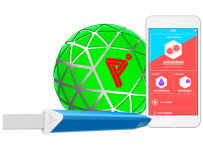
an active STEM system that delivers fun and challenging games integrated with math and physics lesson plans through a professionally crafted ball containing sensors that connect to a smartphone, tablet or PC via Bluetooth.

Robust in build quality, small enough for younger hands, it’s easy to get up and running on the platform of your choice (currently supporting Windows10, iOS and Android) and then the intuitive app guides you through how to get playing … and learning! My 9yr and 7yr old kids figured it out in minutes.

Integrating Learning Into Play

I’ve blogged before about the principals of game based learning, however that was mostly in a Minecraft:Education Edition context. When I saw the Play Impossible Game Ball in action I really wanted to get hands on to see for myself how this works and Brian Monnin and the team at Play Impossible kindly shipped me a few demo units for some upcoming events I’m presenting at.  As soon as I got hands on, it became apparent to me that deep learning could be achieved alongside the obvious element of fun through playing. Principal #10 from James Paul Gee’s 16 Principals For Game Based Learning is:

Situated Meanings: Students learn new vocabulary words by experiencing them within game situations. Research suggests learners do not acquire new vocabulary when the word is learnt purely in the context of other words. By contrast, retention is highest when words are learnt in association with an action, event, or image. Gaming provides the perfect vehicle for this.

With data outputs from the Game Ball including measurements like speed (in kph), acceleration, g-force, newtons, rotational spin and air time there are a lot of vocabulary words that are no longer abstract, but directly linked and associated with actions and activities the students are participating in through situated meanings.

With a Play Impossible Game Ball, students (and educators!) immediately get caught up in the fun of competing and the kinesthetic learning opportunities are boundless. However, for me the integration of Excel’s Data Streamer and Hacking STEM templates is where this goes next level in terms of learning pathways.

Excel Data Streamer & Hacking STEM

The Microsoft Education team have put considerable resources into creating STEM lessons for educators to quickly and easily build engaging projects for students to learn the fundamentals of STEM concepts. At the heart of this is Data Streamer, a plugin for Microsoft Excel for O365 subscribers:

Data Streamer provides students with a simple way to bring data from the physical world in and out of Excel’s powerful digital canvas. With a sensor connected to a microcontroller that is  attached to Excel, begin introducing students to the emerging worlds of data science and the internet of things.

Data Streamer is available for free to all O365 subscribers.

With Data Streamer, the at times abstract concepts of IoT devices and the data generated by them can be brought to life through real time visualizations inside of custom built Excel spreadsheets.  Here is an example Excel using Data Streamer to take the output data from a Microbit recording the impact of knock to a helmet:

DataStreamer.PNG

You can easily activate Data Streamer in your O365 version of Excel by following the instructions here or watching this animated GIF:

DataStreamer Activate.gif

There is an entire library of Hacking STEM projects that you can access here, and to support the Play Impossible Game Ball there is a custom Excel workbook you can download here. Some of my favourite Hacking STEM lessons include:

What Does It Look Like?

I recorded a quick video (using the Meet Now feature in Microsoft Teams – a great way to deliver Flipped Learning) to show you just how easy it is to get up and running with the Play Impossible Game Ball app and the Hacking STEM Microsoft Excel workbook and Data Streamer plugin for live data feeds:

The Data Streamer and Excel Hacking STEM workbook are only available on Windows 10 and this adds a unique value proposition here when using the Play Impossible Game Ball. To maximise the value beyond the included app from Play Impossible, Windows 10 and Excel O365 prove again why it is the most versatile STEM platform unlocking the widest range of learning pathways with STEM and IoT devices. By combining the flexible canvas of Excel you can easily add other data streams to the workbook and create your own custom visualizations of this data, providing students hands on experience with the tools that many data scientists use on a daily basis.

Final Thoughts:

What I like about the Play Impossible Game Ball is the wide range of learning opportunities available through this technology. It’s getting kids active and physically moving around and being hands on, but also introducing elements of IoT, data streams and STEM in a fun and comprehensible way.

The included Play Impossible app provides a “fast start” for students from a young age, however the addition of the Hacking STEM Excel workbook with the Data Streamer plugin really increases the use case scenarios, in particular in subjects such as more senior subjects like Physics, Maths with Statistics, along with Physical Education learning about range of motions. The sheer volume of data generated by the Game Ball, and collected and recorded in Excel via Data Streamer, allows for an almost limitless range of extended learning ideas where teachers can bring their own ideas to the tools.

Categories
Microsoft365

Teaching Girls A.I. On 125th Anniversary of Women’s Suffrage In New Zealand

suffrage 125 logo mowUpdate: My colleague Felipe Ayora has pointed out another data mining tool created in New Zealand at the University of Waikato called Weka that is free and has associated lessons teaching students the fundamentals of AI in data.

For a small country at the bottom of the world, New Zealand has been a world leader and a world beater in many different areas. This week, we are celebrating the 125th anniversary of 19th September 1893 when the Electoral Act 1893 was passed, giving all women in New Zealand the right to vote.  As a result of this landmark legislation, New Zealand became the first self-governing country in the world in which all women had the right to vote in parliamentary elections. (Source: Ministry for Culture and Heritage)

That’s a big deal and the New Zealand curriculum has a similarly far-sighted vision by promoting STEM, with changes to the Digital Technologies Curriculum by including two new strands:

  • Computational Thinking
  • Designing and Developing Digital Outcomes

The Minister for Education, Chris Hipkins said in 2018:

The digital curriculum is about teaching children how to design their own digital solutions and become creators of, not just users of, digital technologies, to prepare them for the modern workforce.

The reality, however, is that many young women do not foresee a future career in these areas. Each March, Microsoft celebrates women in tech with the #MakeWhatsNext initiative which this year focused on inspiring young women to be the inventors of future technologies:

kate sheppard
Kate Sheppard (1848-1934) Source

In previous years, Microsoft has called out the need to change the current trend that sees only 6.7% of women graduate with STEM degrees (based off data from the USA).

In the spirit of Kate Sheppard, the most prominent leader of the Suffragette movement in New Zealand, it’s time we ensured that all women are equipped with the necessary skills and inspired to explore a career that will almost invariably involve technology in some capacity.

In January 2018 LinkedIn published a blog post confirming that technology is here to stay in their list of skills required for the most in demand jobs:

Technology is here to stay. Year-over-year technology jobs and skills have dominated these lists, and that’s a trend that’s likely here to stay. All jobs are likely going to require some technical skills in the future, so make sure to brush up on the basics.

When you look at the top 10 skills identified by LinkedIn you can see the strong prevalence of technology:

  1. Cloud and Distributed Computing
  2. Statistical Analysis and Data Mining
  3. Middleware and Integration Software
  4. Web Architecture and Development Framework
  5. User Interface Design
  6. Software Revision Control Systems
  7. Data Presentation
  8. SEO/SEM Marketing
  9. Mobile Development
  10. Network and Information Security

This is hardly surprising when you consider the biggest companies by market capitalization are now completely dominated by technology:

largest-companies-by-market-cap-chart
Credit: Visual Capitalist

So – it’s one thing to know of the skills required, it’s an entirely different proposition to teach these in an interesting and engaging manner. What is the solution?

Alice Envisions The Future:

Today I had two serendipitous events occur:

  1. I watched Jourdan Templeton from the Aware Group deliver a presentation highlighting the power of Azure Cognitive Services, demonstrating how it can make sense of unstructured data through the use of computer vision, sentiment analysis and PowerBI – it was truly impressive.
  2. I learnt of the work my colleague Oliver Zofic from Slovenia had completed recently with his Alice Envisions the Future project.

For this project, Oliver created seven challenges aimed at encouraging young women to explore the power of Artificial Intelligence (A.I.) and Machine Learning (M.L) through the use of Office365 and a range of powerful cloud technologies from Microsoft. These seven challenges are:

  1. Office365: Create a collaboration hub using Microsoft Teams for the groups of girls to share resources through the use of OneNote, Planner and FlipGrid.
  2. Custom Vision Service: through the use of www.customvision.ai create an image classification tool to distinguish images of cats and dogs – an easy introduction into the world of computer vision.
  3. Azure Machine Learning: using the topic of breast cancer, students create and train a ML model to make a two class prediction model using Azure Machine Learning Studio
  4. Build a Bot: Using Microsoft QnA Maker students build and deploy a bot that takes a natural language query and runs it through a bank of FAQ on breast cancer.
  5. Cognitive Services – Facial Recognition: Using Azure’s powerful Cognitive Services, students build an app that can detect faces and emotion.
  6. Internet of Things & Raspberry Pi: IoT is almost as big of a buzz word as AI and ML and in this challenge students use the online Raspberry Pi simulator to connect to the Azure IoT Hub to understand how devices at the edge can stream data to the cloud
  7. Create a Vlog: A fun way to finish the day, the girls are required to create a video record of their learning and post it to FlipGrid (recently acquired by Microsoft and integrated directly into Microsoft Teams).

Get Started & Give It A Go:

The keys to the ignition to get started learning A.I. are:

  1. Office365 username / password – this is a requirement to log into most of the cloud services listed above (there is no cost for most of these, or a temporary / limited access can be obtained).
  2. Download the seven challenges from here. (please note – in Challenge Three there is a reference to downloading the breast cancer data from the University of Wisconsin Hospitals. This link is no longer valid, however the data is included in the link above as part of the download called breast-cancer-wisconsin.data).

For a while I’ve been trying to get my oldest daughter (14yrs) interested in coding and data related fields but to date, she has shown limited interest. Today, I introduced her to Challenges #2 and #3 and left her to it – she loved it. When asked for some feedback she shared:

I found it really interesting, the tools have a good user interface – I don’t know much about coding but the instructions were for the most part easy to follow and the tools were cool. Overall, I had fun and felt like I’d done something worthwhile.

I also created the image detection tool using CustomVision.ai and it didn’t take me long to build out a working model:

1a
The images I used to train my model, accurately tagging dogs and cats respectively
2
Running a test against my model – identified this new picture with 99.9% probability as being a dog!

My Point of View:

Without doubt, many of the most sought after skills in the workforce are going to include those around data, analysis, modelling, interpretation and all combined towards solving some of the biggest problems in the world today. Just this week I learnt of a young kiwi woman working on a solution that will disperse fog at airports, a problem of very real significant when you consider fog costs airlines over $1.8M and impacts over 135,000 travelers per hour

Last week at The New Paradigm, an education event co-hosted by HP and Microsoft at which I presented, I listened to Elise Beavis talk about her role as a performance engineer at Emirates Team New Zealand. Elise spoke candidly about her wish that she had been introduced to coding at high school, rather than waiting until university to learn the fundamentals. From the speakers page:

Having sailed since age 9, Elise saw studying engineering as a pathway to combine her love of sailing with her interest in maths and physics. She was accepted into the accelerated pathway and graduated with first class honours. The week after finishing her final engineering science exam, Elise started working at Emirates Team New Zealand. During the 35th America’s Cup, as the youngest full time employee, she worked in a number of areas including aerodynamics, designing 3D printed components, running VPP’s and modelling how the boat would fit in the plane to be flown up to Bermuda. Since winning the cup, Elise has been involved with developing the new class of boat and writing the AC75 class rule. She is now working on the design of ETNZ’s first AC75.

The sooner we can introduce students to technology like those in the seven challenges from Oliver, the better equipped they will be to succeed in the rapidly advancing world they will be entering on leaving school.

Can Schools Go Cloud? Debunking “same, same, but different”

WildRoseOne of the things I enjoy about the EdTech sector is the varied conversations I get to participate in that truly range from “the classroom to the cloud.”

This morning I read a case study from the Wild Rose School Division in Alberta, Canada that highlighted the success of moving from a centralized and locally maintained data center, to the Microsoft Azure Public Cloud.

It’s an instructive read (again, check the full case study here) because it mirrors the journey many schools and districts embark on, however it concludes with the less common final step of fully embracing the public cloud. This journey is often as follows:

  1. Decentralized hardware (storage, compute, networking) across a school or multiple schools in a district / cluster.
  2. Centralized hardware into a locally maintained data center – an attempt to rationalize the management, reduce costs and increase efficiencies.
  3. Off site infrastructure for backups / disaster recovery is required and implemented
  4. The realization that more money and expertise is required to maintain this infrastructure and that now the service is better than the decentralized approach in stage one, more consumption occurs requiring more investment.

Wild Rose contains 19 schools and around 4,800 students so it’s not the largest district but there is physical isolation for many of the schools. The key benefit was all schools had fiber internet access to the campus, opening up possibilities for infrastructure in the cloud.

 “We aggressively centralized and virtualized our entire core service catalog, including email, directory services, web servers, and more. We built a data center four times larger than we needed to handle projected future growth.”

Jaymon Lefebvre, Director of IT Services for Wild Rose School Division

As per my 4th point above, however, the schools learnt that demand grew to fill the capacity very rapidly, requiring more data centers to be built with increased expectations around up time.

“We realized that what we could do on-premises couldn’t compete with Azure and solutions like the Microsoft OneDrive storage platform. We chose to align our strategy with the Microsoft cloud roadmap”

Jaymon Lefebvre, Director of IT Services for Wild Rose School Division

Ultimately, this is the challenge for schools managing and maintaining their own hardware – it’s very hard to deliver services at the scale or reliability of the public cloud and the example of OneDrive from Jaymon above is a good example of this. I am active in a number of EdTech forums where IT administrators are realizing this challenge and rather than being threatened by it, are embracing the opportunities it provides. One of the most common conversation threads I’m seeing amongst school IT admins is migrating local, on-premise network file servers into the cloud – whether that be to OneDrive, SharePoint Online, or more recently, Microsoft Teams for Education. This is seen as the “low hanging fruit” and once time and effort is not required to manage this locally, IT admins can focus on delivering more value in other areas of the school.

The Payoff Going Cloud

The case study makes a few interesting observations around the benefits of going cloud, but the following is one of the key ones to me:

In the past, the IT team spent most of its time resolving problems and doing tedious network maintenance. Now that the infrastructure is in the cloud, staff can spend their time enhancing services and improving teacher and student experiences. Rather than resolving infrastructure scaling problems, they can focus on new opportunities and solving critical organizational challenges.

As a former IT Director in a K-12 school, this is what appeals to me. If the management of infrastructure, storage, backups and software delivery is no longer a core ‘day to day task’, time freed up allows greater focus on applying smarter IT solutions to solving those critical challenges for the organisation. This may be around deploying IoT to manage buildings in a smarter way, or deploying educational analytics like PowerBI to provide the key insights to improve the delivery of teaching and learning to boost student outcomes.

Another benefit, as identified in this case study, is the ability to align more closely with modern deployment and management approaches. Wild Rose has adopted:

  • Microsoft System Center Configuration Manager (SCCM)
  • Microsoft Intune
  • Windows 10
  • Microsoft Azure Active Directory Premium (AADP)

Cost Savings & Availability

No matter how much value a cloud solution may provide, the key question is always “but will save me money?” From Lefebvre:

“Our SLA for Azure has been 100 percent so far,” says Lefebvre. “That’s not 99.99999 percent, it is a full 100 percent, which is amazing. And there is no negative impact on performance having our applications in the cloud rather than on premises. On top of that, we used to spend about CAD$12,000 a year just to maintain our data center—that didn’t include capacity increases, electrical work, replacement hard drives, and lots of other costs. We now spend less than that for everything we get from Azure. More computing power, reduced maintenance requirements, terrific reliability… To us that feels like mission accomplished.”

My Perspective – same, same, but different

I talk to a lot of schools. Every school is usually quick to impress on me the uniqueness of their environment, their challenges, their solutions, their requirements. To a large extent, I accept that this is true when viewed from inside the organisation, however there are definitely some shared commonalities across the sector that would benefit from applying the value of public cloud like Azure.

This case study shows that Wild Rose had followed a very common trajectory (stages 1-4 at the top of this blog), however had the vision and leadership to find a more permanent solution to the growing complexity and costs associated with managing all of their infrastructure ‘in-house’. In my experience, schools are often not good at truly quantifying the cost of managing infrastructure. Things such as power consumption, cooling, security, hardware redundancy, and even staff salaries are rarely calculated into the true cost of delivering a solution. Using something like this free Azure Migration Cost Calculator is one way to get a more accurate indication of the cost of a cloud move.

It’s great to read case studies where institutions like Wild Rose has done the costings, tweaked their delivery focus and aligned their planning so that public cloud can be a viable option.

Categories
Microsoft365

Artificial Intelligence In The Classroom

This article first appeared in the Interface Magazine March 2018 edition and has been republished with the kind permission of the editors of Interface. You can see the rest of the great articles here.

Clippy
“Clippy” was once considered the height of AI assistance!

It is an exercise in stating the obvious to say we are living in a rapidly changing world, where technology is both one of the most disruptive and exciting influences on our society. Yet change is constant, and something that we have experienced forever – in the 17th century King Henry IV of France wished for all his people to have “a chicken in every pot.” Fast forward 300 years to 1977 and Bill Gates’ vision was for a “computer on every desk and in every home” and now with the advent of Artificial Intelligence (AI) and the Internet of Things (IoT) it seems there is a computer in every pot and chicken!

Education is not immune to the increasing influences of technology and yet after a decade working in schools and the wider education sector, I’ve never been more convinced that teachers are the most valuable resource a school can possess and the old scare-mongering that robots will replace them could not be further from the truth. That said, technology and AI is going to empower and enable schools and teachers to do more than ever before and this is at the heart of Microsoft’s vision and is evident through increasingly smart applications designed to help educators and students alike.

Classroom Level Apps:

Familiar Office applications are now ‘super charged’ by the power of the intelligent cloud, utilising  Machine Learning (ML) to infuse AI driven features into the products and help teachers improve learning outcomes. This is perhaps most evident in the area of accessibility, where Microsoft works to ensure every student has access to technology in a way that will help them learn.

Presentation Translator is a free plugin for PowerPoint that creates real-time subtitles of what the teacher is saying, displaying them below the presentation. Furthermore, using Azure Cognitive Services, AI-powered speech recognition and translation allows students to hear or read what is being said in their own native language.

Translator
The power of Azure’s intelligent cloud enabling Presentation Translator to work

Even in classes where English is the only language being spoken, deaf or hard-of-hearing students can follow along with the real-time transcriptions, either on the teacher’s display or by joining the conversation on their smart phone. From the free app, students can translate the conversation into over 30 languages and ask questions via voice or keyboard entry, which are optionally displayed alongside the teacher’s sub-titles. Presentation Translator maximises and reinforces key learning messages by presenting concepts both aurally and visually to students, as well as providing a searchable typed transcript for revision later.

For the visually impaired, the free Seeing AI app also leverages the massive computing power of the Azure cloud to narrate the world aloud to a student, simply by taking a photo with their smartphone. Seeing AI delivers the relatively simple “read aloud” of text held in front of a smartphone camera, through to aiding a student by scanning currency when paying by cash and reading barcodes off products (with audible beeps to help guide and align the camera). Developed largely by a blind employee at Microsoft, the app can even describe a scene if a photo is taken such as “I think it is a man jumping in the air doing a trick on a skateboard.” For visually impaired students, having a scene in a classroom or playground independently described to them is a liberating experience increasingly possible through the power of AI.

Avatarion-header-imageIt seems strange to suggest that technology alone can generate a greater sense of inclusion for students. Yet, just like Presentation Translator and the Seeing AI app can draw students into a conversation, AI powered robotics can do the same for students who experience long term medical absences from their classmates.  Avatarion is a Swiss company that builds robots connected to the Microsoft Azure IoT Hub that provide absent children a physical presence in class, with full video and audio connections to their hospital or home so they can continue to participate in their learning. The child uses a tablet to control the robot’s movements, speech, send images to classmates and answer questions by raising the robot’s hand and speaking through a connected microphone and speaker. Cloud based AI monitors the robot’s performance at all times, sending valuable information back to the developers to ensure it performs securely and consistently as it represents that ill child in the classroom.

Another combination of AI powered apps that are making significant improvement to literacy levels for students: Microsoft Office Lens and the Immersive Reader in OneNote and Word. Office Lens is a free smartphone app that allows students or teachers to take a photo of text and send it to OneNote or Word where Optical Character Recognition (OCR) is performed by the Azure cloud meaning the text can now be highlighted, have increased spacing between words and syllables and read aloud using the Immersive Reader build right into core Office365 products. Independent research carried out in 2017 shows that the use of Immersive Reader and Learning Tools can significantly improve the reading and writing levels of students and increase equity to educational resources for all students.

School Wide AI Insights:

As the simple-to-use apps above show, Microsoft does not expect every teacher to be a data scientist and AI is increasingly delivered directly via apps that can be used easily by anyone. However, there is also a rich set of tools in the Azure cloud that developers can leverage to build AI powered applications for schools to harness. Tools such as the Office Graph API, Cognitive Services and Media Analytics can be combined with ML to provide deep analytical insights into student performances and then be visually displayed using Microsoft PowerBI dashboards.

The Tacoma Public School District utilised these for AI powered analytics and improved their student graduation rates from 55% to 82.6% over the course of six years. This was not, however, an exercise in technology in isolation. Instead, the school set out to ‘measure the whole child’ and based the programme on four goals:

  1. Helping students achieve academic excellence;
  2. Creating partnerships between parents, community, and staff in educating children;
  3. Focusing on early assessment and intervention to ensure academic success; and
  4. Creating and maintaining safe learning environments.

By pooling all available institutional data on the students in the Azure cloud, along with accessing additional data from government departments and even social media, the Tacoma Public School District was able to use ML and AI to gain deep insights into their students and identify in real time any ‘at risk’ students who required immediate intervention and support.

Tacoma

Closer to home, the Catholic Education of Western Australian (CEWA) have implemented ‘LEADing Lights’, a cloud-first approach to delivering personalised and AI-informed education to the 78,000 students across 163 geographically dispersed schools. Like Tacoma, they are collecting data points from a range of sources and providing rich insights for teachers to take early intervention with students. Dr Cathy Cavanaugh, the Head of Digital Transformation Learning at CEWA, explains how this can look at a classroom level:

“Microsoft Word is used all the time to create essays. Part of the AI in the back end means that as students are writing reports the text can be analysed and sentiment analysed to inform the teacher. There is AI that reads through the text and identifies – based on data points and markers – the level of literacy for the student”

Conclusion:

­There are many factors that influence the development and adoption of technology and AI. Brad Smith, President and CLO of Microsoft, recently wrote a blog showing the cultural changes that led to horses eventually being replaced as the primary means of transportation in New York City. Individual students, teachers, schools and even governmental departments will embrace technology at different rates as they perceive the value of it for their communities.

The respective pros and cons of technology in education have long been debated, however I believe Artificial Intelligence provides the key to a step change for the industry. It is not merely ‘digitisation’ of existing resources or teaching practices, instead it is adding a new layer of value by delivering data driven insights and tools to enable access to learning that simply could not be achieved without the power of the intelligent cloud. As this happens, more students will be enabled and empowered to learn, who in turn may go on to be the creators of even smarter tools to help educate the students of tomorrow.

Print version layout of the article.

Solving Rooming & Timetabling Problems With Azure IoT

Drenthe-hero-640x360If you have worked in schools for long enough, you will know there is always a premium placed on being as efficient and smart as possible with available room space. Often, it’s the Head of Mathematics who is tasked with the annual challenge of assigning the enormous number of permutations around organizing all of classes needing to go into a limited number of available classrooms.

With modern learning environments leading to a reduction in closed “single cell” classrooms, finding an available space for teaching or break out areas is increasingly difficult, with both clusters of students and even entire classes being more mobile during the day.

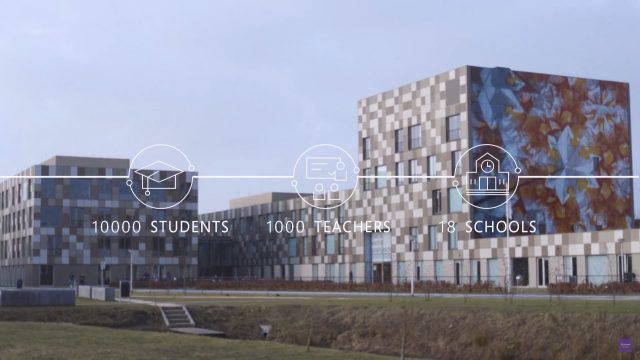
This was a problem faced by Drenthe College in the Netherlands, where students and faculty were finding it difficult to find available space during the day.

Measurements of afternoon usage revealed that, in some buildings, up to 35 percent of the rooms were empty. Paradoxically, students and faculty were still spending up to 15 minutes searching for an available room. Clearly, something was wrong.

The solution relied on the use of 500 bluetooth enabled sensors that could track and monitor:

  • movement
  • sound
  • temperature
  • humidity
  • CO2 levels

All of these were connected back to the Azure IoT Hub which was further connected to the school’s timetabling records, before using Azure Stream Analytics to provide real time updates on the status of each room. Through the use of a mobile app, faculty and students were able to identify free spaces for teaching and learning, a task that had previously involved 10-15 minutes of wandering around the campus looking for a classroom. Through the application of Azure Machine Learning, Drenthe College were able to add a predictive element providing a level of certainty as to room availability up to 2-3 days in advance.

Prior to the solution’s launch in September 2016, overall room usage stood around 65 percent. Since then, it has jumped to as high as 85 percent. Whereas students and teachers were previously spending 10 to 15 minutes trying to find a free space, they are now able to easily look ahead and book an available room immediately.

This is a great use of Azure services to provide a real and measurable return on the investment. Not only was teaching and learning able to start faster (up to 10-15mins), with a 20% improvement in room utilization, by understanding room usage more comprehensively, the College saved around USD$163,000 a year in infrastructure and maintenance costs.

To read the entire story click here.


High Tech Agriculture – IoT & Azure Cloud Transforming Farming

A great example of Azure Internet of Things (IoT) at work in a local farm near where I live.