Categories
Microsoft365

Video: Improve Fluency with Reading Progress in Teams for Education

This is the recording of Mike Tholfsen delivering a webinar in May where he showed Microsoft’s Reading Progress tool and also Reading Coach.

If you’re interested in literacy and improved reading outcomes it’s definitely worth a watch.

When students transition from “learning to read, to reading to learn” it’s a paradigm shift in their lives and their educational journey. I’m always humbled to see how Microsoft’s education products like Reading Progress and Reading Coach can assist in this journey.

The Department of Education in the Philippines were early adopters of Reading Progress and there is a great case study of their experience that you can read here. From the case study:

Understanding that literacy is an important key to unlocking the world of learning, the DepEd declared November as National Reading Month in 2011. Since then, the DepEd has celebrated the month with various activities such as weekly reading sessions with reading ambassadors.

Microsoft Customer Story-Philippines’ Department of Education makes reading fun and closes learning gap for young learners

The case study goes on to say:

For 2021’s Reading Month, the DepEd developed a strategic partnership with Microsoft and built a series of customized activities using different Microsoft tools, including Reading Progress. The partnership gave birth to engaging gamified activities for learners such as Flow Reading, virtual storytelling, and the National Reading Cup competition … The application was built into Microsoft Teams to help learners enhance skills through proactive, independent reading. “Through Reading Progress, learners can independently read aloud, record themselves, and improve their reading skills, while empowering teachers to better support them in their learning progress,” said Diosdado San Antonio, Undersecretary for Curriculum and Instruction at DepEd.

Microsoft Customer Story-Philippines’ Department of Education makes reading fun and closes learning gap for young learners

The gamification of learning is, of course, nothing new and in fact I’ve seen a significant uptick in requests from educators to understand how they can integrate the principles of game based learning into their teaching and learning programs. Two blog posts I often reference in relation to this are:

  1. Teaching Literacy With Minecraft: Education Edition & Research On Game Based Learning – SamuelMcNeill.com
    1. the second half of this blog post references in detail research from James Paul Gee on principles of game based learning and I link this back to Minecraft: Education Edition and how that supports learning outcomes.
  2. Engaging Student Learners with eSports in Minecraft: Education Edition – SamuelMcNeill.com
    1. A dedicated post showing specific lesson plans for eSports using Minecraft: Education Edition

Final Thoughts

One of the reasons I continue to love working in the EduTech sector is the intersection of technology and education and how this has the potential to drive better learning outcomes and ensure that all students have access to materials in the way the need to consume them. Becoming a lifelong learner is a goal for all students to strive towards and if we can leverage technology to support that, I know I’ll have helped in even a small way.

Categories
Microsoft365 Minecraft:EE

Engaging Student Learners with eSports in Minecraft: Education Edition

I am a big fan of learning through game based scenarios and have blogged about both digital and physical tools to support this in the past. For example, the “Play Impossible” balls are one of the best integrations of technology and kinesthetic learning modalities I’ve come across recently – read the full blog post here. By contrast, taking Shakespeare and Charles Dickens and recreating entire fictional worlds inside of Minecraft is a great way to engage literacy skills into play – see the post here. The second post is particularly useful because in the second half of the blog I reference a lot of the research from James Paul Gee, who many see as the ‘god father’ of game based learning research.

In that context, the announcement today that the Minecraft: Education Edition team are releasing an eSports group of worlds and teaching resources is a very welcome addition that extends the existing game based learning features in Minecraft.

As always, I encourage you to read the original blog announcement here.

I’ve talked to many educators, both K-12 and Higher Education, that are already leveraging the huge engagement levels that eSports provides to drive learning outcomes in new modalities.  The future of eSports is huge – don’t believe me?

In 2019 a 16yr old won the Fortnite World Cup, pocketing a cool USD$3,000,000 in prize money. This is comparable with the US Open tennis champs and Tiger Woods’ winnings at Augusta – see the story here.

Suffice to say, students are down for eSports. As educators, there is a real opportunity to use eSports as the hook to drive interest and engagement in platforms that also drive robust learning outcomes.

eSports in Minecraft: Education Edition

eSports 1'

A number of resources have been released by the M:EE team to support educators getting started with eSports, and unquestionably the starting point is the rich OneNote NoteBook here:


eSports 4
The Notebook sections on the left show the topics of resources available for educators

Along with the OneNote above, there are seven specific worlds and lessons that students can get started with:

  • Pirate Cove: Enter an immersive pirate-themed world to take part in build competitions on the high seas. 
  • Space Race: Students visit another world as they compete in build battles set against the backdrop of space. 
  • Gold RushStudents travel back in time to a 19th-century Gold Rush town to compete in team-based builds in the Old West. 
  • Busy Bees: Shrink your students down to the size of a bee, then set them loose in an enormous back yard for the battle of the buzz. 
  • Binary Builders: Enter a gigantic computer where students compete in build battles amid a jungle of circuitry. 
  • Splat Racers: A surreal fantasy racecourse is the setting for competitive builds. Set your students’ creativity free as they dream up fantastic imagery! 
  • 3D Print: Students take their places inside giant 3D printers, then compete in build battles. 

Going Deeper With eSports in Minecraft

If you want to go even deeper, then I suggest you check out:

Final Thoughts

It’s easy for adults to be wary about game based learning and what the actual outcomes are for students. To overcome this, there is a wealth of research available to show the impact that learning via gaming can have for students and adults alike. I know of adult training courses (such as nursing) that use game based learning platforms to drive best practice training engagement and of course specialist sectors like policing and armed forces have been using game based learning for years to provide experiences to their employees.

Leveraging research and a clear strategy with measurable outcomes are critical when preparing to implement an eSports curriculum in your school and I also recommend engagement with your student population. Allow their voice and interests to drive some of the messaging and desired outcomes – they will be your best advocates!

Categories
Microsoft365

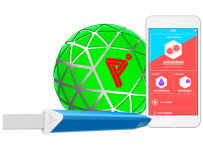
Play Impossible Game Ball Brings An “A-ha” Moment to Education

playImpossible_App_green_edited
Image credit

Every now and then you see a piece of technology that leaves your mind whirring about the possibilities for both educators and students alike. Back in 2016 I encountered the HP Sprout for the first time and blogged my first giddy thoughts about how this could be integrated into incredible teaching and learning moments, calling it an “almost magical technology”.

At BETT London 2019 I saw the Play Impossible ball for the first time, right at the very end of this video and the integration with Microsoft Hacking STEM templates in Excel generated the same reaction in me that the Sprout did:

What endless possibilities could creative teachers come up with when technology infused ball sports in such a fun and natural way?

What’s the big deal? Have a look at this:

(If you’re in a hurry, make sure you scroll to the bottom and watch the video I recorded showing the Play Impossible Game Ball and Excel Data Streamer workbook in action.)

In essence, the Play Impossible game ball is:

an active STEM system that delivers fun and challenging games integrated with math and physics lesson plans through a professionally crafted ball containing sensors that connect to a smartphone, tablet or PC via Bluetooth.

Robust in build quality, small enough for younger hands, it’s easy to get up and running on the platform of your choice (currently supporting Windows10, iOS and Android) and then the intuitive app guides you through how to get playing … and learning! My 9yr and 7yr old kids figured it out in minutes.

Integrating Learning Into Play

I’ve blogged before about the principals of game based learning, however that was mostly in a Minecraft:Education Edition context. When I saw the Play Impossible Game Ball in action I really wanted to get hands on to see for myself how this works and Brian Monnin and the team at Play Impossible kindly shipped me a few demo units for some upcoming events I’m presenting at.  As soon as I got hands on, it became apparent to me that deep learning could be achieved alongside the obvious element of fun through playing. Principal #10 from James Paul Gee’s 16 Principals For Game Based Learning is:

Situated Meanings: Students learn new vocabulary words by experiencing them within game situations. Research suggests learners do not acquire new vocabulary when the word is learnt purely in the context of other words. By contrast, retention is highest when words are learnt in association with an action, event, or image. Gaming provides the perfect vehicle for this.

With data outputs from the Game Ball including measurements like speed (in kph), acceleration, g-force, newtons, rotational spin and air time there are a lot of vocabulary words that are no longer abstract, but directly linked and associated with actions and activities the students are participating in through situated meanings.

With a Play Impossible Game Ball, students (and educators!) immediately get caught up in the fun of competing and the kinesthetic learning opportunities are boundless. However, for me the integration of Excel’s Data Streamer and Hacking STEM templates is where this goes next level in terms of learning pathways.

Excel Data Streamer & Hacking STEM

The Microsoft Education team have put considerable resources into creating STEM lessons for educators to quickly and easily build engaging projects for students to learn the fundamentals of STEM concepts. At the heart of this is Data Streamer, a plugin for Microsoft Excel for O365 subscribers:

Data Streamer provides students with a simple way to bring data from the physical world in and out of Excel’s powerful digital canvas. With a sensor connected to a microcontroller that is  attached to Excel, begin introducing students to the emerging worlds of data science and the internet of things.

Data Streamer is available for free to all O365 subscribers.

With Data Streamer, the at times abstract concepts of IoT devices and the data generated by them can be brought to life through real time visualizations inside of custom built Excel spreadsheets.  Here is an example Excel using Data Streamer to take the output data from a Microbit recording the impact of knock to a helmet:

DataStreamer.PNG

You can easily activate Data Streamer in your O365 version of Excel by following the instructions here or watching this animated GIF:

DataStreamer Activate.gif

There is an entire library of Hacking STEM projects that you can access here, and to support the Play Impossible Game Ball there is a custom Excel workbook you can download here. Some of my favourite Hacking STEM lessons include:

What Does It Look Like?

I recorded a quick video (using the Meet Now feature in Microsoft Teams – a great way to deliver Flipped Learning) to show you just how easy it is to get up and running with the Play Impossible Game Ball app and the Hacking STEM Microsoft Excel workbook and Data Streamer plugin for live data feeds:

The Data Streamer and Excel Hacking STEM workbook are only available on Windows 10 and this adds a unique value proposition here when using the Play Impossible Game Ball. To maximise the value beyond the included app from Play Impossible, Windows 10 and Excel O365 prove again why it is the most versatile STEM platform unlocking the widest range of learning pathways with STEM and IoT devices. By combining the flexible canvas of Excel you can easily add other data streams to the workbook and create your own custom visualizations of this data, providing students hands on experience with the tools that many data scientists use on a daily basis.

Final Thoughts:

What I like about the Play Impossible Game Ball is the wide range of learning opportunities available through this technology. It’s getting kids active and physically moving around and being hands on, but also introducing elements of IoT, data streams and STEM in a fun and comprehensible way.

The included Play Impossible app provides a “fast start” for students from a young age, however the addition of the Hacking STEM Excel workbook with the Data Streamer plugin really increases the use case scenarios, in particular in subjects such as more senior subjects like Physics, Maths with Statistics, along with Physical Education learning about range of motions. The sheer volume of data generated by the Game Ball, and collected and recorded in Excel via Data Streamer, allows for an almost limitless range of extended learning ideas where teachers can bring their own ideas to the tools.

Categories
Minecraft:EE

Teaching History With Minecraft

I’ve blogged a few times already about my love of history, as well as what a Digital History Classroom can look like and today I’m going to share two examples of teaching history using Minecraft.

The Battle of Gate Pa

This is from a New Zealand context and you can read more detail about the event here from the NZ History website. It was shared with me by Mike Shorter, the Director of eLearning at Bethlehem College located in Tauranga near the original battle of Gate Pa.
In Mike’s words:

It was an awesome unit and went way longer than planned! We split the class into Characters, Landscapers, Builders, Clothing and Weaponry. The students then did a mini inquiry on what was required of their group, researched their area and then we made a class timeline of when things needed to be created … The plan all along was to make it interactive and let people try to recreate the battle rather than just make a static representation. To do this we had 20 English Soldiers and 4 Maori warriors (one being Heni Pore) both start at a spawn point and the English then used the cannon to blow a hole in the defences and attack.

This was build using the Minecraft Java Edition as at the time, the Minecraft:Education Edition did not exist. Mike has kindly agreed to share his unit planning for this below:

Download Unit Plan Here

As you can see from the video above, the students accurately re-created the battle scene,  building out the fortified Pa site and then staged a recreation of the attack.

A History Of Singapore Riots

Most people know Singapore to be a very peaceful country and yet there were a number of riots that shaped the identity of the country we know today.

As part of the December 2018 “Asia’s Next Top Coder” competition, Lee Jun Hui created a history lesson in Minecraft: Education Edition that came runner up. You can see the full details here and a walk through of his world in the above video.

Centred upon the Maria Hertogh riots in the 1950s and the Little India riot that took place in 2013, the museum not only takes players through Singapore’s defining moments of days past, it also brings them along an immersive journey by combining key elements of Singapore’s heritage with technology to help them to understand the importance of harmony in a multi-racial, multi-religious society like Singapore.

Singapore Riots.png
Jun Hui shares the code he included in his Minecraft:EE world to animate the various riot events. Credit.

My Point Of View

Minecraft: Education Edition is the perfect tool for digitally recreating historical events and places, so much so that there are pre-built lessons to help teachers do exactly this which you can access here. I particularly like the above examples as it’s localized, “place based learning” for the students from Singapore and New Zealand allowing them to think differently about the events that have shaped the identity of their country.

I’ve blogged previously about some of the research and theory behind Game Based Learning from James Paul Gee and I want to call out a couple of his key principals that lead to effective learning using digital platforms like Minecraft:

  • Identity: Players build a sense of identity throughout the video game, either through direct input or as an on-screen character they inherit

In both of the examples above, but particularly the Battle of Gate Pa, students get to recreate elements of history and are assuming a new identity to do this – this places them right in the middle of the action and the adventure, driving deep learning.

  • Production: Players are producers, not just consumers: they are “writers” not just “readers”. This drives a level of engagement that more passive medias do not allow.

Again, using Minecraft allows students to recreate and “produce” both the world and the events that took place in that world – a very different learning experience compared to simply reading about an event or watching a documentary about it. Students gain a deeper understanding of how the geographical setting contributed to the historical outcome and just how hard it was to build a defensive Pa site!

  • Just in Time or On Demand: Players receive information as they need it, not before, which teaches them patience and perseverance and improves critical-thinking abilities. People are generally inadequately prepared to deal with lots of words out of context e.g. reading entire text books to find a single piece of information. Games provide knowledge “just in time” – school work should do the same.

In the Singapore example above, coding was required to complete the competition and so skills can be developed at that point but it’s applied contextually: in this example, how to code inside Minecraft:EE to show historical forces and events at work. When learnt in the context of an event, students are likely to retain knowledge more effectively which ties into the next point of…..

  • Situated Meanings: Students learn new vocabulary words by experiencing them within game situations. Research suggests learners do not acquire new vocabulary when the word is learnt purely in the context of other words. By contrast, retention is highest when words are learnt in association with an action, event, or image. Gaming provides the perfect vehicle for this.

There are many ideas and unique vocabulary from history that are not used in day to day interactions. Students in both the examples above would have needed to learn new ideas and content contextually in the world they were creating.

  • Cross-Functional Teams: In multiplayer environments, players have different skills, forcing them to rely on each other—a needed soft skill for students. I have seen many teachers talk about student’s developing more inter-personal skills through the use of Game Based Learning such as Minecraft: Education Edition.

In Mike’s example particularly, students were separated into groups to build different components of the world and this in itself became a mini project based learning activity. For the final battle to take place, the teams all had to work together to show case their work. This is similar to the students who worked to build a Parliament of the Future in the lead up to the 2017 New Zealand election.

Through applying the principles of effective Game Based Learning, teachers can drive deep and authentic learning outcomes but through the engaging medium of digital platforms that many students love to work in.

Categories
Minecraft:EE

Teaching Literacy With Minecraft: Education Edition & Research On Game Based Learning

minecraftI spent some time this afternoon listening to this interview with with Deirdre Quarnstrom from the Minecraft: Education Edition and towards the end she referenced the work of Cross Pond Collaborations. I had checked this out previously and it’s the work of Ben Spieldenner and Simon Baddeley, two educators who teach English and are also passionate about Minecraft.

Having taken some time to reacquaint myself with their work, I decided to do a blog about this to really drive some awareness of their work because it’s fantastic and they share it openly on the internet for free:

View and download their projects here.

If you’re wondering why, or even how, you might use Minecraft: Education Edition to teach literacy, have a look at this trailer for their Verona Adventure lesson they’ve created:

Another example of their worlds is the Christmas Carol by Charles Dickens and, with less than a week to go before Christmas 2018, this is a very seasonally relevant world:

Game Based Learning Is Legitimate

Globe
Shakespeare’s Globe Theatre, as recreated in Minecraft by Cross Pond Collaborations

In my previous capacity as the Director of ICT at St Andrew’s College, I worked with a range of awesome educators and some were exploring how they could integrate Minecraft into their teaching and learning programmes in a pedagogically robust way. Wilj Dekkers was one of these and I had the privilege of going into his classrooms to meet with his students and see the output of their work using Minecraft. Two examples from as far back as 2014 are worth reviewing:


I do encourage you to review the two blog posts above, but to see the student output here are the videos:

Kiwiana Theme Parks In Minecraft w. Student Narratives

Minecraft inspires creative writing in students, who compose “choose your own ending” stories in OneNote
One of the best aspects from Cross Pond Collaborations is they have already put the hard work and effort in to not only build out very detailed Minecraft worlds, but have also provided standards aligned curriculum lessons to support them. You can see all of their projects here. To give a small snippet of one example from their Verona Adventure above, here is the overview:

What happens years after the deaths of Romeo and Juliet?  Did the inhabitants of Verona truly forgive one another? The Shakespeare classic, Romeo and Juliet, leaves readers with a city previously plagued by the constant fighting of two powerful families.  If the fighting ends abruptly how does Verona begin to function in this new peace? Students explore these ideas through an adventure that ultimately leads to an argumentative essay in which they attempt to regain their freedom.

Simon and Ben have also aligned this with Standards from the Common Core:

Standards (Common Core)

Grades 8-10 (Ages 14-17)

  1. CCSS.ELA-LITERACY.W.9-10.1:Write arguments to support claims in an analysis of substantive topics or texts, using valid reasoning and relevant and sufficient evidence.
  2. CCSS.ELA-LITERACY.W.9-10.4: Produce clear and coherent writing in which the development, organization, and style are appropriate to task, purpose, and audience.
  3. CCSS.ELA-LITERACY.W.9-10.5:Develop and strengthen writing as needed by planning, revising, editing, rewriting, or trying a new approach, focusing on addressing what is most significant for a specific purpose and audience.
  4. CCSS.ELA-LITERACY.W.9-10.9:Draw evidence from literary or informational texts to support analysis, reflection, and research.

Learning Outcomes have even been provided:

Learning Outcomes

  1. Students will gather evidence from multiple in-game sources.
  2. Students will determine credible sources.
  3. Students will use evidence in an argumentative essay.

With lesson outlines and pre-built worlds and given the fact that most grade school students have had some previous exposure to Minecraft, it really comes down to teachers being prepared to be bold and give Game Based Learning a go. One example of this is a friend and former colleague Ms Tam Yuill Proctor who I blogged about earlier this year when she gave Minecraft: Education Edition a go for the first time in her class. You can read the post here, however the key quote was:

After avoiding it due to to a lack of understanding and confidence, I thought, ‘lets give it a go!’.

Well,  I was blown away with the students and Minecraft Edu.

What Does The Research Say?

gee2
Image Credit

James Paul Gee, an American academic, researcher and expert on Game Based Learning has published books and articles on this topic and I encourage you to read his Good Video Games and Good Learning article available online for free. In it, he outlines his 16 Principles For Good Game Based Learning:


  1. Identity: Players build a sense of identity throughout the video game, either through direct input or as an on-screen character they inherit
  2. Interaction: Communication occurs between the player and the game. In a good game, words and sdeedes are all placed in the context of an interactive relationship between the player and the world.
  3. Production: Players are producers, not just consumers: they are “writers” not just “readers”. This drives a level of engagement that more passive medias do not allow.
  4. Risk Taking: Good video games lower the consequences of failure; playrrs can start from the last saved game when they fail. Players are thereby encouraged to take risks in a way they might not normally do so.
  5.  Customized: Games usually offer a level of customization so that users can play — and succeed — at their competency level. Customized curricula in school would not just be about self pacing, but about real intersections between the curriculum and the learner’s interests, desires, and styles.
  6. Agency: Players have control over the gaming environment – based on the first five principles above, players develop a sense of ownership over what they’re doing that often exceeds the sense of ownership in other areas of their school learning.
  7. Well-Ordered Problems: The gaming environment contains problems that naturally lead into one another, allowing a player’s mastery to grow and evolve. Where learners are left to roam in a complex problem space, they tend to hit on creative solutions to these complex problems [something that Minecraft: Education Edition promotes].
  8. Challenge and Consideration: Games offer a problem that challenges students’ assumed expertise. Skills are developed and mastered through repetition, before the player is challenged again by a new set of problems to build on their newly honed skills. This is called the “Cycle of Expertise”.
  9. Just in Time or On Demand: Players receive information as they need it, not before, which teaches them patience and perseverance and improves critical-thinking abilities. People are generally inadequately prepared to deal with lots of words out of context e.g. reading entire text books to find a single piece of information. Games provide knowledge “just in time” – school work should do the same.
  10. Situated Meanings: Students learn new vocabulary words by experiencing them within game situations. Research suggests learners do not acquire new vocabulary when the word is learnt purely in the context of other words. By contrast, retention is highest when words are learnt in association with an action, event, or image. Gaming provides the perfect vehicle for this.
  11. Pleasantly Frustrating: The game should frustrate the student enough to challenge them but be easy enough that they believe and can overcome the problem(s) faced. School, by contrast, is often too easy for some students and too hard for others, even in the same classroom.
  12. System Thinking: Games make players think in a bigger picture, not just individual actions taken, helping them see how the pieces fit or can be fitted together. They encourage players to think about relationships, not isolated events, facts and skills. In collaborative games such as Minecraft: Education Edition, players often need to work together to achieve a common outcome.
  13. Explore, Think Laterally, Rethink Goals: Games force players to expand their situational knowledge and consider courses of action other than linear ones. Going fast and straight is not encouraged – lateral thinking is rewarded.
  14. Smart Tools and Distributed Knowledge: In-game tools help students understand the world. Through using them, they gain confidence to share their knowledge with others.
  15. Cross-Functional Teams: In multiplayer environments, players have different skills, forcing them to rely on each other—a needed soft skill for students. I have seen many teachers talk about student’s developing more inter-personal skills through the use of Game Based Learning such as Minecraft: Education Edition.
  16. Performance before Competence: Competency occurs through taking action in the game, reversing the typical model in which students are required to learn before being allowed to act. This is daunting for many adults, who acquire a fear of failure as they grow older, but many students are prepared to “give it a go” before they’ve either read the manual or developed sufficient proficiency.

Conclusion

It is always awesome when educators provide first class content online, for free. It’s a hallmark of the educator community and I applaud Ben Spieldenner and Simon Baddeley for contributing so significantly to this longstanding tradition.

There are others, of course, creating similar content and you can access a plethora of content on the official Minecraft: Education Edition Lessons page. If you’re an educator and have not considered Game Based Learning, then reflect on the 16 Principles above from James Paul Gee and consider whether an open world platform like Minecraft might help engage your students in a new form of learning to drive better outcomes.