Categories
Microsoft365

The Digital Classroom – A History Teacher’s Viewpoint

I’ve shared a few blog posts on here from other bloggers, usually in situations where they’ve nailed the content in a way that I can’t really improve on! Today I read a blog post from an Australian History Teacher where they shared how they had transitioned their classroom to a digital environment. As a former teacher of history and social studies myself, I really enjoyed this perspective from the classroom of 2019.

Read the original blog post here

old vs new.PNG
The blog post compared the ‘old’ way of teaching to the “new” digital tools being used in their place. Red ink annotations are by me (courtesy of my Surface Laptop!)

What I liked about this blog post is the author has identified free solutions (based off Office365) to support their digital classroom, but based them on traditional, easily understandable classroom tools but supercharging them through technology:

I have found a whole range of programs that do exactly what my old resources did, while providing improved functionality. The digital solutions I found also provided a whole world of new experiences and opportunities that were impossible under traditional teaching styles.

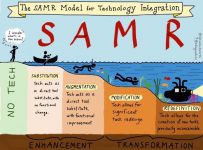
To me, this is leveraging the SAMR model – something which I am a big fan of and have blogged about in previous roles when I was working in K-12 education:

samr-diving
The SAMR model provides teachers with a clear trajectory to integrating technology into their teaching practice.

In my experience, teachers inherently “get” the idea of taking a digital equivalent of a traditional teaching tool (Substitution) but then extending their practice through the added benefits of a digital platform (Augmentation). An obvious example of this is the Whiteboard app referred to in the blog post:

New: Whiteboard App

Whiteboard may be the simplest idea for an app, but also the most instantly useful for a teacher. At the most basic level, it works just like a physical whiteboard: you write information on it. However, you do so by writing on the screen of your computer, which means you never have to turn your back, and you can do it from anywhere in the room. Also, you can instantly add images from online. Finally, you can save any of your work digitally and share it with any student at any time, which means that no student has to ever miss notes from class again.

With time, increased confidence and competence, teachers can start planning how they can use these tools in more advanced ways, working towards Modification and eventually Re-Definition in the SAMR taxonomy. There is a whole world of how this can be applied by the creative teacher, including using Skype in the Classroom do stimulate learning through fun activities such as Mystery Skypes (see my blogs about this here)

Two examples of Mystery Skype I helped organize

Technology is a great enabler, but it should always remain a servant to pedagogy. This post shows how the teaching and learning must always remain front and centre of the lesson design, with the technology merely super-charging the delivery.

Categories
Minecraft:EE

Hidden Chinese Character Mission In Minecraft: Education Edition

Chinese Minecraft EE Coding
Sample code students build after completing the translation activity

One of the best parts of my job is meeting amazing educators who think up new and creative ways to engage learners on their educational journey. I was talking recently with Annelise Borger, a Microsoft Innovative Educator Expert (MIE-E) who shared with me how she had been using Minecraft: Education Edition and the Code Builder feature to teach her students learning the Chinese language.

Intrigued, she agreed to share her lesson plan with me so I could review and share on here under the Creative Commons License:

DOWNLOAD:

Hidden Chinese Character Minecraft Mission – NZ Chinese Classroom

In conjunction with the PDF lesson plan above, you can download the sample code to run the ‘solution’ from here so you have both the student work and the ‘answer’ if you want to demonstrate the successful outcome.

Chinese MEE.PNG
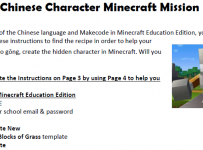
The PDF Lesson plan

The Code Executing In Minecraft: Education Edition

My Thoughts:

This is certainly a creative way to introduce the highly engaging platform of Minecraft into a subject area that may not be one that traditionally leverages game based learning. Annelise has done a great job of combining language translation skills with computational thinking to help her students learn 21st century skill sets.

I did a quick scan of the other lessons on the Minecraft: Education Edition homepage that included references to China and there were some fun ideas if you’re interested in exploring further:

  1. Recreating the Chinese Tang Dynasty capital city – this is especially interesting as the lesson plan and outline is designed to support multi-class engagement.
  2. Exploring systems of measurement used by the Chinese – a great numeracy activity that includes some historical angles as well.

In my experience, usually a very high percentage of students in a class have had at least some exposure to Minecraft before, so teachers can introduce lessons like the above without necessarily being experts in the game play of Minecraft itself. Instead, they can build robust learning outcomes they want their students to work towards, the medium is simply pivoted towards using Minecraft instead of alternative platforms they may have previously used. To be able to integrate elements of coding into a subject such as languages is an additional bonus!

Thanks again to Annelise for sharing this lesson and if you do use it, be sure to respect the Creative Commons licensing around her lesson. If you want to see more of what Annelise is doing in this space, check out her homepage here.