Categories
Minecraft:EE

Teaching History With Minecraft

I’ve blogged a few times already about my love of history, as well as what a Digital History Classroom can look like and today I’m going to share two examples of teaching history using Minecraft.

The Battle of Gate Pa

This is from a New Zealand context and you can read more detail about the event here from the NZ History website. It was shared with me by Mike Shorter, the Director of eLearning at Bethlehem College located in Tauranga near the original battle of Gate Pa.
In Mike’s words:

It was an awesome unit and went way longer than planned! We split the class into Characters, Landscapers, Builders, Clothing and Weaponry. The students then did a mini inquiry on what was required of their group, researched their area and then we made a class timeline of when things needed to be created … The plan all along was to make it interactive and let people try to recreate the battle rather than just make a static representation. To do this we had 20 English Soldiers and 4 Maori warriors (one being Heni Pore) both start at a spawn point and the English then used the cannon to blow a hole in the defences and attack.

This was build using the Minecraft Java Edition as at the time, the Minecraft:Education Edition did not exist. Mike has kindly agreed to share his unit planning for this below:

Download Unit Plan Here

As you can see from the video above, the students accurately re-created the battle scene,  building out the fortified Pa site and then staged a recreation of the attack.

A History Of Singapore Riots

Most people know Singapore to be a very peaceful country and yet there were a number of riots that shaped the identity of the country we know today.

As part of the December 2018 “Asia’s Next Top Coder” competition, Lee Jun Hui created a history lesson in Minecraft: Education Edition that came runner up. You can see the full details here and a walk through of his world in the above video.

Centred upon the Maria Hertogh riots in the 1950s and the Little India riot that took place in 2013, the museum not only takes players through Singapore’s defining moments of days past, it also brings them along an immersive journey by combining key elements of Singapore’s heritage with technology to help them to understand the importance of harmony in a multi-racial, multi-religious society like Singapore.

Singapore Riots.png
Jun Hui shares the code he included in his Minecraft:EE world to animate the various riot events. Credit.

My Point Of View

Minecraft: Education Edition is the perfect tool for digitally recreating historical events and places, so much so that there are pre-built lessons to help teachers do exactly this which you can access here. I particularly like the above examples as it’s localized, “place based learning” for the students from Singapore and New Zealand allowing them to think differently about the events that have shaped the identity of their country.

I’ve blogged previously about some of the research and theory behind Game Based Learning from James Paul Gee and I want to call out a couple of his key principals that lead to effective learning using digital platforms like Minecraft:

  • Identity: Players build a sense of identity throughout the video game, either through direct input or as an on-screen character they inherit

In both of the examples above, but particularly the Battle of Gate Pa, students get to recreate elements of history and are assuming a new identity to do this – this places them right in the middle of the action and the adventure, driving deep learning.

  • Production: Players are producers, not just consumers: they are “writers” not just “readers”. This drives a level of engagement that more passive medias do not allow.

Again, using Minecraft allows students to recreate and “produce” both the world and the events that took place in that world – a very different learning experience compared to simply reading about an event or watching a documentary about it. Students gain a deeper understanding of how the geographical setting contributed to the historical outcome and just how hard it was to build a defensive Pa site!

  • Just in Time or On Demand: Players receive information as they need it, not before, which teaches them patience and perseverance and improves critical-thinking abilities. People are generally inadequately prepared to deal with lots of words out of context e.g. reading entire text books to find a single piece of information. Games provide knowledge “just in time” – school work should do the same.

In the Singapore example above, coding was required to complete the competition and so skills can be developed at that point but it’s applied contextually: in this example, how to code inside Minecraft:EE to show historical forces and events at work. When learnt in the context of an event, students are likely to retain knowledge more effectively which ties into the next point of…..

  • Situated Meanings: Students learn new vocabulary words by experiencing them within game situations. Research suggests learners do not acquire new vocabulary when the word is learnt purely in the context of other words. By contrast, retention is highest when words are learnt in association with an action, event, or image. Gaming provides the perfect vehicle for this.

There are many ideas and unique vocabulary from history that are not used in day to day interactions. Students in both the examples above would have needed to learn new ideas and content contextually in the world they were creating.

  • Cross-Functional Teams: In multiplayer environments, players have different skills, forcing them to rely on each other—a needed soft skill for students. I have seen many teachers talk about student’s developing more inter-personal skills through the use of Game Based Learning such as Minecraft: Education Edition.

In Mike’s example particularly, students were separated into groups to build different components of the world and this in itself became a mini project based learning activity. For the final battle to take place, the teams all had to work together to show case their work. This is similar to the students who worked to build a Parliament of the Future in the lead up to the 2017 New Zealand election.

Through applying the principles of effective Game Based Learning, teachers can drive deep and authentic learning outcomes but through the engaging medium of digital platforms that many students love to work in.

Categories
Windows 11

MakeCode.com – Fun With Minecraft:Education Edition

I’ve been doing a fair amount of different things in Minecraft:Education Edition recently, including recording a ‘how to get started’ webinar that will go to air shortly. I’ve also been exploring coding examples using the MakeCode.com Code Connection companion application and Richard from the MakeCode team has helped me out with a fantastic example of coding a real life building directly within Minecraft:EE.

Firstly, I do want to point out that Richard does a live coding session once a week on Microsoft’s Mixer.com platform that you can check out here. It’s a fun hour where Richard and a guest jointly code (and then share) a project of interest to them.

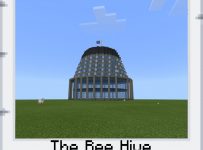
beehiveFor an upcoming presentation I’m doing, I really wanted to show off the coding component of Minecraft:EE through the automated building of a famous New Zealand building. Richard encouraged me to keep it simple and reasonably geometric in shape so I queried him whether the New Zealand Government’s “Beehive” would be acceptable – he thought it a great project! If you have ever been to Wellington, New Zealand then the chances you’ve seen this iconic building are pretty high. Some love it, others …. not so much! Richard got to work and quickly coded up an automated building of this using the block-based coding tools from MakeCode.com:

(You may want to watch at 2x speed)

If you would like to download the source code for yourself and run it you can do so here (disclaimer: Richard coded this very quickly and did not optimise it – he told me it could be improved for elegance and speed of execution):

 Build The Beehive in MakeCode Source Code

During the construction as the code was executing, I took some photos in the game using the Camera and Portfolio features – helpfully, I even got atrocious rainy weather in one of them which, if you’ve ever been to Wellington, you will know is pretty accurate!

I hope this is a good example to inspire you with how you can use coding within Minecraft:Education Edition to automatically built impressive structures.

Categories
Microsoft365 Windows 11

Deploy & Code In Minecraft

Minecraft has become something of a global phenomenon, engaging users of all ages both in and out of the education sector. The official Minecraft site lists sales figures of the original Java edition exceeding 27 million, and this won’t include Minecraft on other platforms or the Education Edition released earlier this year that adds some unique features for schools.

In this blog post I want to share two key messages:

  1. How to deploy Minecraft:Education Edition and links to the best resources to ensure a smooth roll out.
  2. Code Builder – explain what it is and provide some great resources to enable you or your students to get coding in Minecraft:Education Edition

Deployment:

The best place for up to date information is the official Deployment Guide web page which covers off:

  • Purchasing Minecraft: Education Edition
  • Managing Minecraft: Education Edition licenses
  • Getting Minecraft: Education Edition support
  • Running a Minecraft Family Night event
  • Purchasing Minecraft: Education Edition merchandise
  • Finding Minecraft: Education Edition lessons and worlds

If you’re in a real rush, I encourage you to get the PDF version directly from this link here.

The content in the downloadable materials should be explored in detail, because as the bullet point list above shows, there is some helpful resources to kick start engagement in your school. Whilst the technical elements of purchasing and assigning licenses is important, I call special attention to the Running a Minecraft Family Night Event. This is a key way to increase parental buy in and help them understand both the pedagogical benefits of Minecraft as well as the inherent appeal of game based learning.

Play is our brain’s favourite way of learning

Diane Ackerman

The idea that we learn through observation, trial and error and play-based practice is reinforced through Minecraft. It can be daunting, however, for new users to learn when there is no “instructions” or “best practice” in terms of how to build and design things in Minecraft – you need to give it a go, fail fast, and try again.

Additionally, you need to be super collaborative to achieve things at scale and it is no coincidence that PISA is now looking to assess how well students collaborate together. These are key skills required in the work force, as identified by Jeff Healey (MSNZ Public Sector Director) when he was interviewed about the recent project between MSNZ, NZ Parliamentary Services and three Wellington Schools who used Minecraft:EE to build their own versions of New Zealand’s parliamentary buildings.

To assist you with your rapid deployment, here are some key links you should check out:


Code Builder – Getting Started:

Code Builder was announced back in May 2017 as being available for Minecraft:EE and then subsequently in October 2017 it was launched for Minecraft for Windows 10.

The official description of Code Builder is:

Code Builder for Minecraft: Education Edition is a brand-new extension that allows educators and students to explore, create, and play in an immersive Minecraft world – all by writing code. Connecting to learn-to-code packages like ScratchX, Tynker, and a new open source platform called Microsoft MakeCode, players start with familiar tools, templates and tutorials.

I’ve done a bit of work in Code Builder and love the fact that it introduces users to the concepts of coding through the use of familiar “block based coding” techniques. The key, in my view at least, is that as the skills of users progress they can easily switch into programming directly in JavaScript, a ubiquitous language.

Consequently, students get to leverage the high interest of Minecraft while simultaneously learning core concepts of computational thinking and the introduction to programming concepts like loops and arrays.

Reading the blog post from Microsoft Research when the launched Code Builder for Minecraft Windows 10 is useful to understand the background to the “why” it was developed, but I’ve embedded the best video from the blog post below:

The video is instructional because it provides a few tips on how to get the best out of Code Builder (e.g. starting with a “flat” world is just easier, as is keeping it “always day time”), but also provides code snippets for two popular scenarios:

  • Raining chickens (using a few lines of code to spawn chickens falling from the sky)
  • Zombie apocalypse (building a walled environment with code, then using arrays to create variable zombie type characters)

While neither of those may necessarily appeal to adult audiences, I can assure you that kids go crazy when they realize that through the use of code they can automate their creations. Helpfully, Code Builder allows students and educators to share their code with each other, either through exporting it as a Code Builder file (.mkcd) that can be imported by another user, or even easier: uploading from within the app itself and sharing a shortened URL with a user:

makecode share.PNG
Publish and share your code snippets easily through MakeCode.com

If you are seeking instructional documents and guides for Code Builder then click below:

Code Builder for Minecraft:EE Help Docs

You might still be asking “so what? What is the big deal with coding?” Well, many countries, including New Zealand, is pivoting their curriculum to align with future ready skills where Science, Technology, Engineering and Maths (STEM) is a major component. The following graphic comes from the proposed changes to the NZ Curriculum for 2018:

Dig-Tech NZ Curriculum.png

The first two rows of the Technological Areas are new:

  • Computational thinking for digital technologies
  • Designing and developing digital outcomes

It’s easy to see how these two can be taught through the creative processes students use in Minecraft:EE with the added benefit of Code Builder.

If you are interested in giving Minecraft:EE a go, download it from the above links – you can sign in for a limited number of times free before you need a paid license. If you’re already using Minecraft:EE in your school I’d love to hear how it is going – feel free to drop a comment below or share your code snippets.

Reflections On Teachers For Tomorrow

QudwaI started my working day reading about the research into the impact on literacy of Microsoft’s Learning Tools and I’m finishing it reading the reflections of Andreas Schleicher on the recent Qudwa Global Teachers’ Forum hosted in the UAE earlier this month.

It’s a terrific read – and I direct you to the original blog post in full here – if for no other reason than Andreas is a great writer who has managed to capture the sense of optimism and hope for the future of education. Naturally, however, it’s far more than just that and in my mind he has articulated the challenges facing the teaching profession between being progressive and future focused, whilst working within the paradigm of government enforced bureaucracy.

The hope, as he sees it at least, is contained in the most precious resource of all – the talents of individual teachers. He encapsulates this in the following quote, which is my personal favourite:

Knowledge and skills have become the global currency of 21st-century economies. But there is no central bank that prints this currency; we cannot inherit this currency, and we cannot produce it through speculation. We can only develop it through sustained effort and investment by people and for people. And no school system can achieve that without attracting, developing and sustaining great teaching talent. (emphasis my own)

Attracting and sustaining great teaching talent comes at a cost (the NZ Teacher Unions are saying when, not if, a strike is coming) however it would seem those teachers present at the forum didn’t even raise this well acknowledged issue. Instead, they focused on the challenges and offered possible solutions, many of which could be implemented immediately.

Some of the themes that emerged that stood out to me from the article include:

  • The deep commitment of teachers to the ongoing issue of equity and how they can personalize and differentiate learning so that all students can engage meaningfully in their own education not simply a “one size fits all” model. This is not new by any stretch, but it’s pleasing nonetheless to see it at the forefront of discussion.
  • Demonstrating a true “growth mindset” is a critical success factor for educators. This idea came through in a few places in the article, where it was suggested that a teacher training college should be seen as simply laying the foundation for a professional career, and something that should be actively built upon by the teacher who demonstrates to their students a commitment to being a “life long learner”

As Richard Spencer, from the United Kingdom, noted: “Great teachers are great learners and students need to see their teachers learning.”

  • Digital technology can leverage great teaching, but it can never replace poor teaching. This echoes a phrase that I’m sure I’ve plagiarized from an unknown source that “technology is a great servant of pedagogy” – in other words, get the priority order right! Schleicher goes on to suggest teachers could crowd source the best educational content and ideas to drive their own professional learning – a fine idea in theory, yet it remains challenging in practice. In New Zealand, we have the N4L Pond set up to deliver something precisely like this, declaring itself as “Future Ready, World Ready” however ongoing challenges around copyright and ownership of intellectual property created by teachers remains a blocker for sharing. This can, of course, be resolved through the implementation of Creative Commons licensing, yet only a fraction of schools have gone down this pathway.
  • The challenges of managing the pace of change in schools and the subsequent need for “ownership of the teaching profession” to lie with teachers rather than bureaucrats. To me, this was possibly the most fascinating point as I constantly hear from schools, and particularly the teachers responsible for professional development and change management, that teachers simply can not keep up with the pace and constant changes to curriculum, assessment practices, digital technologies and pedagogical theory. I’m going to quote at length on this section:

 Even the most effective attempts to push a government-established curriculum into classroom practice will drag out over a decade, because it just takes so much time to communicate the goals and methods through the different layers of the system and to build them into traditional methods of teacher education. In this age of accelerations, such a slow process is no longer good enough and inevitably leads to a widening gap between what students need to learn and what teachers teach. When fast gets really fast, being slow to adapt makes us really slow.

Having a plan, people sticking to the plan, working a plan, people not being destructive.

I know that when we hire people at Microsoft they’re some of the skills: do they have those critical thinking skills? Can you work in a team? Are they open to making mistakes and learning from those mistakes? They’re some of the valuable things that we’re looking for as an employer.

My Point Of View:

I am probably a curious blend of personalities when it comes to working in the EdTech sector – I’m naturally conservative by nature and yet possess at least some vision to see the impact that technology is having on the education sector. The superb whitepaper entitled Youth, Technology & Disruption highlights the disruptive effect of technology at an unprecedented scale on virtually every sector of society. As educators, we ignore this at our peril and are forced to grapple with what it means for our profession and how change will be managed.

Will this result in a “loosening of the grip” of educational policy? Almost invariably. Indeed, the research I mentioned at the outset of this blog post openly states it was produced in response to the demand from educators for faster research cycles because they could not wait for traditional longitudinal findings to be published.

Will this sit uncomfortably with the educational purists who have long determined what is “best practice” in schools? No doubt. It unsettles me, that’s for sure, but it is going to be our response to these challenges that will determine the level of success for future national curriculum.

It’s often been said that teaching is a vocation, not just a profession – here’s the two definitions to consider:

vocation
və(ʊ)ˈkeɪʃ(ə)n/
noun
  1. a strong feeling of suitability for a particular career or occupation.
    “not all of us have a vocation to be nurses or doctors”
    synonyms: calling, life’s work, missionpurposefunctionpositionnicheMore
profession
prəˈfɛʃ(ə)n/
noun
  1. 1.
    a paid occupation, especially one that involves prolonged training and a formal qualification.
    “his chosen profession of teaching”
    synonyms: careeroccupationcallingvocation, line of work, line of employment, linemétier;More

It’s interesting, if not slightly ironic, that the definition of profession references teaching – but perhaps that is the point? For education to flourish in this time of rapid change, perhaps we need a professional approach to this most noble of vocations.

Categories
Microsoft365 Windows 11

Minecraft: Education Edition Builds A New Parliament

electionIn New Zealand it’s been pretty hard to avoid what has become a spectacularly unconventional general election, all culminating with voting happening on this coming Saturday, 23rd September 2017. No fewer than three major parties have had leadership changes in the last couple of months before the voting begins and that excludes the stepping down of the incumbent Prime Minister of the last 8.5yrs John Key.

Exciting times so far!

To further engage the younger population of New Zealand in the democratic process, the NZ Parliamentary Services partnered with Microsoft NZ to deliver a Minecraft: Education Edition solution whereby they could recreate virtual parliaments with their own unique twists on how these 11-13yrs think it should look. This was covered by our local media here, and NZ Parliamentary Services own news coverage here, which includes a good video walk through of one of the M:EE worlds:

MEE
Wellington’s distinctive Bee Hive parliamentary building recreated in Minecraft: Education Edition by students from St Benedict’s School in Wellington.

It was interesting seeing some of the reflections from the students involved in this project, with working together collaboratively one of the biggest challenges for them according to 12yr old Ben Vickers from Waikanae Primary:

Everyone had different ideas and ways of working and it took about a week for the team to gel, he says.

“It was difficult but we learned to work together.

“I think it was the collaboration with everyone else that made it different from just going home and playing it.”

From my perspective, this is one of the best things about game based learning – there is no manual or instruction book on how to build a project. Instead, students need to communicate, negotiate, assign responsibilities and hold each other mutually accountable to achieve the outcome. To this end, it aligns very well with the Key Competencies of the New Zealand Curriculum:

  • Thinking
  • Relating to others
  • Using languages, symbols and texts
  • Manging self
  • Participating and contributing
MEE 2
Students presenting their Minecraft:EE worlds. Credit: Stuff

As a teacher friend of mine pointed out to me when I was re-training to become a history teacher after a decade in the ICT sector, there are really only two “academic” Key Competencies (Thinking / Using Languages, Symbols and Texts) whereas the other three are really the soft skills, interpersonal and vital to modern workplaces which are expected to be far more collaborative than ever before. If you’re interested in how eLearning can be delivered through the lens of the Key Competencies, have a look at this presentation I delivered to Pukekohe High School teachers earlier this year.

Whilst not an educator, Microsoft NZ’s Director of Public Sector Jeff Healey acknowledged the above when he said Minecraft: Education Edition teaches not only maths and spatial awareness, but the skills of team work:

“Having a plan, people sticking to the plan, working a plan, people not being destructive.

“I know that when we hire people at Microsoft they’re some of the skills: do they have those critical thinking skills? Can you work in a team? Are they open to making mistakes and learning from those mistakes? They’re some of the valuable things that we’re looking for as an employer.”

I’ve blogged previously about the research showing game based learning with Minecraft can grow students’ Social and Emotional Learning (SEL) outcomes and hearing the students from this project share how they had to negotiate to achieve the goal reinforces this.

I was fortunate to be able to contribute in a small way in the background to this Minecraft: Education Edition project with Parliamentary Services through:

It’s really gratifying to see that the methods we know and use internally at Microsoft can be used to support a project like the above and work with students across a number of schools. This really was a team effort with multiple Microsoft NZ staff across a number of business teams working together for this outcome – One Microsoft!