Categories
Microsoft365 Minecraft:EE

Easier 3D Printing With Minecraft: Education Edition

UPDATE 7th September: Stephen Reid has released a “class set” of 3D printers world now – see the latest tweet:

One of the great things about Minecraft: Education Edition is the ability to export models you’ve built using the structure block. This is particularly good for creating evidence of learning and completing the link between rapid prototyping of models inside of Minecraft and then building them as proof of concepts with a 3D Printer. From a New Zealand perspective, this aligns with the Design and Develop a Digital Outcome strand of the Digital Technologies curriculum.

There is a helpful video showing how this can be done here:

However, new users often find it difficult to place the structure block correctly beside their model and to get the co-ordinates accurate to be able to successfully complete the export.

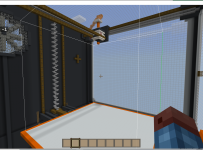
Enter Stephen Reid and the team at Immersive Minds who have created a clever Minecraft:EE world that actually looks like a large scale 3D Printer:


Helpfully, whatever you build on the white base plate of the model 3D Printer is perfectly positioned to be exported by the structure block sitting in the corner beside the sign.

Download the worlds here

This is a super example of how software can bridge the gap between the virtual and the physical worlds. Thanks to Stephen and team for this awesome world!

3dprint3.PNG

Categories
Minecraft:EE

Video: Building Sustainable Communities In Minecraft: Education Edition

This week Sonja Delafosse shared with me the above video of some Canadian educators sharing their experiences with introducing Minecraft: Education Edition into their classrooms to build sustainable communities with their students.

It’s worth watching (like most YouTube videos now I watched it at 1.75x speed), as it shows how often students pick up and run with an idea inside of Minecraft:EE because their existing enthusiasm for the platform translates into high levels of engagement in the learning journey.

A few key points that stood out to me:

  • The two teachers presenting both said they’re not experts in Minecraft themselves – they were prepared to set the learning objective but relinquish any claims to expertise in the game play itself.
  • They learnt alongside the students, especially when the students wanted to extend the parameters of the learning into 3D printing of Minecraft models
  • Many students are passionate about their communities and sustainability – this creates a wide scope of learning opportunities and a cross-curricular thematic approach to education.
  • Minecraft helped the students learn empathy for others – understanding the impact of the different environments on their fellow Canadians across a very large geographic region.
  • Minecraft allowed the integration of STEM skills in various ways e.g. creating motion sensor street lighting that turned on/off when students walked past them (whilst also driving awareness of energy conservation)
  • Students gained confidence in presenting ideas in various ways – whether that was verbally to audiences, or via the chat features inside the Minecraft game, differentiated presentation skills were developed.
  • Some students experienced confidence gains through having their skills recognised for the first time, and being actively approached for assistance from other students.

Again, I encourage you to watch the video above if you’re interested in how Minecraft:EE might be able to be used in your classrooms. If you’re after a quick setup guide for Minecraft:EE check out this blog post, and here is some research into the Social and Emotional Learning (SEL) impact of Minecraft in the classroom.

Categories
Windows 11

Introduction To Paint 3D

Paint3D is one of those cool apps that allow you to completely unlock your inner creativity and explore like a kid again.

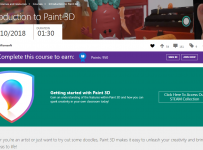
However if, like me, you lack inspiration or you just need a bit of guidance on how to take a 2D object and turn it into a 3D interactive model, then you should definitely check out the following:

Introduction to Paint 3D

Paint3D.PNG

As you can see, the course is part of the Microsoft Education Community (MEC) and is 17 courses split across 5 modules dealing with topics such as:

  • Overview and Intro to Paint 3D
  • Selecting & Cropping Content
  • Brushes, colours, materials, stickers and textures
  • Manipulating models in 3D spaces
  • Uploading and sharing models in Remix 3D, and printing 3D Models

Like all courses on the Microsoft Education Community, you can sit a quiz at the end of the session to obtain a batch as a micro-credential and proof of further ongoing learning.

Categories
Windows 11

Real Stories Of Teaching With Minecraft:EE

Last week I shared a blog post from the Microsoft Australia Education Team about the difference accessibility to devices makes for learners and this week I see they’ve shared an excellent webinar showcasing the work of four teachers from New South Wales.

As always, I refer you to the original blog post to read in detail:

Minecraft Education Edition takes the Australian Curriculum into a whole new world.

The webinar is definitely worth watching as well:

A few things really stick out to me from listening to these passionate educators:

  • The ability to integrate Minecraft:EE and game based learning across curriculum areas. Many of the examples shared link Science, Mathematics, Geography, History and English into a thematic unit.
  • Dispelling the notion that gaming and game based learning is only for boys. One of the teachers works in a girls school and describes very high levels of interest and enthusiasm for the activities.
  • Strong linking to the Australian Curriculum. This can, of course, be adapted for other curriculum in different countries, but it’s pleasing to see a solid pedagogical basis for the learning.
  • Some of the teachers who share explained this was the first time they were using Minecraft:EE and were nervous about it’s outcome. Nevertheless, they were prepared to give it a go, and demonstrated all the attributes of being a life long learner.
  • Exporting of models and maps designed in Minecraft:EE to 3D printers to take ideas from concepts to production. This is an important workflow that makes the learning “real” for many students.
  • The use of Microsoft OneNote Class NoteBooks to tightly plan and structure the lessons and outcomes that students were required to work towards. This can provide the framework for students and also confidence for teachers that there is a structure and direction to the lessons and it’s not always simply “playing”.
minecraft_5-1024x572.png
Using OneNote as a PBL Template for structuring activities in Minecraft
  • Digital Citizenship can be taught and “lived” through the playing of Minecraft.
minecraft3.jpg
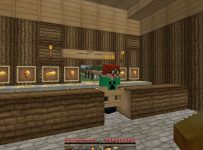
Screenshot of a general store as part of the Gold Trail in Victoria, Australia


My Point Of View:

minecraft_4-1024x572
Student drawings of the “Code Agent” in Minecraft:EE

Hearing first hand from other educators about their fears, challenges and successes in the classroom is important for teachers. The webinar above provides some insights into the learning from four teachers and is worth listening to as they are pretty candid about what did and did not work. I am particularly interested in the discussion around teaching of Coding and Computational Thinking through Minecraft as this is something I’ve blogged about before and is particularly relevant in NZ with the changes to the Digital Technologies Curriculum Strands. From the original blog:

With the integration Code Builder in Minecraft Education Edition, Lynne Telfer’s students have been exploring ways to program their Code Agent powered by Microsoft Make Code. This requires students to access their computational thinking and develop a set of algorithms (set of instructions) for the Code Agent to create with structure blocks within Minecraft Education Edition. The Code Agent is a fantastic way to expose students to both visual programming and free coding in Java Script. Students experience the benefits of its application through the designing their own commands and solving efficiency challenges when building digital artifacts.

Again, have a look at the original blog post for more details and if you’re interested in giving Minecraft:EE a go in your classroom then perhaps check out this blog post about how to deploy and code in Minecraft.

Categories
Windows 11

Cool Ideas For 3D Printing Project

I am in Singapore this week at the APAC Education Partner Summit and it has been great meeting partners from across the region and hearing their enthusiasm for their businesses and how they’re connected in various ways.

Whilst here, I came across this great example of contextualising 3D printing for students. In the image above, students have designed and 3D printed scale models of various buildings in downtown Singapore and then placed them on a large map of the CBD. Most of the models were between 10-15cm high which gives you a sense of scale of the project. This project was on display at the Tanglin Trust School and various students were working on it.

To give you an alternative view of the same setting, here is two photos from the 22nd floor where some of the Microsoft offices are located:


You can identify the distinctive Marina Bay Sands hotel with the boat on top spanning the three buildings and in the first photo the tall buildings on the right are also in the 3D models made by the students.

I thought this was a cool idea for students.

UPDATE: I had a couple of other photos from another school in Singapore today also related to 3D Printing that I thought I would share. This is a 3D printed “Pi” Cup, where the sides of the cup are the number Pi: