Categories
Windows 11

Video Editing In Education On Windows 10

I’ve previously worked as a Social Sciences teacher and know that every teacher has needed to complete video editing at some point. Whether this is capturing the best moments from a school camp or field trip into a video to show in assembly, or collating all the most exciting shots from an athletics day or swimming sports to show parents, a quick and easy way to make a compelling video is incredibly useful.

Of course, students love to make video presentations for assignments to show their learning as well, so having a built in video editor in Windows 10 makes it very easy for both educators and students to achieve their goals. An example of a video made entirely in Video Editor is the latest “What’s new in Edu?” – check it out below:

That’s a pretty good looking video!

Getting Started With Video Editor in Windows 10

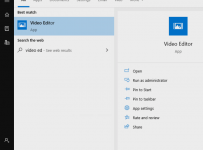
If you’re wondering how to get started, simply hit the Windows key and start typing “Video Editor”:

Video Editor

To start, there are a few resources I’d recommend:

Of course, it makes sense in this visual age that Video Editor also has video tutorials on how to use some of the most popular features, and you can follow the YouTube Channel here. A couple of favourites from me:

Adding Special Effects:

Adding Background Music:

Video Editor How-To Guide For Educators

Last, but certainly not least, is the how to guide for educators which has detailed instructions on how to use the Video Editor

Download Video_Editor_How_To_Guide

Students can automatically create quick videos with music, or customize their movie with narration, filters, and 3D effects to bring learning to life. Through this process they can develop creativity with the power of video storytelling and leverage 3D effects and Digital Inking within their films.

As I touched on at the start, educators often need to create video newsletters, training materials, and recaps from special events along with movies to engage and inform their class – Video Editor is perfect for this.

New Features In Video Editor

Recently, the Video Editor team has added a number of top requested features such as:

  • Split Video and Precision Trim so students and educators have fine-grained controls frame by frame and can break apart video clips easily.
  • Add from web allows students to get photos from the Bing Image Search and insert them directly into a storyboard complete with Creative Commons captioning to support digital citizenship.
  • Backup Projects with this, Educators can easily back up a project to save video projects in progress and share them as templates with their class. Importantly,  students can back up group projects between devices and classmates.
  • Improved navigation with Thumbnails and Multi-select save valuable classroom time to get films produced efficiently

My Thoughts

From first hand experience, I know how useful it is to have an easily accessible video editor on every device – whether it is your personal teacher laptop or computers your students have access to in your classroom or school.

Since Windows Movie Maker is no longer available or bundled with Windows, it’s awesome to see Video Editor to continue to evolve as a built-in application for quickly making great looking videos. If you’ve not tried it, give it a go!

Categories
Microsoft365 Minecraft:EE

Reflections On Being A Life Long Learner & The Top THREE Lessons I Learnt

Recently, I have been reflecting on what it means to be a “Life Long Learner” in light of the ongoing research indicating that the K-12 students of today will likely have 5 or more distinct careers during their time in the workforce, meaning re-training is an inevitability.

Related to this topic, I am actually going to be speaking on May 7th 2019 as part of the Microsoft #FutureOfWork Event (registration here) on the topic of Game Based Learning principles, something that many organisations are starting to adopt for staff training.

Speaker Organic Post - Join me at the Microsoft FutureOfWork Summit.jpg
Register to attend for free here

As evidence of this, the following LinkedIn post from Chee Kiat OH shows staff learning about Robotic Process Automation via Minecraft:Education Edition:

LinkedIn.PNG

Alice Bonasio, writing for CIO.com earlier this week commented:

The concept that there are clear milestones and an eventual finishing line to learning was never ideal, but it is even more woefully inadequate in a technology-enabled world. To thrive in volatile environments, we must embrace life-long learning. (emphasis mine)

Cut To The Chase: What Are The Top Three?

I’m going to expand on these in more detail further down in the post, but for those impatient to know what my top three reflections were on being a Life Long Learner here they are:

  • It’s critical – all sectors are changing too fast for individuals to NOT be learning all the time.

As I quoted in this blog post on reflections of tomorrow’s teachers,

In this age of accelerations, such a slow process is no longer good enough and inevitably leads to a widening gap between what students need to learn and what teachers teach. When fast gets really fast, being slow to adapt makes us really slow.

Andreas Schleicher

  • It requires determination – individuals are always short of time, energy and motivation

I admire anyone that works full time in a demanding job and still finds time to complete formal study on top of that. The good news is that with MOOCs and other online training options like edX and LinkedIn Learning it’s becoming ever more flexible to wrap training around busy schedules.

  • It’s rewarding – learning new things has an inherent thrill to it, just ask any student that has grasped a new concept or skill for the first time.

My learning journey has included being a K-12 student, both undergraduate and post-graduate University student, re-training into a new career with a secondary teaching diploma and now finally continuous on-the-job learning. Through this journey, I’ve covered just about every type of learning there is. Nevertheless, it’s still exciting when I grasp new knowledge or skills and then proceed to apply it for the first time in my daily life or job.

So where and how have I been learning?

Minecraft:EE Build Challenge – Solar Model

I was in Singapore last week as part of the APAC Education Partner Summit 2019 and I was asked to present on the topic of “Making Education Transformation Real in K-12” and you can see my slides below (note: I was deliberately using Office365 PowerPoint with support for 3D models to animate my Minecraft:EE and Solar System Models – SlideShare does not support this animation):

After talking about Game Based Learning I ended up showing a Build Challenge inside of Minecraft:EE that I had worked on that morning (around 3am actually, since I work up very early with time zone differences!). Here’s the link to the build challenge that had a reasonably simple objective:

Objective

The Sun is 286 times the size of the smallest planet in our solar system, Mercury. If Mercury were the size of one Minecraft block, try to build a scale model of Mercury and the rest of the planets. You may have to round up or down to the correct number of blocks. To get you started, we’ve created a world with a Minecraft block scale sun!

To complete this, I ended up needing to do quite a bit of learning and also develop an iterative approach to knowledge building. I’m going to describe this for you but if you want to access my finished files you can download them from here (they include the Minecraft world, my Excel spreadsheet, and my MakeCode coding files).

The first challenge was finding out the basic facts around the Solar System – planet names, colours, sizes, relative distances from each other and the sun. I ended up compiling this into an Excel Spreadsheet and used a basic formula to convert 1km into 1 block inside Minecraft:EE

Excel

With this in mind, I was able to then create some sample code to build out each planet to scale:

Solar 3

This would be faster than building each planet by hand inside of Minecraft and the intial results were pleasing enough – here are spheres representing Earth (blue, small) and Mars (red and partially built):

Solar 4

So I now knew I could build each planet individually but the question was how to make this a scale model with the accurate distances between each planet? I decided to build each planet sequentially and place the starting position relative to my location – so you can see that Mercury would be built first, 58 blocks away from my starting position against the Sun, representing 58million kilometers away. This was followed by Venus (pale yellow) 108 blocks away, representing 108million km from the sun and so forth. Here’s two views of the same code, one in MakeCode.com blocks and the other in JavaScript:

When I ran my code this executed beautifully:

Solar 7

However, because of the huge scale of the universe, I quickly realised that to travel 5,946 blocks in Minecraft to get to Pluto (representing 5,945,900,000km from the sun) would take a LONG time.

KEY LEARNING: the scale of the universe is ginormous! This was reinforced to me through trying to create a scale model inside Minecraft! Whilst I built this using code, I never got to see those planets as it would take forever to run to them inside the game (unless I teleported).

The other learning was that to build a scale model of Jupiter inside of Minecraft:EE as a sphere with a diameter of 143 blocks also takes a LONG time.

Instead, I decided to iterate my code in two important ways:

  1. So that I could at least see each of my planets I set an arbitrary distance between each planet of 50 blocks inside Minecraft. I also set each planet to be 10 relative blocks above the previous one so it would go up in a nice consistent line.
  2. I replaced the “sphere” command in Minecraft with a “circle” command meaning it would be far faster to build, as it would only be a disk the appropriate size, and not a sphere.

Here was my new code alongside each other:

Solar 8

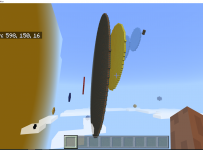
When I ran the “solarCircle” code it worked wonderfully,quickly building out scale circles of each planet but near enough so I could visualize them together:

In the first picture on the left you can see the planets scaling out nicely, before being hidden by the massive size of Jupiter. Navigating around that to the right, you can see in the second picture the remaining planets.

Through this exercise, done in my hotel room before I presented to group of ~70 partners, I learnt many things about the solar system! It also helped me understand different way that data can be represented and how by using computational thinking and coding I was able to break down a bigger problem of building a scale model into smaller steps that I could replicate and modify individually.

If I linked this back to my three key reflections on Life Long Learning:

  1. It’s critical
    1. For my presentation I really wanted to have an authentic example that the audience could relate to and show a real use of Game Based Learning.
  2. It requires determination
    1. I admit I got a bit annoyed during this and thought about quitting and using a different example where I didn’t have to prepare all the data, but I persevered and chose a Growth Mindset instead.
  3. It’s rewarding
    1. I got a genuine kick out of this when my final version of code worked flawlessly and gave me a great view of the scale of the planets relative to each other. It has also given me another working example I can use in different demonstrations with educators around the region.

LinkedIn Learning – Azure Technical Training

Badge LinkedIn LearningThe second example of life long learning has taken place over the course of this week as I completed some mandatory technical training around Azure services for my job with Microsoft. One of these modules was around Microsoft Azure Artificial Intelligence Strategy and Solutions (see the badge on the left that I got when completing this learning).

In many ways, the learning via LinkedIn includes elements of Game Based Learning Theory – there are points that can be gained for completing each section and badges that can be unlocked for finishing an entire module. These can then be shared and celebrated on various social media platforms (I published mine on my LinkedIn wall).

Through completing around five hours of training in this space I learnt a lot and also had much of my wider ideas clarified or affirmed. Again, if I link it back to my three reflections on Life Long Learning:

  1. It’s critical
    1. If I want to be able to have relevant conversations with customers in the Education Sector, I need to be across both the trends happening in the sector but also the technology offerings and solutions that Microsoft have. I literally could not keep my job if I was not continuing to learn as our technologies evolve.
  2. It requires determination
    1. With hundreds of emails a week coming and going, customer presentations, internal meetings there are always reasons to delay or ignore critical training. I needed to prioritize this and commit to being a Life Long Learner or else it simply would not have happened.
  3. It’s rewarding
    1. Just like in the Minecraft:EE example above, I got a genuine thrill when I passed the assessment related to each module and was pleasantly surprised when I realized I knew more than I thought I did in some areas. Additionally, it’s equipped me to have deeper conversations with my customers in a way that I would not have been able to before.

Final Thoughts:

It can sometimes be trite to talk about Life Long Learning, however I’m more convinced than ever that we all need to be adopting this, along with a Growth Mindset when it comes to our workplaces. As someone that has had three distinct phases in my professional working life already I am in many ways an accurate reflection of the trends the research is predicting. If you’re interested in more research, check out the Class of 2030 data published here.

Having worked in a range of different sectors, including as a secondary school teacher, I’ve been both inspired and dismayed by my colleagues approaches to life long learning. The best continually challenge themselves to both reinvent and reimagine how they complete their jobs and deliver amazing results. Others, sadly, “stick to what they know and what they’ve always done” and I believe that it will be increasingly difficult to be successful in the workplace both now and in the future when a Growth Mindset is not adopted to power life long learning. It seems appropriate to finish with the words of General Eric Shinseki from the US Armed Forces:

Eric Shinseki.jpg

Categories
Windows 11

Microsoft HoloLens Delivers Wow Factor In Maths

HoloLens2This article first appeared in the Interface Magazine May 2018 edition and has been republished with the kind permission of the editors of Interface. You can see the rest of the great articles here.

Known for his digital innovation and creativity in teaching, the Microsoft HoloLens team knew Subash Chandar K was just the person to try out Virtual Reality with his maths class – and the results were amazing.

“Virtual Reality is something that’s interested me for a long time – and not just VR but Augmented Reality (AR) and Mixed Reality (MR), as well,” said Subash Chandar K, Curriculum Leader of Mathematics and Statistics at Ormiston Senior College in Auckland.

“I can see in 3D space. I’ve tried so many different ways to explain my perspective to students but with varying success – it’s quite challenging. Students struggle with concepts like volume and area. I tried creating 3D models with SketchUp, and turning them upside down and looking at them in different angles. They started to see but not as well as I wanted.”

Subash is a Microsoft Innovative Educator (as well as a ‘Sphero Hero’, one of only 18 in the world!). He describes being a MIE as “the biggest catalyst in transforming my perspective on teaching.”

“It’s opened me to what other educators in other countries are doing. I’m chipping in and contributing where I can. I think HoloLens was looking for maths teacher wanting to do something different and knew I was the guy willing to try tech.”

About HoloLens

HoloLens is a pair of Mixed Reality smartglasses developed and manufactured by Microsoft. It has see-through holographic lenses that use an advanced optical projection system to generate multi-dimensional full-colour holograms

microsoft.com/en-nz/hololens

HoloLens

Excited and engaged

He was provided with four HoloLens kits and some newly-developed apps to try – and asked for feedback.

“There were practical things like how students cope with something on their head and the VR space. But, essentially, it was exploring what could be done with HoloLens and maths.”

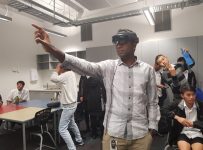
Subash wore one headset, while students wore the other three. The system let them see where he was looking, so they could literally follow his eye.

“We looked at 3D shapes and measurements. I could open a box into a net and explore how different sizes and how surface area can be calculated. It was mind blowing, and really got them excited and engaged.

Becoming the norm

What sort of future does Subash see for VR in education?

HoloLens3“I can see so many possibilities in maths and science, physics, biology, even drama – across all different subjects. I’d like to see VR developed from a makerspace angle – making it a stepping stone, where students can see how things pan out in virtual space before printing products, for example.

“The other day we were measuring things and I put 900 on the board. One student asked what the unit was – if I’d been able to show them the perspective in virtual space, they wouldn’t have needed to ask. Students often struggle to make planes in their heads – they can more easily see what it is from within the virtual environment.

“I see kids afraid to make mistakes on paper, but I feel they’re more confident working in a VR environment, happy to give it a go.

“VR is going to become the norm. But it’s one thing hearing about the technology, I encourage all teachers to experience it.”

Comment from one of Subash’s students:

“We are a generation that learns through examples and visualisation, not explanation and reading, and HoloLens is supportive of this. It helps us rediscover the touch of ingenuity we have lost through the boring, old methods and disconnected learning environments.

“HoloLens inspires critical thinking. It has tremendous potential because it gives us as students so much freedom to experiment, and the only limits are our creativity and imagination. This is not changing what we learn but simply how we learn it, and it may just be the solution to the problems of our education system.”

Categories
Windows 11

Windows 10 Fall Creators Update – What’s New?

MixedReality1.pngThis week saw the major announcement of the latest iteration of Windows 10 operating system called “Fall Creators Updates” (or 1709 if you prefer to track version numbers!).

There is a heap of blog posts about this that touch on the various new features but the overall summary is that this update is still focused on allowing end users to be super creative through enhanced Mixed Reality apps and tools, but also maintaining the longstanding commitment to accessibility for all users. The following 30 minute video really gives a great overview of the new features and I encourage you to check it out:

This official blog post is also a great read as it goes over some of the major features in the Fall Creators Update, including:

  • Windows Mixed Reality
  • Photos App updates (better story telling features that students will love)
  • Mixed Reality Viewer (drop 3D models directly into the real world and then take photos)
  • My People – pinning your favourite people/contacts to the task bar for even quicker access and sharing of content.
  • Microsoft Edge updates – especially around handling PDFs and digital inking support
  • Microsoft Store – updates for a better customer experience
  • Security – no update would be complete without even further features keeping your device and content secure.
  • Mobile Phone handoff – the ability to continue your searches from your phone to your device
  • Productivity enhancements – worth looking at the blog for the full list, but OneDrive Files On Demand has landed, along with some neat features like “find my pen” if you’re using a compatible device, and eye control of Windows 10 for even greater accessibility.
  • PC Gaming – bunch of updates to make gaming (and sharing of your gaming through Mixer) even easier on Windows 10
  • 3D in Office – for students and teachers that are really wanting to make their presentations sizzle, you can build and deploy 3D models into PowerPoint.
MixedReality
A virtual shark being dropped into a classroom

The list above is just a brief summary and it’s definitely worth checking out the details in the blog post . One of the features that impressed me most was the eye tracking support in Windows 10. I’ve blogged about how accessibility is at the heart of everything Microsoft does, as well as how machine learning in Azure is supporting diagnosing dyslexia and the video below shows how people suffering from ALS can use Windows 10 simply through eye tracking:

It’s truly incredible to think of the impact on the lives of these people who can start to communicate again through using their eyes.

An Educational Perspective:

Windows 10 Fall Creators Update delivers amazing value to empower students and educators to be creators in and out of the classroom.

  • The Photos app brings new functionality that introduces students to visual storytelling. It helps them learn the vital skills of visual communication and digital storytelling through an easy to use inbox Windows application.
  • Microsoft Edge now ships natively with Read Aloud functionality for web pages, PDFs and ePubs.
  • Windows 10 automatic redeployment streamlines end of year device reset for schools. Administrators can easily start the process with a simple key stroke on the lock screen, entering their admin credentials.
  • Intune for Education updates multiple fixes around improving performance plus new settings and management capabilities for basic printer setup, Microsoft Edge, Windows Defender, Windows Firewall and power policies.
  • Basic printer set up for Azure Active Directory joined devices allows IT to set a default printer for a device or student through Intune for Education. Students automatically see and print to assigned printers without any additional setup on their devices. IT admins can specify whether students can find and install additional printers. This is a real key and something that many schools exploring Intune for Education have been asking me about for a while.

Windows 10 Fall Creators Update (1709) is of course a free update and you can download it by simply:

  • Click the Windows button on your keyboard or bottom left of your screen, followed by the cog icon as seen below:

Creators Update0


  • Select “Update & Security”

Creators Update1

  • Click “check for updates” and you you should see the new version of Windows 10 start downloading:

Creators Update

So go get it – and have fun!

Categories
Windows 11

Story Remix In Windows 10

Story Remix is a free tool in Windows 10 that will allow students to quickly and creatively generate awesome video content as well as introduce 3D visual effects to really make their work stand out.

I have been playing with Microsoft Paint3D lately and I can see how Story Remix will take this to the next level. I can’t wait for this to arrive.

Categories
Windows 11

Windows 10 Creators Update Is Here

Many of you will have been waiting for the official release date of the Windows 10 Creators Update last week and now that it is launched the best place to get an overview of the new features is the official Windows Blog.

You can read the post introducing Creators Update here.

For a visual overview, here is a good video clip:

Some of the features that really stand out for me are:

  • 3D Paint – the ease of building out 3D apps in Creators Update is a neat feature with plenty of real world application, especially in education.
  • Mixed Reality – the announcement of lower-cost devices that will support mixed reality is exciting as it means more students can develop in this space without the cost of a HoloLens headset.
  • Beam Game Broadcasting – for the gamers amongst us, you can now easily stream your games in real time to the web for others to follow along with – no need for third party tools.
  • Updates to the Edge Browser, including better tab management and preview options, default support of PDF and eBook reading is now a feature as well.
  • Mini View Feature – an “always on top” frame allowing you to keep an eye on a critical app, skype call, or browser window, whilst working in another window at the same time.
  • A whole range of new security updates to keep your device safe.

Read the blog overview here.

There are a range of different ways to get Windows 10 Creators Update, from the blog link above:

You can get the Creators Update in a few different ways. If you already have a Windows 10 PC and have automatic updates enabled, the update will be delivered to you when it’s ready. If you are an advanced user and would like to get the update manually, visit this blog post to learn how to get the Creators Update.

So go get started creating and leave comments with your experience below.