Categories
Windows 11

HoloLens 2 – Stretching The Boundaries Of Reality

About two years ago in Seattle I got my first “hands on” experience with the original HoloLens – suffice to say, I was really impressed.  This week, Microsoft announced the availability of HoloLens 2 for pre-order and it just looks like a really cool iteration of the original.

This time, it appears the HoloLens 2 will be customisable for specific scenarios e.g. where you need a safety hardhat – this is cool!

HoloLens Hardhat.PNG
A totally new way to re-imagine HoloLens and Mixed Reality. Image Credit

Here is the launch video:

Here are some of promo videos:

Finally, here is what The Verge had to say:

If you prefer more of a written review of the launch, here are some tech write ups:

My Thoughts:

As usual, can’t wait to try it! The extended field of vision is a really important feature to increase the immersiveness of the experience, although I can honestly say that after using HoloLens 1 for countless hours, you do simply adapt to the limited field of vision in how you use the device.

There were no specific education examples that I heard from the launch, although the fact that Pearson has already created Mixed Reality educational curriculum content for HoloLens 1, it would stand to reason more would come for HoloLens 2.

The drop in price is welcome, although the launch continued to make a very clear statement that this is not a consumer focused device – for now.

Categories
Windows 11

Teaching Maths With Microsoft HoloLens

I’ve blogged previously about Subash Chandar K exploring the possibilities of Microsoft HoloLens with his maths students and now there is a great video above capturing the enthusiasm of his students.

After the experience, one of Subash’s students commented:

“We are a generation that learns through examples and visualisation, not explanation and reading, and HoloLens is supportive of this. It helps us rediscover the touch of ingenuity we have lost through the boring, old methods and disconnected learning environments.

“HoloLens inspires critical thinking. It has tremendous potential because it gives us as students so much freedom to experiment, and the only limits are our creativity and imagination. This is not changing what we learn but simply how we learn it, and it may just be the solution to the problems of our education system.”

HoloLens3It’s an interesting observation from the perspective of an active participant in the New Zealand education system and I shared it with 32 Principals from the Taranaki region last week. I was asked to step in at short notice and talk about Microsoft Mixed Reality and HoloLens to them and then allow them to experience it first hand with a HoloLens unit I had managed to borrow for the session.

It was interesting observing how they immersed in the experience they were and also how intuitively they picked up the gesture controls. I’ve demonstrated HoloLens to hundreds of people and there is always a spectrum of how quickly they learn to use it – these Principals were sharp!

As more providers like Pearson Education develop HoloLens educational apps the appeal of  Mixed Reality in the classroom will only grow. Meanwhile, the commercial and enterprise sectors completely understand how this will transform marketing and design, with Mercedes Benz recently releasing a video showcasing HoloLens with the question posted:

How do you present invisible technology?

Mixed Reality is the perfect medium to visualize the underlying safety features built into a vehicle, by connecting real objects (the car, the observers) with projected scenarios (the holographic cyclist) and how the “invisible technology” actually operates (the sensors constantly scanning the environment around the vehicle and triggering warnings).

This is hugely exciting technology that will invariably become more mainstream in classrooms and beyond.

Categories
Microsoft365 Windows 11

Why Did The Titanic Sink? Explaining With OneNote & Digital Ink

I do a lot of demonstrations to schools and educational IT partners and one thing I commonly get asked is “can you explain why Digital Inking is so valuable?” Consequently, I decided to create the above video showing how visual ideation looks when using Microsoft OneNote and Digital Inking on my Surface Book and compared it to a traditional typed and bullet-pointed list attempting to answer the same question:

Why did the Titanic sink?

I’ll leave it up to you which version you find more memorable, however the use of the incredible SAMR model is always helpful in these discussions:

samr-diving.jpg
SAMR is a simple and incredibly instructive taxonomy to assist teachers planning how they can integrate technology into their pedagogy.

In a simple example like this, I’d explain SAMR a follows:

  • Substitution: Instead of a teacher photocopying a worksheet about the Titanic and physically handing it out to the students, they instead deliver it electronically e.g. on a Learning Management System such as Moodle or Microsoft Teams for Education or even simply emailing it to students. I find that many teachers are doing this on a frequent basis already
  • Augmentation: Using a tool such as Microsoft OneNote where students can not only edit their own copy, but can work collaboratively on it with other students in their class through something like OneNote Class NoteBooks. The functional improvement here is the ability to co-author and permanently save a copy of the brainstorm to be reviewed later, or even shared with students who may be away from the class for some time.
  • Modification: You’ll see in my video above that by using Digital Inking and OneNote a number of things are achieved that would simply not be possible without technology, allowing the task to be redesigned e.g.
    • As ideas evolve, they can be re-prioritized by selecting the text and associated sketches, and moved into a priority order. Additionally, they can be resized depending on their importance and even have the original colour of the “ink” changed if there is a colour coding scheme at work – imagine the possibilities here if integrated with de Bono’s six coloured hats thinking scheme.
    • Additional media can be added to ‘canvas’ in OneNote to cement learning in different ways. In the video above, I insert a YouTube clip of an animation of the sinking of the Titanic that can be played alongside the notes being recorded and sketched – students can take ideas directly from this media and add new information or expand on existing contributions from expert sources.
  • Re-Definition: Whilst not shown in the above video, an easy way to take this lesson sequence into the top level of SAMR could include ideas such as:
    • Using Paint3D and Mixed Reality Viewer to create a replica of the Titanic that can be projected into the class learning spaces and record a video explaining precisely why the Titanic sunk based on the research and ideation above.
    • Using Microsoft Teams Meet Now video calling to dial in an expert on the Titanic and host a Q&A with your class over the internet. If you think this is not possible, think again – I did this with a group of Year 3 students and the Viking Museum in York and it was a huge success. Microsoft have even created a website to assist in connecting your class with experts and other classrooms around the world – give it a go here.
    • Design 3D models of the Titanic and imaginary icebergs it may have hit and then print them directly from your Windows 10 device.

If you’re after more examples of SAMR in action, have a look at the following collection of blog posts that I wrote when still at St Andrew’s College.

Here’s the final two screenshots of the different ways we could record our responses to the question “Why did the Titanic sink?”

Blog 2.PNG
A “traditional” approach using a keyboard and enumerated list – how memorable is this?
Blog 1
A zoomed out view using Digital Ink on my Surface Book, with sketches and symbols naturally recorded as ideas expanded. Note the ability to embed third party media like YouTube directly into the canvas and ideas re-arranged, grouped and re-sized based on importance.

Research & Additional Thoughts:

Transforming Edu
Download your free eBook copy here

This month, Microsoft released an excellent collection of research collated into a single book called Transforming Education (you can download a free PDF version of the eBook here) and I highly recommend you have a look through this for guidance on what works and what does not work in the classrooms after 30 years of research into EdTech.

At the end of each section of the book are “Red Flags” – a short list of things that have not worked across the years when attempting to integrated technology into classrooms, and “Green Flags” – critical concepts that have been proven to add value in schools for educators and students alike by successfully integrating technology.

On pages 84-90 in the book are suggestions on device choice that includes interesting research into the value of adding a digital pen/stylus to the student device (as I used in my video above):

In two different studies in which high school students solved the same mathematics and science problems, the best results came from students using a digital pen, while marking up on the digital digital content. Using the pen, students produced 56% more non-linguistic content (i.e. diagrams, symbols, numbers etc), which led to a 9-38% improvement in performance. Additionally, research revealed that informal marking of existing content (using a digital pen on top of digital content) helps students to group and organize information, and has been associated with 24.5% higher solution correctness.

For further research into the value of digital inking vs typing have a look at pp.177-181 in the eBook.

How To Test Device Capabilities For Deep Learning:

Taken from p.90 of the Transforming Education eBook, this is a helpful exercise when selecting devices:

Blog 3.PNG#MSFT

Final Thoughts:

I’m a competent typist and can type at around 90 words per minute with 98% accuracy on an average day. I’m also a terrible artist and poor at handwriting. Even before I ever had access to a computer I struggled to keep my handwriting tidy and legible.

Nevertheless, the value I get from being able to sketch, link ideas and easily move and prioritize my thinking with Digital Inking far outstrips anything I can achieve with faster typing. When listening to a presentation I fall into the trap of attempting to type verbatim what is being said (and at 90wpm I can pretty much do that), whereas when digital inking I’m forced to synthesize information ‘on the fly’, actively engaging and processing knowledge during the session, resulting in far deeper recall and understanding at a later date. Whilst it is easy to scoff at my messy handwriting and poor artistic attempts to draw the Titanic hitting an iceberg, I’d be willing to wager you’re going to recall those ideas and answers far more readily than if I’d simply typed them into a bullet point list.

If you have not used a device that supports Digital Inking and Microsoft OneNote, I really encourage you to give it a go. With the recent launch of the Microsoft Surface Go, this is the most affordable and compact Surface yet and an awesome introduction to the value of Digital Inking in the classroom.


Categories
Microsoft365

Why AI In Office Matters: Accessibility For All

AI in PowerPoint

Most people would probably not consider PowerPoint one of the sexier apps out there, with too many of us having experienced dying a slow death by presenters intent on reading to us every single word they’ve carefully crafted onto their decks!

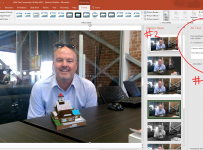
However, I want to point out a small, but truly significant feature, in PowerPoint that I’ve highlighted above. I dragged the photo above of me sitting at desk with a model built in Minecraft:Education Edition in front of me (being projected onto the desk using Mixed Reality on Windows 10)

Using the power of the intelligent cloud, PowerPoint immediately (and automatically) added an “Alt Text” description to this image:

A person sitting at a table in front of a building

Furthermore, PowerPoint was very confident this was an accurate descriptor, including the line below the Alt Text “Description generated with high confidence”.

Why does this matter?

If you’re visually impaired this is a game changer. When your colleagues are quickly building out presentation decks in PowerPoint they will likely overlook adding Alt Text references for images (how many can honestly say they do this on even a semi-regular basis?). Now, however, any images that are added to PowerPoint will have these descriptions automatically generated allowing the Alt Text to be read aloud to a visually impaired person accessing the document providing greater meaning to them.

People often ask me how AI is going to impact our daily lives. This is a simple, yet powerful, example of how it is already at work enabling everyone to access their documents more meaningfully. This is powered by the Microsoft Computer Vision Cognitive Services and is available in the Office365 version of PowerPoint.

Categories
Windows 11

Microsoft HoloLens Delivers Wow Factor In Maths

HoloLens2This article first appeared in the Interface Magazine May 2018 edition and has been republished with the kind permission of the editors of Interface. You can see the rest of the great articles here.

Known for his digital innovation and creativity in teaching, the Microsoft HoloLens team knew Subash Chandar K was just the person to try out Virtual Reality with his maths class – and the results were amazing.

“Virtual Reality is something that’s interested me for a long time – and not just VR but Augmented Reality (AR) and Mixed Reality (MR), as well,” said Subash Chandar K, Curriculum Leader of Mathematics and Statistics at Ormiston Senior College in Auckland.

“I can see in 3D space. I’ve tried so many different ways to explain my perspective to students but with varying success – it’s quite challenging. Students struggle with concepts like volume and area. I tried creating 3D models with SketchUp, and turning them upside down and looking at them in different angles. They started to see but not as well as I wanted.”

Subash is a Microsoft Innovative Educator (as well as a ‘Sphero Hero’, one of only 18 in the world!). He describes being a MIE as “the biggest catalyst in transforming my perspective on teaching.”

“It’s opened me to what other educators in other countries are doing. I’m chipping in and contributing where I can. I think HoloLens was looking for maths teacher wanting to do something different and knew I was the guy willing to try tech.”

About HoloLens

HoloLens is a pair of Mixed Reality smartglasses developed and manufactured by Microsoft. It has see-through holographic lenses that use an advanced optical projection system to generate multi-dimensional full-colour holograms

microsoft.com/en-nz/hololens

HoloLens

Excited and engaged

He was provided with four HoloLens kits and some newly-developed apps to try – and asked for feedback.

“There were practical things like how students cope with something on their head and the VR space. But, essentially, it was exploring what could be done with HoloLens and maths.”

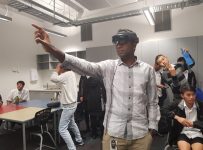
Subash wore one headset, while students wore the other three. The system let them see where he was looking, so they could literally follow his eye.

“We looked at 3D shapes and measurements. I could open a box into a net and explore how different sizes and how surface area can be calculated. It was mind blowing, and really got them excited and engaged.

Becoming the norm

What sort of future does Subash see for VR in education?

HoloLens3“I can see so many possibilities in maths and science, physics, biology, even drama – across all different subjects. I’d like to see VR developed from a makerspace angle – making it a stepping stone, where students can see how things pan out in virtual space before printing products, for example.

“The other day we were measuring things and I put 900 on the board. One student asked what the unit was – if I’d been able to show them the perspective in virtual space, they wouldn’t have needed to ask. Students often struggle to make planes in their heads – they can more easily see what it is from within the virtual environment.

“I see kids afraid to make mistakes on paper, but I feel they’re more confident working in a VR environment, happy to give it a go.

“VR is going to become the norm. But it’s one thing hearing about the technology, I encourage all teachers to experience it.”

Comment from one of Subash’s students:

“We are a generation that learns through examples and visualisation, not explanation and reading, and HoloLens is supportive of this. It helps us rediscover the touch of ingenuity we have lost through the boring, old methods and disconnected learning environments.

“HoloLens inspires critical thinking. It has tremendous potential because it gives us as students so much freedom to experiment, and the only limits are our creativity and imagination. This is not changing what we learn but simply how we learn it, and it may just be the solution to the problems of our education system.”

Categories
Windows 11

Minecraft:Education Edition Webinar

minecraftEE webinarf

Last month I recorded a 35minute webinar about Minecraft:Education Edition with my colleagues Anne Taylor (Teacher Engagement Manager) and Crispin Lockwood (Microsoft Learning Consultant). You can register and view the webinar here:

VIEW WEBINAR HERE

We deliberately started the webinar in a very simple way assuming the viewer knew nothing about Minecraft:Education Edition whatsoever and Anne walked through how to get started and also what resources were available to support educators and students to get started.

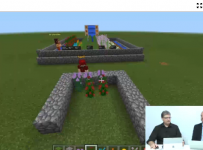
In the second half of the webinar, Crispin and I demonstrated how the game can be played, from a basic maths lesson on fractions and decimals, through to using MakeCode.com to build a TNT Cannon before using Mixed Reality to export a model from Minecraft:Education Edition and display it in the room.

Crispin.PNG
Crispin demonstrating how Minecraft works in a Maths lesson

The ability to export models from Minecraft:EE and use in Mixed Reality is a great feature that really appeals to students and I demonstrated this at the Microsoft Elevate event in Auckland this month, where we took the Beehive model we built in MakeCode.com and touched it up in Paint3D before projecting it amongst our audience. I first started experimenting with exporting models in my own time and taking the odd selfie photo:

Donna.jpg
A model church exported from Minecraft:EE and projected onto my desk using Mixed Reality

If you’re new to Minecraft:Education Edition and wondering how you can integrate this into your teaching and learning then I strongly encourage you to check out this webinar where Anne, Crispin and myself walk through how to get started with downloading the game and finding pre-built lessons to engage your students in game based learning. Simply click the link below to get watching:

VIEW WEBINAR HERE