Categories
Minecraft:EE

Bett Asia 2022: Fostering Student Creativity With Minecraft: Education Edition Presentation

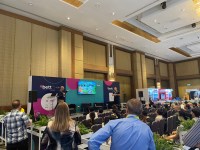
Presenting on stage at Bett Asia 2022 with Glenn Malcolm

This week I have been in beautiful Bangkok, Thailand presenting at the Bett Asia 2022 Conference. Among the numerous sessions I presented, one of the favourites was co-presenting with the incredible Glenn Malcolm from local Bangkok Patana International School. Glenn is a Minecraft Mentor and expert educator and what made this so special was I first connected with him way back in 2017 shortly after I joined Microsoft. He had stumbled across some of my blog posts on Minecraft: Education Edition and we connected over our shared love of game based learning and integrating this into our teaching and learning practice.

The session was well attended on the main stage in the exhibitor hall and Glenn shared three examples of how he has integrated Minecraft: Education Edition into his classes. As is his custom, Glenn makes all his sessions available on his own blog and he pre-recorded the session and it’s available here too:

Of course, this is not a recording of the live session we did so my contributions and questions are not included, but Glenn has generously made the resources he references available on his blog for anyone to access – I highly encourage you to check them out here.

Source: Fostering Student creativity with Minecraft Education Edition — EdTech Lounge
Presenting at Bett Asia 2022 with Glenn Malcolm

I really appreciate the thoughtful approach Glenn brings to game based learning and his awareness of how this can integrate into virtually any curriculum area and across a wide age range. The noticeable thing from the videos he shared of his students was the way they articulated so much of their learning, especially around some of the soft skills such as the need to communicate and collaborate to accomplish the task set for them. To me, this highlighted one of the many benefits of game based learning – you get the instant engagement of “the game”, but you get so much of the learning skillsets developed “by stealth”. It struck me that as the students talked about what they did they used language such as “the challenge we faced was…..” and “the problem we had to overcome looked like….” and they were likely unconsciously connecting that challenge/problem with a specific learning outcome – they simply saw it as part of “the game”.

When we think about attributes of successful people in the work force, one thing that is prized is being able to clearly articulate the challenge/problem/blocker and then work collaboratively with a team to resolve that for the success of the business. An inability to clearly define a problem and then go about seeking a solution can lead to serious inefficiency and unproductiveness in the workplace. These students are demonstrably displaying those nascent skills through the gameplay of Minecraft in their classrooms. It’s that sort of link to developing the whole student (and not just the academic markers of traditional education) that keeps me so enthusiastic about this as a platform for teaching and learning.

A big thanks again to Glenn for supporting us at this event (do check out his blog) and of course Bangkok Patana International School for releasing him for the day to come along.

Categories
Microsoft365

SAMR Alignment For Student Choice on Assignments In Office365

UPDATE 30th August:

Matthew Nickerson has posted a revised / improved version of his graphic which you can see in the tweet below:

Image Credit

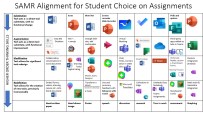
I’m a huge fan of the SAMR model and have blogged about it numerous times on my blog previously so I was delighted when my Twitter PLN (Professional Learning Network) tagged me in on this awesome tweet from Matthew Nickerson (I suggest you follow him!) showing a matrix he had created focusing on how students could submit assignments using only tools in the Office365 suite:

If this spins your wheels, then definitely check out my previous blog post about creating a digital classroom with O365 from a history teacher’s perspective which also mentions SAMR and includes my favourite SAMR poster of:

samr-diving

Last month I did a presentation to educators and leadership in South East Sulawesi Region in Indonesia who were launching a new O365 initiative and I shared the SAMR model with them too at the time – they appreciated the simplicity of the taxonomy but also the breadth and freedom to integrate tools in creative ways to drive better learning outcomes. Ultimately, I see SAMR as being a framework that you can hang your own thinking and planning on in a structured way to drive deeper student engagement with technology, but it is not intended to be a prescriptive guide.

It was back in 2014 that I first came across SAMR and could see it’s power in math lessons where teachers were flipping the classroom with tools like OneNote and Surface Pro devices with digital inking. Check out this blog post I wrote at the time featuring Ben Hilliam (who is now the global head of Math for Education Perfect) where I included my other favourite SAMR poster:

Explaining the SAMR model through coffee

The Role of Twitter

A final word about Twitter – I mentioned at the start of this post that I came across this great teaching aid via my Twitter Professional Learning Network. I’m not overstating it to say that every week there are multiple tweets that catch my eye from dedicated, creative professional teachers that are freely sharing their knowledge on Twitter to assist and inspire their colleagues.

I am not a fan of social media – I have no personal social media accounts myself, so I found it strange that in May 2014 I was training teachers at the school I was working at how to use Twitter to build their own Professional Learning Network (PLN). You can read about that experience and my rationale for it here.

Fast forward from 2014 when I wrote that blog post to 2021, and I used Twitter daily for learning about and keeping abreast of education developments and EduTech. If you have not built your own PLN I encourage you to do so, and I shared tips on how to do this in the blog post above.

Categories
Microsoft365

Reading Progress In Teams – A Faster Way To Assess Student Literacy Rates

Reading Progress overview

When I first quit my job in ICT and trained to become a teacher, I was told on day one of my teacher training:

EVERY one of you will be a teacher of literacy. No matter if you’re thinking you’ll be a Math teacher or a Science teacher or a Physical Education teacher, you’re ALL teachers of literacy – it’s not just the job of our English teachers.

This stuck with me in a powerful way and as I progressed my career as a History, Social Studies and English teacher I always gently reminded my colleagues from other faculties that they needed to ensure they were providing students with strategies in their subjects to help with literacy and comprehension too!

Consequently, I super enthusiastic about the new product coming called Reading Progress in Teams. As always, I do encourage you to read the full information and blog here but I’ll include the vidoes below for convenience and add my thoughts too.

This blog explains in detail the four components of Reading Progress which are:

  1. Create an assignment in Microsoft Teams.
    1. This is where the reading material is populated for the students to read.
  2. Student reading and recording.
    1. Student opens the assignment, sees the reading material, and can video record themselves reading the passage.
  3. Educator Review.
    1. The reading is automatically ‘graded’ for fluency and this data is provided to the educator for review, just like any other normal assignment in Teams
  4. Powerful insights to track student progress.
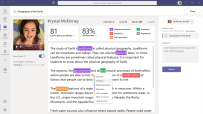
    1. Trends, accuracy, words per minute, common mistakes and omissions are all recorded and can be viewed at an individual student or entire class level. (coming soon: school wide insights for leadership to review)
thumbnail image 6 of blog post titled 


							Reading Progress in Microsoft Teams - Improve student reading fluency, save time and track progress
Example of reading progress trends

My Thoughts

As a trainee teacher, I was required to learn how to take “running records” – these are crucial tools for tracking student literacy and improvement and identifying issues to comprehension. Every teacher has done these, and every teacher knows it’s a time intensive but critical task.

I can immediately see how Reading Progress can pick up some of the ‘heavy lifting’ in this process. I don’t think it will ever be a direct replacement for all running records, but will quickly give a baseline that will allow a teacher to focus on the students with the most needs, whilst also accelerating those students who have the strongest fluency. Additionally, Reading Progress can help reduce student fear / self consciousness in terms of reading in front of others. With this, they can do this by themselves but the teacher still gets the full benefit of seeing their progress.

As a father of four children, I know that all students learn at different paces and in different ways. Some take to reading like a duck to water, others need constant encouragement and assistance to get going. In terms of saving teachers time and focusing on students with the highest needs, I can see Reading Progress being a very valuable tool in the classroom.

Categories
Microsoft365 Minecraft:EE

Students Use Minecraft: Education Edition To Showcase Solutions Combatting Climate Change

UPDATE: July 2021

This competition ran again in 2021 and had some stunning student submissions that I’m embedding here to show what’s possible when combining deep learning and knowledge sharing in a game based platform for sharing that knowledge:

Team Electrae – Champion (Senior Category)
Team Energae – 1st Runner-up (Senior Category)
Team Goaty – 2nd Runner-up (Senior Category)

Original Post:

I always consider myself very privileged in my role because of the diverse experiences and opportunities I get to participate in. One of the highlights of late 2020 was being asked to judge student submissions in a competition run by Singapore’s Energy Market Authority (EMA).

A well lit campus in a world created by students in Singapore. Credit

The quality of entries by secondary school students was very high, as they collaboratively worked to come up with innovative solutions to combat the energy trilemma of balancing the tradeoffs between:

  1. Energy security
  2. Energy equity (i.e. competitive prices)
  3. Environmental sustainability

There is a terrific blog from the Minecraft: Education Edition team here that I encourage you to read in detail, but you’ll see below I’ve embedded the three top entries.

What I particularly liked about this competition was the depth of scientific knowledge demonstrated by students: both in their explanations during their video walkthrough, and in their world creation inside of Minecraft: Education Edition. As a platform, Minecraft is sometimes dismissed as merely “a game”, but I think readers will see the complex environment that can be created with real-world physics and mechanics demonstrated by these student entries.

To that end, Minecraft: Education Edition is the perfect platform to demonstrate student creativity, collaboration and deep theoretical knowledge and understanding – all skills that sit at the heart of most education frameworks in countries today. On top of this, the students have very high engagement because of the great fun that Minecraft represents as a platform to demonstrate learning.

The Winners

First Place

Each student group reflected on their learnings from this competition (again, read these in full here), with the winners noting:

After taking part in the challenge, we learned that there is no one silver bullet that would solve global and complex issues such as the energy trilemma … We also learned that we do not necessarily have to work in the power industry in order to contribute to a more sustainable energy future.

Students Design Innovative Solutions in the Singapore Energy Grand Challenge for Youth | Minecraft: Education Edition

First Runner Up

When building our energy-efficient world, we were initially worried that we might not be able to meet the deadlines, since we were juggling between this project and our school examinations. But we encouraged one another along to get the tasks done, and we were glad that our strong camaraderie allowed us to eventually finish building a world we are proud of for the challenge…. Through this experience, we have gained a deeper understanding of Singapore’s Energy Story and had fun exploring different, innovative, energy-efficient ideas. It was indeed a gratifying experience for the team as we learned and grew as individuals.

Students Design Innovative Solutions in the Singapore Energy Grand Challenge for Youth | Minecraft: Education Edition

Second Runner Up

The thought of using Minecraft: Education Edition to put our vision of a future energy-efficient school excited us. It put our critical thinking skills to the test because we needed to consider implications and trade-offs to come up with new and innovative ideas …. One of our key takeaways from participating in the challenge is that we are now all more careful about how we use energy and make a point of saving it where we can. Learning more about Singapore’s Energy Story and the energy trilemma that we need to manage has also inspired us to contribute more actively to making Singapore more sustainable for everyone.

Students Design Innovative Solutions in the Singapore Energy Grand Challenge for Youth | Minecraft: Education Edition

Final Thoughts

Running Minecraft:Education Edition competitions like this is a great way to engage students and allow them to demonstrate authentic learning, student voice and creativity in a platform that many students are already familiar with.

Putting together a robust learning outcome from the outset is the key and then wrapping a competition framework around that if appropriate. Hopefully this example from students in Singapore help prove what is possible and inspire you to get involved with your students.

Categories
Microsoft365 Minecraft:EE

Engaging Student Learners with eSports in Minecraft: Education Edition

I am a big fan of learning through game based scenarios and have blogged about both digital and physical tools to support this in the past. For example, the “Play Impossible” balls are one of the best integrations of technology and kinesthetic learning modalities I’ve come across recently – read the full blog post here. By contrast, taking Shakespeare and Charles Dickens and recreating entire fictional worlds inside of Minecraft is a great way to engage literacy skills into play – see the post here. The second post is particularly useful because in the second half of the blog I reference a lot of the research from James Paul Gee, who many see as the ‘god father’ of game based learning research.

In that context, the announcement today that the Minecraft: Education Edition team are releasing an eSports group of worlds and teaching resources is a very welcome addition that extends the existing game based learning features in Minecraft.

As always, I encourage you to read the original blog announcement here.

I’ve talked to many educators, both K-12 and Higher Education, that are already leveraging the huge engagement levels that eSports provides to drive learning outcomes in new modalities.  The future of eSports is huge – don’t believe me?

In 2019 a 16yr old won the Fortnite World Cup, pocketing a cool USD$3,000,000 in prize money. This is comparable with the US Open tennis champs and Tiger Woods’ winnings at Augusta – see the story here.

Suffice to say, students are down for eSports. As educators, there is a real opportunity to use eSports as the hook to drive interest and engagement in platforms that also drive robust learning outcomes.

eSports in Minecraft: Education Edition

eSports 1'

A number of resources have been released by the M:EE team to support educators getting started with eSports, and unquestionably the starting point is the rich OneNote NoteBook here:


eSports 4
The Notebook sections on the left show the topics of resources available for educators

Along with the OneNote above, there are seven specific worlds and lessons that students can get started with:

  • Pirate Cove: Enter an immersive pirate-themed world to take part in build competitions on the high seas. 
  • Space Race: Students visit another world as they compete in build battles set against the backdrop of space. 
  • Gold RushStudents travel back in time to a 19th-century Gold Rush town to compete in team-based builds in the Old West. 
  • Busy Bees: Shrink your students down to the size of a bee, then set them loose in an enormous back yard for the battle of the buzz. 
  • Binary Builders: Enter a gigantic computer where students compete in build battles amid a jungle of circuitry. 
  • Splat Racers: A surreal fantasy racecourse is the setting for competitive builds. Set your students’ creativity free as they dream up fantastic imagery! 
  • 3D Print: Students take their places inside giant 3D printers, then compete in build battles. 

Going Deeper With eSports in Minecraft

If you want to go even deeper, then I suggest you check out:

Final Thoughts

It’s easy for adults to be wary about game based learning and what the actual outcomes are for students. To overcome this, there is a wealth of research available to show the impact that learning via gaming can have for students and adults alike. I know of adult training courses (such as nursing) that use game based learning platforms to drive best practice training engagement and of course specialist sectors like policing and armed forces have been using game based learning for years to provide experiences to their employees.

Leveraging research and a clear strategy with measurable outcomes are critical when preparing to implement an eSports curriculum in your school and I also recommend engagement with your student population. Allow their voice and interests to drive some of the messaging and desired outcomes – they will be your best advocates!

Categories
Windows 11

Be Bold & Brave In Your Classroom!

I have had the absolute privilege working alongside some incredible educators during my decade inside the Education Sector and in my role with Microsoft I get into a truly wide and diverse range of schools now.

I shared a lot of the stories of my time at St Andrew’s College in the StAC eLearning Blog – Innovative & Engaging eLearning from St Andrew’s College highlighting the incredible work of the teachers across the primary and secondary schools there.

One of the very first blog posts I wrote back in October 2013 featured Tam, at the time the assistant Head of English, that explored using technology with a Level 3 English Standard. It’s a great post (with some amazing student work being displayed) showing how fearless she was in introducing technology that she freely admitted was not something she was an expert in:

What came through from both teachers during our discussion was there was no need for the teacher to be the expert in the technology, rather by guiding students towards various options and encouraging them to ask discerning questions and collaborate with their peers, then they would be able to learn the necessary skills themselves to complete the assessment. By using tutorials available online through sites such as YouTube, it was the equivalent of bringing experts into the classroom to teach particular skill-sets.

An example of student work from the Level 3 Standard Tam taught

I concluded the blog post at the time with this summary observation:

Summary:

  • Student choice around technologies and content for the assessment increased engagement in the teaching and learning.
  • Students collaborated to find the best tools and tutorials for their presentations
  • Cross-curricular links were made, with students using content from classes as diverse as Agriculture, Geography and Media Studies
  • Teachers recognised they did not need to be the experts in every piece of technology used by students
  • Using online tutorials was the equivalent of bringing experts into the classroom to facilitate the teaching and learning

That was then, this is now:

TamSince 2016, both Tam and I have moved on to different roles, managing to keep in touch with our shared online communities and occasionally crossing paths at various eLearning and EdTech events.

Yesterday, I saw her post online her first attempt at integrating Minecraft:Education Edition into her classroom and with typical boldness she went straight in and let the students lead the way. You can read her great blog post reflecting on it here.  Tam commented:

After avoiding it due to to a lack of understanding and confidence, I thought, ‘lets give it a go!’.

Well,  I was blown away with the students and Minecraft Edu.

A key strategy to ensuring successful take up was allowing the students an initial class to simply “play” in Minecraft – the results were positive:

  • Students were all engaged and talking about what they were doing
  • They were soon creating and several were exploring the Science elements
  • Tam was asked by the students if they could work on it at home, or stay in at lunch.
  • Students that had previously preferred to work on their own were now collaborating with others in the class

minecraft-8That last point is particularly important as it affirms what I’ve seen from other schools and teachers. Some students, who previously have little contribution to class discussions, suddenly become more engaged and willing to work alongside their fellow students when co-operating inside Minecraft:EE. This is a central part of the New Zealand Curriculum, called the Key Competencies and are:

  • Thinking
  • Relating to others
  • Using language, symbols, and texts
  • Managing self
  • Participating and contributing

It’s easy to see how all of those competencies will be utilized through Minecraft:Education Edition.

I did chuckle over Tam’s final comment about the effectiveness of the classroom controls in Minecraft:EE, that include a global “Pause” button on game play – this must be the most effective “full attention cue” a teacher could ever ask for!

A Personal Perspective:

Last month I introduced my 7yr old son to some Minecraft:EE at home. He’s not played any other games before so I was interested to see how he would approach the game. I’ve taught and trained many adult teachers on how the game works and in basic to medium game play and watched as some of them have become frustrated and given up.

It was therefore fascinating to watch my son just “give it a go”, watch him fail, stop and think, and then give it another go in a slightly different way. He was determined to master the gameplay and now we play for 30-60mins each Saturday working away at building various things like an animal petting zoo, circus or tree houses in Minecraft:Education Edition.

I wonder if adults, like Tam has demonstrated over the years, need to let go of some of their concerns about being unskilled or failing with technology, and simply “give it a go”, and also be prepared to be led by students in this area. When it comes to technology, the younger people are less inhibited and worried about failure – they’re used to failing and just keeping on going.

When I observed to my 7yr old son that he had certainly learnt a lot about Minecraft over the last month or so, he looked at me seriously and said:

Dad, I don’t want to hurt your feelings but I think I probably definitely know more about Minecraft than you do now!

I love it!