Categories
Microsoft365 Windows 11

Updated Documentation For M365 Education

M365 Edu Documentation

I have done a lot of live demos over the last couple of months to customers, partners, school leaders and IT admins. I have found that one of the best ways to prepare for these is to ensure I’m following best practice direct from the source. In my case this is the official Microsoft Education documentation.

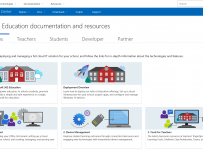
For those that have been paying attention, the fairly recent addition of “Education” to the front page of the Microsoft Docs website is a big deal and shows how serious the Education sector is and remains for Microsoft:

Docs

This week, those documents received an overall update to reflect the new Microsoft 365 Education (M365) offerings and this is split into five sections:

  1. IT Admins
  2. Teachers
  3. Students
  4. Developers
  5. Partners

Perhaps the biggest overall has been to the IT Admin Deployment Overview Guide which has a strong focus on all the things I’ve been live demo’ing of late: Managing Windows 10 through Cloud Deployment and pushing the best applications and tools for teachers. There is a scaled approach here too, with more advanced topics for IT admins that have moved well beyond the basics of modern cloud deployment. For example, I had a school reach out to me earlier this week asking for assistance with setting up Exchange Online – there is now improved documentation for that linked directly from the M365 Edu Documentation e.g.:

My Point of View:

The reality is that products evolve and change constantly. It is virtually impossible for IT admins (let alone teachers) to keep up with the rapid release of new features in products as release cycles get shorter and shorter. Consequently, knowing the source of the best documentation becomes incredibly important and it is pleasing to see that the Microsoft Docs continues to evolve and update just as rapidly as the products themselves.

Without exaggeration, I probably come back to this website every other day for various reasons and if you’re an IT Admin managing any of the M365 Edu solutions then this should be a favourite in all your web browsers!

Categories
Microsoft365

SharePoint Migration Tool Preview Available – Move Those Network Shares To The Cloud!

SPMTIt seems that every week I am having conversations with more schools that are wanting to explore how they can reduce their on-premise servers and leverage the power and flexibility of the cloud more effectively. These conversations usually follow a similar narrative, identifying the “low hanging fruit” – in other words, which servers/services are easiest to migrate first.

The answer almost invariably is local network file shares, and migrating data into SharePoint Online libraries is the easiest and most cost effective way of achieving this.  Happily, Microsoft have recently announced the new, first party SharePoint Migration Tool which schools can use to easily migrate both on-premise SharePoint libraries and local network shares to the cloud.

Download Preview of SharePoint Migration Tool

For a video introduction and overview of how this new tool works, please see below:

This is going to be a fantastic aid for schools to accelerate their move to Cloud services and I encourage you to read the full announcement here. Some key links include:

Just a reminder that this tool is still currently in Preview so take the usual precautions when using this (recommend a test environment first before launching into your production environment). I expect the functionality will also improve over time, however the ease of the tool currently is what I expect will attract a lot of schools to it. Pleasingly, there is the ability to have more complex workloads included as well through the use of CSV and API.