Categories
Microsoft365

The Ultimate Collection of Intune / Endpoint Manager Resources For Education

Intune for Education

UPDATE 19th July 2021: added some additional interactive guides from Joe Cicerco showcasing common scenarios with MEM for Education (specifically, configuring Enterprise WiFi and wrapping .exe files for deployment) as well as an AutoPilot in Edu guide.

UPDATE 24th May 2021: added another section of third party blogs/resources that are helpful. Specifically today, a post to show how Win10 Location Finding services in Intune works.

Looking back over four years of blogging during my time at Microsoft, I realise I’ve made a couple of “Ultimate Collections of ….” blog posts and my rationale for these is very clear: if I can make a “one stop shop” for people to get resources and then keep that one blog post updated as things change, it becomes easier to simply refer customers and partners to that location. The two I currently have are:

  1. Ultimate Minecraft:Education Getting Started Guide
    1. This has proven incredibly popular, regularly on the ‘trending posts’ on my blog and whilst I’ve not added a heap to it recently, remains a great starting point for educators and IT admins alike.
  2. Ultimate Collection of Resources for Remote Learning With M365
    1. This was purely a response to the COVID19 pandemic and was being shared (and accessed) regularly during the first half of 2020 and seen as a go to collection for educators around the world.

Now, I’m always very clear that none of my blog posts should ever replace the official Microsoft Documentation and I always try to link back to this as the source of truth and guides to best practice. I’m also very clear that I try to indicate when changes / updates have occurred by adding a date stamp at the top of the blog post and then using the strikethrough of text when something is no longer relevant.

With this in mind, I’m going to start collating resources on this blog post and keep it updated over time and if I’m missing any obvious ones, please let me know in the comments below or ping me on @samuelmcneill

My Own Blog Posts

There are others, but the above are the more recent / in depth posts but to check the rest, simply click this link to search for Intune across by blog.

Video Resources

The Microsoft Intune for Education Deployment Workshop is a tremendous collection of 21 videos taking you through the deployment stages – click here to access the entire library Here is the embedded playlist:

Documentation

This is a somewhat ‘catch all’ area for largely written documentation that should prove helpful – I’ll add a comment below each link to give you more guidance on what it is before you click the link.

Third Party Blogs / Resources

Partner Specific Content

There may be some overlap here between Documentation and content generated by MSFT specifically for Partners, but worth separating it out too:

People To Follow On Twitter / LinkedIn

A very incomplete list and in no ways ranked, but just some very knowledgable people you could learn from (as I do every day!)

Categories
Microsoft365

Universal Print – A Complete Cloud Printing Solution From Microsoft

UPDATE 9th March 2020: A few people have asked me whether macOS and ChromeOS are supported, particularly because the architecture diagram indicates Windows 10 only:

architecture

For now, the focus remains remains on Windows 10 initially, however I understand both MacOS and ChromeOS (ChromeBooks) are on the roadmap. If these are critical features for you, I suggest you add to the Universal Print Feature Request here. For example, there is a MacOS request already that you could upvote here.

up1Last week saw the exciting announcement of the Universal Print solution from Microsoft and, whilst still only in private preview, this is something education customers should definitely pay close attention to. As described in the announcement blog:

Universal Print moves key Windows Server print functionality to the Microsoft 365 cloud, so organizations no longer need on-premises print servers and do not need to install printer drivers on devices. In addition, Universal Print adds key functionality like security groups for printer access, location-based printer discovery, and a rich administrator experience.

I’ve blogged in the past about the hybrid cloud print solution (still available today) powered by AzureAD, however the Universal Print solution goes that next step and requires no on premise infrastructure for print server queues. Now, this is something that I’ve known about internally for quite a while and have been working with some customers on trialling in the private preview. To be able to go public with it at last is pretty exciting and the fact that the launch blog specifically calls out education customers as a focus is awesome.

The Universal Print solution promises to be more simple to deploy than the hybrid cloud solution I mentioned above:

IT organizations can deploy printers and register them with the Universal Print service without the need for a complex hybrid print setup. In addition, printers can be preconfigured and are easily discoverable from Windows devices that are Azure Active Directory (Azure AD) joined. Users can continue to print from their Windows devices or Office as they always have, with no learning curve.

Why Is This Important?

Many schools are already well underway with full cloud migrations of their on premise infrastructure, this webinar I did with Aaron Overington the IT Manager from One School Global is a great example of this. However, in that case Aaron still ran into issues around fully moving to a cloud print solution as Microsoft’s hybrid cloud print required on premise servers still. To that end, he adopted Printix to achieve a 100% cloud environment.

Now, schools could explore the Universal Print solution from Microsoft, instead of third party cloud products and manage their printing with deep integration with Microsoft 365 (M365).

up2.png

The Importance Of Partners

For cloud printing to work, integration with hardware is important. The launch blog notes that Microsoft is working with printer partners to integrate Universal Print directly into their hardware for native support and Canon Inc appears to be one of the first bringing this to market:

The way people work is changing as cloud computing and technology continue to expand and evolve, driving digital transformation. Canon Inc.’s imageRUNNER ADVANCE and Office Printers provide the flexibility and scalability to address diverse workplace needs. In partnership with Microsoft, we are committed to supporting Universal Print and support our customers in their journey to the digital workplace. Isamu Sato, Senior General Manager, Office Imaging Products Operations, Canon Inc.

Most schools will likely have existing printers that do not yet natively support Universal Print, so Microsoft has provided a cloud connector to enable these to work seamlessly. Documentation for the connector is here.

The other component where partners are important for Universal Print is in cost recovery – expensing the cost of that printing. I note that PaperCut has announced on their blog that they have support for Universal Print:

Good news for Azure fans wanting to use PaperCut

Between you and me, we’ve been working with Microsoft for a while on this project. It was hush-hush until today, hence why you haven’t heard us talking about it.

Microsoft contacted us early on in development to ensure PaperCut MF and NG would interface with Universal Print from the get-go. Which, as it happens, is where we’re at today.

We’ve got an easy-to-use integration with the Azure platform via Universal Print, and we’re looking forward to feedback from those in the private preview testing.

Like Microsoft, PaperCut are offering customers the ability to get into a private preview to trial this if you want to – check out their blog.

I expect more partners, both hardware and software, to announce integrations with Universal Print in due course.

Documentation & Getting Started

Even though the product is still in private preview, there is some documentation available already here.

If you want to register for the private preview then complete this form and there is also a Tech Community page here for community discussion on this solution.

Final Thoughts

Printing is not always a glamourous part of IT management, but I am genuinely excited about this announcement as it means there is going to be one less workload required on premise to deploy, manage, backup and replace over time. With deep integration into M365 and AzureAD this should make the ongoing management of printing an easier task for busy IT administrators.

For schools where there is a drive to move the cloud from their Department or Ministry of Education, this is a good announcement and allows time to start strategically integrating the Universal Print into their plans. Some schools have been using the Google Cloud Print solution, however this is being discontinued as per Google’s blog:

Google Cloud Print, Google’s cloud-based printing solution that has been in beta since 2010, will no longer be supported as of December 31, 2020. Beginning January 1, 2021, devices across all operating systems will not be able to print using Cloud Print. We recommend that you find an alternative print solution and migrate your print services by the end of 2020.

Now might be the perfect time to register for that private preview to get a jump on how to integrate Universal Print into your school!

Categories
Microsoft365 Windows 11

Updated Documentation For M365 Education

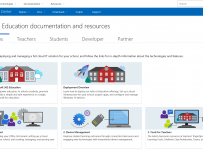
M365 Edu Documentation

I have done a lot of live demos over the last couple of months to customers, partners, school leaders and IT admins. I have found that one of the best ways to prepare for these is to ensure I’m following best practice direct from the source. In my case this is the official Microsoft Education documentation.

For those that have been paying attention, the fairly recent addition of “Education” to the front page of the Microsoft Docs website is a big deal and shows how serious the Education sector is and remains for Microsoft:

Docs

This week, those documents received an overall update to reflect the new Microsoft 365 Education (M365) offerings and this is split into five sections:

  1. IT Admins
  2. Teachers
  3. Students
  4. Developers
  5. Partners

Perhaps the biggest overall has been to the IT Admin Deployment Overview Guide which has a strong focus on all the things I’ve been live demo’ing of late: Managing Windows 10 through Cloud Deployment and pushing the best applications and tools for teachers. There is a scaled approach here too, with more advanced topics for IT admins that have moved well beyond the basics of modern cloud deployment. For example, I had a school reach out to me earlier this week asking for assistance with setting up Exchange Online – there is now improved documentation for that linked directly from the M365 Edu Documentation e.g.:

My Point of View:

The reality is that products evolve and change constantly. It is virtually impossible for IT admins (let alone teachers) to keep up with the rapid release of new features in products as release cycles get shorter and shorter. Consequently, knowing the source of the best documentation becomes incredibly important and it is pleasing to see that the Microsoft Docs continues to evolve and update just as rapidly as the products themselves.

Without exaggeration, I probably come back to this website every other day for various reasons and if you’re an IT Admin managing any of the M365 Edu solutions then this should be a favourite in all your web browsers!