Categories
Windows 11

Minecraft:Education Edition Webinar

minecraftEE webinarf

Last month I recorded a 35minute webinar about Minecraft:Education Edition with my colleagues Anne Taylor (Teacher Engagement Manager) and Crispin Lockwood (Microsoft Learning Consultant). You can register and view the webinar here:

VIEW WEBINAR HERE

We deliberately started the webinar in a very simple way assuming the viewer knew nothing about Minecraft:Education Edition whatsoever and Anne walked through how to get started and also what resources were available to support educators and students to get started.

In the second half of the webinar, Crispin and I demonstrated how the game can be played, from a basic maths lesson on fractions and decimals, through to using MakeCode.com to build a TNT Cannon before using Mixed Reality to export a model from Minecraft:Education Edition and display it in the room.

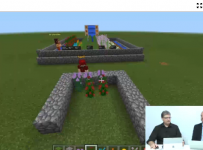
Crispin.PNG
Crispin demonstrating how Minecraft works in a Maths lesson

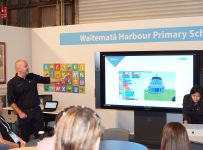
The ability to export models from Minecraft:EE and use in Mixed Reality is a great feature that really appeals to students and I demonstrated this at the Microsoft Elevate event in Auckland this month, where we took the Beehive model we built in MakeCode.com and touched it up in Paint3D before projecting it amongst our audience. I first started experimenting with exporting models in my own time and taking the odd selfie photo:

Donna.jpg
A model church exported from Minecraft:EE and projected onto my desk using Mixed Reality

If you’re new to Minecraft:Education Edition and wondering how you can integrate this into your teaching and learning then I strongly encourage you to check out this webinar where Anne, Crispin and myself walk through how to get started with downloading the game and finding pre-built lessons to engage your students in game based learning. Simply click the link below to get watching:

VIEW WEBINAR HERE


Categories
Microsoft365 Windows 11

Microsoft Elevate – The Modern Classroom

elevate 2

On Tuesday I was in Auckland for the Microsoft Elevate event at Shed 10 which had been transformed into “Everyday Lane” – showing what the Modern Workplace really looks like:

Elevate4

I co-presented with my colleague Anna with a focus on Education and the idea of the “Modern Classroom” with a focus on dispelling three myths:

  • Windows is hard to manage
  • Microsoft is not innovative or engaging
  • Windows is not suitable for teaching and learning.

Here’s a copy of the slide deck from the session:

elevate_085

We focused on three aspects to address the ‘myths’ above:

  1. Intune for Education as a cloud based Mobile Device Management (MDM) solution
  2. Immersive Reader as a tool to support the literacy of students and ensuring equity of access to learning content for all. See here for additional research on this tool and here for a 1hr webinar on the tool.
  3. A truly engaging creative process with coding in Minecraft:Education Edition personalising it in Paint3D and then using Mixed Reality to project the creation into the classroom.

For an independent review of the session, here’s an article from Ben Moore who was at one of my sessions and made the following observations:

The standout offerings were Intune for Education, Immersive Reading, and Minecraft for Education.

Making use of intelligent cloud, Intune for Education is a mobile device management platform that lets teachers create student groups with granular control over what apps are available on their devices and even whether or not the camera is switched on.

Immersive Reading lets students set their own pace for reading, focusing on clarity of the text and building up their skills through a scaffolding approach, presenting a single line at a time, then three lines, then five.

The software can also find and highlight various parts-of-speech to help with those tricky grammar specifics – a truly innovative and equitable approach…..

The myths were on their way to being dispelled by the end of this session.

It was a long day, presenting the above 15 minute session nine separate times over the course of the event, however it was a great opportunity to show how the messaging happening in a modern classroom was the same as what is landing in the modern workplace in the other breakout pods that were on show that day. In fact, one partner pointed this out to me on the day that it would have been great to have Principals and school leaders at the event, as they would have picked up on that consistency of messaging.