This is the recording of Mike Tholfsen delivering a webinar in May where he showed Microsoft’s Reading Progress tool and also Reading Coach.
If you’re interested in literacy and improved reading outcomes it’s definitely worth a watch.
When students transition from “learning to read, to reading to learn” it’s a paradigm shift in their lives and their educational journey. I’m always humbled to see how Microsoft’s education products like Reading Progress and Reading Coach can assist in this journey.
Understanding that literacy is an important key to unlocking the world of learning, the DepEd declared November as National Reading Month in 2011. Since then, the DepEd has celebrated the month with various activities such as weekly reading sessions with reading ambassadors.
For 2021’s Reading Month, the DepEd developed a strategic partnership with Microsoft and built a series of customized activities using different Microsoft tools, including Reading Progress. The partnership gave birth to engaging gamified activities for learners such as Flow Reading, virtual storytelling, and the National Reading Cup competition … The application was built into Microsoft Teams to help learners enhance skills through proactive, independent reading. “Through Reading Progress, learners can independently read aloud, record themselves, and improve their reading skills, while empowering teachers to better support them in their learning progress,” said Diosdado San Antonio, Undersecretary for Curriculum and Instruction at DepEd.
The gamification of learning is, of course, nothing new and in fact I’ve seen a significant uptick in requests from educators to understand how they can integrate the principles of game based learning into their teaching and learning programs. Two blog posts I often reference in relation to this are:
the second half of this blog post references in detail research from James Paul Gee on principles of game based learning and I link this back to Minecraft: Education Edition and how that supports learning outcomes.
A dedicated post showing specific lesson plans for eSports using Minecraft: Education Edition
Final Thoughts
One of the reasons I continue to love working in the EduTech sector is the intersection of technology and education and how this has the potential to drive better learning outcomes and ensure that all students have access to materials in the way the need to consume them. Becoming a lifelong learner is a goal for all students to strive towards and if we can leverage technology to support that, I know I’ll have helped in even a small way.
It can be said that play and learning are synonymous, leading to cognitive and emotional development inside a social and cultural context. (source)
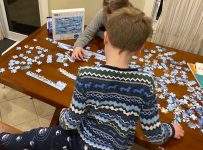
Before bedtime tonight, my two youngest engaged in a quick 40mins of puzzling:
Working as a team to complete the shark puzzle that had been selected
Whilst I was an active participant in the puzzling, I was also an interested observer and while it was clear the goal was a fun activity before bed, it was abundantly evident that a lot of skills were being developed through this play.
This is not an exhaustive list, but included:
Communication: Miss 11yrs and Mr 9yrs were in constant communication with each other, as well as myself, discussing pieces they were looking for, celebrating when a piece was successfully matched, and humming popular songs of the day. They also liberally engaged in ‘stream of consciousness’ thinking and talking, associating the activity of puzzling with other activities they’d engaged in at school earlier in the day and memories from holidays at the beach.
Collaboration: at times, they paired up to find a specific piece of the puzzle (in this case with the aim of completing a singular shark). This required teamwork, especially when they each had pieces of a single shark and had to move them around to fit them together correctly
Critical Thinking: it’s easy to overlook the level of thinking that takes place when playing games. Throughout our time of puzzling this evening, there were frequent references to the illustration on the box, along with consulting the names of the sharks they were attempting to complete. There was also considerable spatial awareness required to correctly locate partially completed sharks in the overall ‘frame’ of the puzzle, even when it was not yet complete. To do this successfully required negotiating where the other person was working at the time, so both communication and collaboration also came into play again here.
Creativity: One of the great challenges of puzzles is the need to visualize in entirety what is only partially complete on the table. This requires imagination and creativity of thought because you can not rely on the individual pieces to tell the whole story/picture until they are actually completed. Listening to my two kids discussing aloud how they thought the puzzle was going to look and what would go where was really an exercise in listening to creative thought and imagination in action.
Why This Matters
When I was a classroom teacher I believed in using a wide variety of tools to assist students in comprehension and learning. I loved digital tools like Google Earth for teaching students geography, but I equally liked batting around my classroom an inflatable globe so students that preferred kinesthetic learning styles could catch it, spin it around to find the country in question, then punch it on to another classmate to have a go. Another example was using digital timelines in history – these were great as you could easily embed images, videos and expand/contract the timeline based on the amount of records you wanted to include. However, nothing quite surpassed having a physical timeline of history on a wall where students could scan a large epoch of history, run their fingers over it, locate a specific event and see at a glance where it fit in the breadth of human development.
Clearly, there is a place for both digital and physical tools for learning in the classroom.
I’m a huge fan of Minecraft: Education Edition and believe it’s awesome at teaching the 5 C’s of 21st Century Skills that I saw evidenced above in the puzzling, but the point is mixing up the digital and the analogue tools we use in our classrooms really helps engage students in different ways. The aim of puzzling before bedtime was to relax and unwind after a busy day at school, however inherent in the gameplay was plenty of learning and socialising – the chatter between the three of us was constant.
Analogue activities like board games and puzzles promote the social skills developed by being in proximity, looking at a shared space but also having “downtime” between turns to engage in off topic chatter and conversation. When you’re working on a screen in isolation there is less of this (it still exists, but in a different way).
I was on a flight home last night and struck up a conversation with the person beside me. After around 20mins the topic turned to Minecraft and how it can be used in such wide areas of learning. I discussed how my two kids puzzling above love to play Minecraft but are limited to 1hr of gameplay on a Saturday and 1hr on a Sunday. Nevertheless, the allure of Minecraft: Education Edition is so strong that they read a lot of books on how to improve their knowledge and skills in the game, and when we go on bike rides together they discuss at length (indeed, it’s more of a monologue!) what they’ve built so far as well as what they intend to build in future sessions.
I love the fact that the digital gameplay is both a motivation and driver of their literacy and oral skills too. I’ve blogged previously about the way Game Based Learning is expressed in Minecraft: Education Edition that may be of interest to you here – check it out here.
As you may have picked up, I quite like puzzles and I think one of the other reasons is that it’s great for mental health! It’s calming and relaxing and great as a mindfulness activity, not dissimilar to colouring-in / illustrating books (and also completing Lego sets following the instructions!)
Update 8th April 2020 – The team at Minecraft: Education Edition have posted a great PDF guide to multi-player gaming – check it out here.
—
I’ve blogged a lot about Minecraft: Education Edition and what an incredible tool it is for teaching 21st Century skills such as collaboration, communication, critical thinking and creativity – not to mention coding!
Today I am blown away by the fact you can play across the internet using Join Codes
Historically, Minecraft: Education Edition was only playable across the Local Area Network (LAN) however with the launch of Join Codes this has opened up Internet play as well. Without further ado, I’ll show you how easy it is to play with the help of my good friend Dan Bowen:
Earlier this week I wrote a post collating a HEAP of amazing resources to help classroom teachers, IT Administrators and parents learn teach and effectively during this period of increased remote learning and self isolation – check it out here.
Adding Minecraft: Education Edition to the list of tools that educators and students can use in remote learning scenarios absolutely changes the game (excuse the pun!)
So What Needs To Be Configured?
As per the video above, simply sharing the Join Code is sufficient for the guest user to enter the world, however the host does need to take some steps to allow this. The official M:EE blog has some guides here, but it all comes down to something called “port forwarding” – honestly, it’s not as scary as it sounds!
To allow Minecraft:Education Edition to communicate across the internet, the host needs to allow their Minecraft application to forward port #19132 across the internet, thus allowing the guest to join to their world. The slightly tricky part here is:
Every student/teacher will likely have a different router at home which will have it’s own configuration methodology.
Never fear! The great website PortForward has step-by-step guides for just about every router under the sun, including my FritzBox!
You will need the administrator username/password for your router to make these changes.
You only need to make the change once, and then it should be fine for that device (if you intend to host worlds on multiple devices, you’ll need to configure the port forwarding for each device.
So what does this look like?
Here is the setting on my FritzBox:
The numbers in red ink above correspond to:
My device name – this is my Surface Laptop and is what I’m configuring the port forwarding for (remember, if I was to do this from an iPad I’d need to also set up port forwarding for that device)
My internal IP address associated with my Surface Laptop – these can change from time to time, so if it stops working, you may need to set the rule up again
MAC Address – this is the unique hardware identifier of the wireless card in my laptop and is used to identify the laptop on the internal network
The routing rules I’ve configured to forward ports
Note that I’ve set up TWO rules – one for TCP traffic and one for UDP traffic, but both on the same port #19132 (you don’t really need to understand the technology behind this, but you DO need to configure the routing rules correctly).
Note that there is a green dot to the left of my two rules showing the port forwarding is active and working correctly.
Internet Play With Minecraft: Education Edition Is A Game Changer
The awesome team at Minecraft: Education Edition made an announcement last week, providing both free resources for remote learning AND free access to Minecraft:EE through to the end of June 2020 – check out this announcement here.
If you’re new to Minecraft:EE I suggest you check out my Ultimate Setup Guide to Minecraft:EE that will include all the information you should ever need to get up and running.
SELF-AWARENESS An individual has the ability to identify and name one’s emotions and their influence on behavior.
COPING SKILLS An individual develops and demonstrates the ability to regulate emotions, thoughts and behaviors in context with people different than oneself.
SOCIAL MANAGEMENT An individual has the ability to make safe and constructive choices about personal behavior and social interactions.
Final Thoughts
What are you waiting for? Get stuck into playing Minecraft: Education Edition across the internet – and use this time of remote learning to build something incredible.
Wondering where to get started?
Check out the 2020 Minecraft Education Challenge to engage students in creative problem solving – it’s an awesome way for students to remain connected with multiplayer Minecraft: Education Edition over the internet whilst remaining at home. The details are all here.
NOTE: even though Join Codes allow you to play across the internet, you can still only connect with other users inside your Office365 Tenant – i.e. your fellow students and teachers. You can not play inter-school at this stage.
I blogged back in June around the ISTE event in Philadelphia about the newly announced features that were going to land in Minecraft: Education Edition and I’m thrilled to see them released today! Note: the new release is version 1.12.0 (previous version was 1.9.3)
Big improvements to Multiplayer mode – one of the biggest frustrations I’ve heard from schools is that people in other classes simply join the worlds of students uninvited. Now, with the release of “Join Codes” you can’t enter a world without first being provided the pictorial join code: problem solved. Additionally, the host can invite others into their world in “guest mode” meaning they can view, but not edit/change the world. This is a huge release.
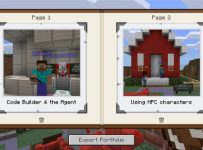
Improved Sharing of Worlds & Exporting of Content – one of the best parts of Minecraft:EE is the ability to deeply integrate it into the learning and assessment happening in a classroom. This got even easier now with links to worlds inside of libraries, meaning teachers can hyper link from an LMS or Microsoft Teams directly to the template world they want students to use. Additionally, you can now export content students have been collecting inside their in-game portfolio (Book & Quill) as a PDF, not simply a text file with separate images. This makes it far easier when it comes to submitting in-game assessment to a LMS or Teams assignment. These two small tweaks will make a big difference for educators.
Single Sign On – a handy one for users on Windows 10 who sign into their device with their O365 credentials. Now, Minecraft:EE will automatically sign you in as well which is handy on 1:1 devices. In shared scenarios you can still sign out of M:EE to allow a different user to sign in.
Immersive Reader – I remember when I first quit my job in ICT to re-train to become a teacher and. the first day of teacher’s college we were told “You’re all teachers of literacy! No matter your subject specialty, you’re all teachers of literacy!” Now, with Immersive Reader coming to Minecraft:EE, this app joins the growing list of others that are helping students access the material they need to learn with the support they need.
Final Thoughts:
It’s great to see the continued evolution of Minecraft: Education Edition and, as always, make sure you go to the home page for full details. In my view, this update addresses some key requests from educators so it’s always pleasing to see the product team is listening to the customers and updating accordingly. Additionally, the focus on the learning side of things with better portfolio export options, easier external linking to worlds and improved literacy support means this update will appeal even more to teachers.
If you’re on Windows 10 or an iPad you’ll get the update automatically. If you’re on a MacBook / iMac you’ll need to download the app and reinstall – start here.
Every now and then you see a piece of technology that leaves your mind whirring about the possibilities for both educators and students alike. Back in 2016 I encountered the HP Sprout for the first time and blogged my first giddy thoughts about how this could be integrated into incredible teaching and learning moments, calling it an “almost magical technology”.
At BETT London 2019 I saw the Play Impossible ball for the first time, right at the very end of this video and the integration with Microsoft Hacking STEM templates in Excel generated the same reaction in me that the Sprout did:
What endless possibilities could creative teachers come up with when technology infused ball sports in such a fun and natural way?
What’s the big deal? Have a look at this:
(If you’re in a hurry, make sure you scroll to the bottom and watch the video I recorded showing the Play Impossible Game Ball and Excel Data Streamer workbook in action.)
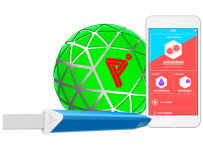
an active STEM system that delivers fun and challenging games integrated with math and physics lesson plans through a professionally crafted ball containing sensors that connect to a smartphone, tablet or PC via Bluetooth.
Robust in build quality, small enough for younger hands, it’s easy to get up and running on the platform of your choice (currently supporting Windows10, iOS and Android) and then the intuitive app guides you through how to get playing … and learning! My 9yr and 7yr old kids figured it out in minutes.
Situated Meanings: Students learn new vocabulary words by experiencing them within game situations. Research suggests learners do not acquire new vocabulary when the word is learnt purely in the context of other words. By contrast, retention is highest when words are learnt in association with an action, event, or image. Gaming provides the perfect vehicle for this.
With data outputs from the Game Ball including measurements like speed (in kph), acceleration, g-force, newtons, rotational spin and air time there are a lot of vocabulary words that are no longer abstract, but directly linked and associated with actions and activities the students are participating in through situated meanings.
With a Play Impossible Game Ball, students (and educators!) immediately get caught up in the fun of competing and the kinesthetic learning opportunities are boundless. However, for me the integration of Excel’s Data Streamer and Hacking STEM templates is where this goes next level in terms of learning pathways.
Excel Data Streamer & Hacking STEM
The Microsoft Education team have put considerable resources into creating STEM lessons for educators to quickly and easily build engaging projects for students to learn the fundamentals of STEM concepts. At the heart of this is Data Streamer, a plugin for Microsoft Excel for O365 subscribers:
Data Streamer provides students with a simple way to bring data from the physical world in and out of Excel’s powerful digital canvas. With a sensor connected to a microcontroller that is attached to Excel, begin introducing students to the emerging worlds of data science and the internet of things.
Data Streamer is available for free to all O365 subscribers.
With Data Streamer, the at times abstract concepts of IoT devices and the data generated by them can be brought to life through real time visualizations inside of custom built Excel spreadsheets. Here is an example Excel using Data Streamer to take the output data from a Microbit recording the impact of knock to a helmet:
You can easily activate Data Streamer in your O365 version of Excel by following the instructions here or watching this animated GIF:
I recorded a quick video (using the Meet Now feature in Microsoft Teams – a great way to deliver Flipped Learning) to show you just how easy it is to get up and running with the Play Impossible Game Ball app and the Hacking STEM Microsoft Excel workbook and Data Streamer plugin for live data feeds:
The Data Streamer and Excel Hacking STEM workbook are only available on Windows 10 and this adds a unique value proposition here when using the Play Impossible Game Ball. To maximise the value beyond the included app from Play Impossible, Windows 10 and Excel O365 prove again why it is the most versatile STEM platform unlocking the widest range of learning pathways with STEM and IoT devices. By combining the flexible canvas of Excel you can easily add other data streams to the workbook and create your own custom visualizations of this data, providing students hands on experience with the tools that many data scientists use on a daily basis.
Final Thoughts:
What I like about the Play Impossible Game Ball is the wide range of learning opportunities available through this technology. It’s getting kids active and physically moving around and being hands on, but also introducing elements of IoT, data streams and STEM in a fun and comprehensible way.
The included Play Impossible app provides a “fast start” for students from a young age, however the addition of the Hacking STEM Excel workbook with the Data Streamer plugin really increases the use case scenarios, in particular in subjects such as more senior subjects like Physics, Maths with Statistics, along with Physical Education learning about range of motions. The sheer volume of data generated by the Game Ball, and collected and recorded in Excel via Data Streamer, allows for an almost limitless range of extended learning ideas where teachers can bring their own ideas to the tools.
Recently, I have been reflecting on what it means to be a “Life Long Learner” in light of the ongoing research indicating that the K-12 students of today will likely have 5 or more distinct careers during their time in the workforce, meaning re-training is an inevitability.
Related to this topic, I am actually going to be speaking on May 7th 2019 as part of the Microsoft #FutureOfWork Event (registration here) on the topic of Game Based Learning principles, something that many organisations are starting to adopt for staff training.
The concept that there are clear milestones and an eventual finishing line to learning was never ideal, but it is even more woefully inadequate in a technology-enabled world. To thrive in volatile environments, we must embrace life-long learning. (emphasis mine)
Cut To The Chase: What Are The Top Three?
I’m going to expand on these in more detail further down in the post, but for those impatient to know what my top three reflections were on being a Life Long Learner here they are:
It’s critical – all sectors are changing too fast for individuals to NOT be learning all the time.
In this age of accelerations, such a slow process is no longer good enough and inevitably leads to a widening gap between what students need to learn and what teachers teach. When fast gets really fast, being slow to adapt makes us really slow.
It requires determination – individuals are always short of time, energy and motivation
I admire anyone that works full time in a demanding job and still finds time to complete formal study on top of that. The good news is that with MOOCs and other online training options like edX and LinkedIn Learning it’s becoming ever more flexible to wrap training around busy schedules.
It’s rewarding – learning new things has an inherent thrill to it, just ask any student that has grasped a new concept or skill for the first time.
My learning journey has included being a K-12 student, both undergraduate and post-graduate University student, re-training into a new career with a secondary teaching diploma and now finally continuous on-the-job learning. Through this journey, I’ve covered just about every type of learning there is. Nevertheless, it’s still exciting when I grasp new knowledge or skills and then proceed to apply it for the first time in my daily life or job.
So where and how have I been learning?
Minecraft:EE Build Challenge – Solar Model
I was in Singapore last week as part of the APAC Education Partner Summit 2019 and I was asked to present on the topic of “Making Education Transformation Real in K-12” and you can see my slides below (note: I was deliberately using Office365 PowerPoint with support for 3D models to animate my Minecraft:EE and Solar System Models – SlideShare does not support this animation):
After talking about Game Based Learning I ended up showing a Build Challenge inside of Minecraft:EE that I had worked on that morning (around 3am actually, since I work up very early with time zone differences!). Here’s the link to the build challenge that had a reasonably simple objective:
Objective
The Sun is 286 times the size of the smallest planet in our solar system, Mercury. If Mercury were the size of one Minecraft block, try to build a scale model of Mercury and the rest of the planets. You may have to round up or down to the correct number of blocks. To get you started, we’ve created a world with a Minecraft block scale sun!
To complete this, I ended up needing to do quite a bit of learning and also develop an iterative approach to knowledge building. I’m going to describe this for you but if you want to access my finished files you can download them from here (they include the Minecraft world, my Excel spreadsheet, and my MakeCode coding files).
The first challenge was finding out the basic facts around the Solar System – planet names, colours, sizes, relative distances from each other and the sun. I ended up compiling this into an Excel Spreadsheet and used a basic formula to convert 1km into 1 block inside Minecraft:EE
With this in mind, I was able to then create some sample code to build out each planet to scale:
This would be faster than building each planet by hand inside of Minecraft and the intial results were pleasing enough – here are spheres representing Earth (blue, small) and Mars (red and partially built):
So I now knew I could build each planet individually but the question was how to make this a scale model with the accurate distances between each planet? I decided to build each planet sequentially and place the starting position relative to my location – so you can see that Mercury would be built first, 58 blocks away from my starting position against the Sun, representing 58million kilometers away. This was followed by Venus (pale yellow) 108 blocks away, representing 108million km from the sun and so forth. Here’s two views of the same code, one in MakeCode.com blocks and the other in JavaScript:
When I ran my code this executed beautifully:
However, because of the huge scale of the universe, I quickly realised that to travel 5,946 blocks in Minecraft to get to Pluto (representing 5,945,900,000km from the sun) would take a LONG time.
KEY LEARNING: the scale of the universe is ginormous! This was reinforced to me through trying to create a scale model inside Minecraft! Whilst I built this using code, I never got to see those planets as it would take forever to run to them inside the game (unless I teleported).
The other learning was that to build a scale model of Jupiter inside of Minecraft:EE as a sphere with a diameter of 143 blocks also takes a LONG time.
Instead, I decided to iterate my code in two important ways:
So that I could at least see each of my planets I set an arbitrary distance between each planet of 50 blocks inside Minecraft. I also set each planet to be 10 relative blocks above the previous one so it would go up in a nice consistent line.
I replaced the “sphere” command in Minecraft with a “circle” command meaning it would be far faster to build, as it would only be a disk the appropriate size, and not a sphere.
Here was my new code alongside each other:
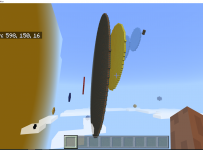
When I ran the “solarCircle” code it worked wonderfully,quickly building out scale circles of each planet but near enough so I could visualize them together:
In the first picture on the left you can see the planets scaling out nicely, before being hidden by the massive size of Jupiter. Navigating around that to the right, you can see in the second picture the remaining planets.
Through this exercise, done in my hotel room before I presented to group of ~70 partners, I learnt many things about the solar system! It also helped me understand different way that data can be represented and how by using computational thinking and coding I was able to break down a bigger problem of building a scale model into smaller steps that I could replicate and modify individually.
If I linked this back to my three key reflections on Life Long Learning:
It’s critical
For my presentation I really wanted to have an authentic example that the audience could relate to and show a real use of Game Based Learning.
It requires determination
I admit I got a bit annoyed during this and thought about quitting and using a different example where I didn’t have to prepare all the data, but I persevered and chose a Growth Mindset instead.
It’s rewarding
I got a genuine kick out of this when my final version of code worked flawlessly and gave me a great view of the scale of the planets relative to each other. It has also given me another working example I can use in different demonstrations with educators around the region.
LinkedIn Learning – Azure Technical Training
The second example of life long learning has taken place over the course of this week as I completed some mandatory technical training around Azure services for my job with Microsoft. One of these modules was around Microsoft Azure Artificial Intelligence Strategy and Solutions (see the badge on the left that I got when completing this learning).
In many ways, the learning via LinkedIn includes elements of Game Based Learning Theory – there are points that can be gained for completing each section and badges that can be unlocked for finishing an entire module. These can then be shared and celebrated on various social media platforms (I published mine on my LinkedIn wall).
Through completing around five hours of training in this space I learnt a lot and also had much of my wider ideas clarified or affirmed. Again, if I link it back to my three reflections on Life Long Learning:
It’s critical
If I want to be able to have relevant conversations with customers in the Education Sector, I need to be across both the trends happening in the sector but also the technology offerings and solutions that Microsoft have. I literally could not keep my job if I was not continuing to learn as our technologies evolve.
It requires determination
With hundreds of emails a week coming and going, customer presentations, internal meetings there are always reasons to delay or ignore critical training. I needed to prioritize this and commit to being a Life Long Learner or else it simply would not have happened.
It’s rewarding
Just like in the Minecraft:EE example above, I got a genuine thrill when I passed the assessment related to each module and was pleasantly surprised when I realized I knew more than I thought I did in some areas. Additionally, it’s equipped me to have deeper conversations with my customers in a way that I would not have been able to before.
Final Thoughts:
It can sometimes be trite to talk about Life Long Learning, however I’m more convinced than ever that we all need to be adopting this, along with a Growth Mindset when it comes to our workplaces. As someone that has had three distinct phases in my professional working life already I am in many ways an accurate reflection of the trends the research is predicting. If you’re interested in more research, check out the Class of 2030 data published here.
Having worked in a range of different sectors, including as a secondary school teacher, I’ve been both inspired and dismayed by my colleagues approaches to life long learning. The best continually challenge themselves to both reinvent and reimagine how they complete their jobs and deliver amazing results. Others, sadly, “stick to what they know and what they’ve always done” and I believe that it will be increasingly difficult to be successful in the workplace both now and in the future when a Growth Mindset is not adopted to power life long learning. It seems appropriate to finish with the words of General Eric Shinseki from the US Armed Forces: