Categories
Windows 11

Experimenting With Azure Virtual Machines Part 2 – Windows 365

Back in June I wrote about experimenting with Azure Virtual Labs service as part of a multi blog series on virtual machines hosted in Azure.

In this multi-part blog series, I’m going to explore different flavours of Azure Virtual Machines, so buckle up and enjoy:

Hybrid Working & The Role Of CloudPC

This morning I’m writing this blog as I work from home on my MacBook Pro as I need to take my son to a doctors appointment over lunch. It’s this sort of hybrid/flexible working situation that has become increasingly common over the last few years and I’m fortunate that I have both a supportive employer that allows this, as well as technology that makes it possible for me to work seamlessly from my home.

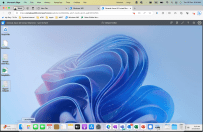
My MacBook Pro is managed by Intune, my default browser is Microsoft Edge with an Entra ID (formerly AzureAD) work profile on it securing access to work resources in M365 and most importantly for this blog post, I also have a Windows 365 CloudPC accessible through my work browser on my Mac:

A screenshot of my MacBook showing my Windows 365 CloudPC running in a tab of Microsoft Edge giving me a full, native Windows 11 experience when I need it.

Most recently, I’ve been using Hyper-V virtual machines hosted on my Windows 365 CloudPC for customer testing:

I’ve blogged previously about my Hyper-V set up, and it was easier for me to continue that on a Windows 11 device than replicating it locally on my MacBook. When working with customers more familiar with a Windows 11 environment, having immediate access to the same OS on my primary machine is incredibly helpful and also means I can run Windows only applications when required securely on my CloudPC. The specs for this CloudPC are:

Just as my MacBook is, this Windows 365 CloudPC is configured and managed by Intune meaning the same corporate baselines are applied protecting both the OS and the content stored on it. I’m heading to Europe at the end of the year for a holiday and whilst I don’t intend to do any work (and won’t be taking my work MacBook with me) if something critical happened and I needed access to work resources I know I could access this Windows 365 CloudPC from a device and have a secured experience to complete any work necessary and my employer could have confidence I was not using a local device from a friend or internet cafe with possible data leaks or compromise risks.

The Windows 365 eBook

This morning I received a copy of the Windows 365 eBook from Microsoft that reminded me of this series of Azure virtual desktop blogs I’m writing and prompted this blog post. You can read a copy of it below in full. I thought I’d share a few take away thoughts from this short document (it’s a 6 minute read).

The Changing Landscape of Work

Microsoft’s messaging to IT Decision Makers (ITDM) is that in a world of increased uncertainty and change, you need to have technology that can support remote/hybrid working effectively in any location and on any device. They share some research data that over half of fully remote employees are considering a shift to a more hybrid work setup and that similarly over half of hybrid employees are considering going fully remote:

In my view this is not going to work for every industry, but certainly many information workers are able to work effectively from various locations and it becomes an increasing consideration for employers how they can deliver that flexibility whilst still meeting their security and compliance requirements around access to sensitive corporate data (see this blog post for more thoughts). I lived through the devastating Christchurch earthquakes of of 2010-11 when much of the central city was laid waste and know first hand how disruptive it was for many businesses, including schools and universities, that could not get physical access to their work locations.

A photo showing the dust rising over Christchurch immediately after the February 22nd 2011 earthquake – Image Credit.

Things had clearly moved forward significantly in the following decade as workplaces shut down again with the global Covid19 pandemic but I still know of large businesses and Government departments that had not fully implemented an effective remote workplace strategy or lacked sufficient numbers of laptops to give to staff who primarily used desktops in their workplace to complete their work. It’s in these scenarios that a secure CloudPC would shine. While I referenced information workers above, Microsoft has a grander vision of where the Windows 365 CloudPC can support a spectrum of roles:

The Only Constant Is Change

Windows 365 helps organisations provision secure Cloud PCs for a variety of job types – including full-time employees, consultants, temporary workers (like product-testers and interns) and mobile teams – no matter if they’re remote or in-person. Windows 365 can be effectively deployed to information workers just as easily as it is to frontline service workers and shift workers.

Security Will Be A Key Determining Factor For ITDM Whether To Embrace CloudPC

I recognised the convenience of having a virtual CloudPC on Windows 365 earlier in my blog post in terms of working from home, running Hyper-V or using Windows-only applications, but I believe one of the key considerations ITDM will have in mind with this type of solution is security, something outlined in the eBook as follows:

Saving Time & Gaining Efficiencies Through CloudPC Deployments

The other core benefit I see here is the ease and efficiency of deploying larger volumes of devices – using Microsoft Intune to configure the specs and settings of Windows 365, an IT Administrator can use the tools they already know for managing their existing physical devices to easily deploy Windows 365 devices, be it a single device for a temporary contractor, or hundreds of CloudPC for every staff member in an organisation if an emergency necessitated working from home on their personal PC or tablet. I acknowledge the eBook is Microsoft marketing material so take the following numbers as you will, but they suggest efficiencies gained are:

  • 40% cost savings when using Windows 365 compared to on-premise VDI or Desktop as a Service (DaaS) offerings
  • 75% reduction in endpoint configuration times
  • 25% reduction in new software deployment times

The Differences Between Windows 365 & Azure Virtual Desktop

A number of customers have asked me about the difference between Windows 365 (W365) and Azure Virtual Desktop (AVD) and at the most simplistic level, it’s helpful to understand that W365 is a subscription based license with fixed monthly costs, no matter how much you use it but with correspondingly less configuration options over the virtual device. On the other hand, AVD is a consumption based model with almost endless configuration options and you pay for what you consume.

Beyond that simple difference, the eBook does provide a helpful comparison chart which was one of the more useful things in the eBook:

Closing Thoughts

After nearly seven years running Windows 10 and Windows 11 devices as my primary working machine, I’m enjoying being back on macOS with my MacBook Pro and experiencing the changes that have happened to the OS since I last used it regularly. However, I use my Windows 365 CloudPC almost every other day for various tasks related to my work and having the flexibility to work across OS is very empowering.

I have talked with a number of CIO in organisations who are actively evaluating the role of CloudPC in their device fleet strategy, with some running pilots with identified users already. I don’t see this trend changing as long as there are requirements for mobile, hybrid and remote working scenarios for employees.

Drop me a line if you’d like to talk more about this or check out https://www.windows365.com to see Microsoft’s information on CloudPC.

Read The Entire Windows 365 eBook – Embedded

Video: Integrating Moodle LMS Into Microsoft Teams

The impact of COVID19 on the digitization of education is truly remarkable and, I believe, irreversible. Student expectations for course content to be delivered “on demand” and “just in time” via a variety of mediums has become the norm and many Universities and schools are struggling to keep up.

One trend I’ve observed is that with the proliferation of digital platforms, many educators and students are now struggling to understand what content goes where and how to streamline the entry points to accessing learning materials. This is a real and valid question, especially in light of the drive from many educational institutes to improve the equity of access to content and accommodating the varied learning needs of students. With a plethora of platforms deployed, it makes sense to being rationalization, both through improved security via Single Sign On (SSO) between them, but also simplifying the user experience (UX) by providing a common entry point to start learning and collaborating.

Microsoft LMS Integration Documentation

To this end, Microsoft has created a number of integrations between Microsoft Teams and popular Learning Management Systems (LMS). Linking directly to some of the documentation for this:

Moodle Integration Video

My colleague Lalit Mohan has created a great walkthrough video showing the tight integration of Moodle inside of Microsoft Teams. This has both the end user experience and the configuration required by an administrator:

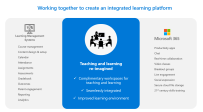
The ease of a truly integrated experience between the real-time collaboration benefits of Microsoft Teams (and M365) with the LMS of Moodle natively accessible with one click is a powerful combination:

If you’re an organization that has deployed multiple platforms to meet the needs (and demands) of remote and hybrid learners and are now starting to return to a mixture of face to face and remote learning, it could be the right time to consider the rationalization and deeper integration of your learning platforms.

Seeing the ease of connecting Microsoft Teams with a variety of LMS could be the start of that journey for you.

Categories
Microsoft365 Windows 11

Empowering Students & Teachers To Self-Deploy Windows 10 Devices with AutoPilot & Intune

One of the most common discussions I have with education customers, both in K-12 and Higher Education, along with our partners, is around the easiest pathways to mass scale device deployments. As the COVID19 pandemic continues to impact schooling, many students are in remote/hybrid learning scenarios and require devices to support their learning. Consequently, traditional models of deployment need to be reconsidered as devices are often needing to be shipped directly to teachers and students who may be in various levels of lockdown, there may be a mixture of institution and personally only devices needing management and of course a pressing concern to ensure the devices are secure and compliant.

This graphic illustrates the changing approach to device deployment that many education institutes are facing

With that background, I was thrilled to see a recent LinkedIn post from my colleague Ovi Barceló Hernández where he shared a real life, very personal example of “practicing what you preach” as he recorded his 8yr old son unboxing and self-deploying his new school Windows 10 device:

As always, I encourage you to read the full original post, but the key take away was his 8yr old son could easily deploy his device for learning, straight from the sealed box from the manufacturer and within minutes end up with:

  • A full zero-touch deployment of Windows 10 EDU, already secured
  • A deployment of all the needed software (now we have Notepad ++, Minecraft: Education Edition, Scratch, Chrome, Lego WeDo, Paint.Net, VLC Player, 7-Zip, Publisher apps, and, of course M365 Apps)
  • A completely managed device, end to end, with full control on updates
  • All in a 4/128 device!! 78GB still available after everything I mentioned here.

Aside from dispelling myths around the challenges of deploying Windows in education, Ovi’s son was able to independently prepare his device for learning and gain new skills and a sense of ownership from being part of the preparation of his device for learning during this period of remote and hybrid teaching.

If you’re interested in learning more about how to do this, we have created interactive, click-through guided demos of many of the required tools, including the Windows for AutoPilot and Intune for Education platforms to enable this. I’ve collated all of these videos in this blog post here but will specifically link to:

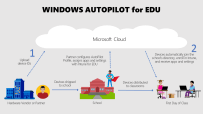
I particularly like the above video because it demonstrates genuine options around end user self-deployment allowing both schools and deployment IT partners to save money on what has historically been a costly and time/labour intensive part of the deployment process. This is outlined in the following infographic:

Understanding Windows AutoPilot for Edu and empowering students and teachers to self-deploy their own devices

If you are wondering what is required to achieve the same outcomes, the base line solutions to seamlessly allow end user self-deployment like Ovi’s son achieved would be:

Not Just For Education…

If you’re reading this and thinking this solution is just for education, then think again! It’s widely used in many organisations now and when I saw Ovi’s post above, it reminded me of one from my NZ based colleague Ben Brown when he posted the following question!

IT people, why are you still imaging devices?? 💻 A real world example of why autopilot + cloud ☁️managed devices just makes so much sense. Broken work laptop -> full work machine in <10 minutes 🎉

Ben Brown – LinkedIn

Being the talented individual he is, Ben created a time lapse of his re-deployment process from unboxing his new Surface, to deploying it via Windows AutoPilot and then submitting the return ticket for his broken device – all in under ten minutes!

Final Thoughts

These two examples are great because they’re real world examples of people who would likely both identify as “not super techy” IT Manager type individuals and yet, with the power of modern deployment technologies likes Windows AutoPilot and Intune, they were both able to quickly get themselves up and running with new devices in mere minutes.

It’s hard to overstate the importance of this empowering of end users to ‘own the process’ both in terms of building their confidence that they could redeploy their existing device if it needed a full reset if something went wrong, or in the case of Ben, deploy a brand new replacement device if something more serious had happened.

For education leaders, this should prove the point that the pathway forward for large scale deployment of Windows devices is a modern management approach, freeing the IT team up for more important functions to the organisation than simply touching every device to prepare it for end users. If you are an IT Admin in a school and would like to know more about how to implement this process yourself, then check this link which has all the documentation you need:

Link to documentation here

If you have questions on this, feel free to hit me up on Twitter or in the comments section below!

Categories
Microsoft365

Microsoft Teams Classroom Drop-In App Template: Allowing Virtual Attendees To Visit Classes

thumbnail image 2 captioned Install and use the Classroom Drop-in app to allow school leaders, substitute instructors, evaluators, TAs, to check in on or become a temporary teacher for a class
Image Credit

I am based in New Zealand and for the last two weeks we have been back in full Level 4 lockdown as the Government and Ministry of Education responds to the first community infections of the Delta variant of COVID19.

Consequently, I’m fielding a few interesting calls from educators and IT Administrators that are either wanting some refreshers on how to best use Microsoft Teams for Education for remote learning, or are asking about specific needs for the first time.

My Principal / Head of Teaching and Learning / Head of Student Support etc etc is wanting to do ‘virtual drop ins’ to Teams – not just the video conferencing meetings, but see the chat, assignments, files etc. Help! How can I do this?

(example of the questions I have been asked recently)

The above question is completely understandable: as students partake in a renewed round of remote learning, the senior leaders in schools are wanting to ensure that robust and quality teaching and learning is taking place remotely. This is not always measured by the number of video calls that take place, but other indicators such as the depth of discussion in the Teams Posts chat as well as files being edited or collaborated on and assignments being submitted are all useful.

Fortunately, there is a Teams App built for this and published on GitHub that anyone can download and build – click here to view the instructions. From the installation instructions comes the overview of the functionality of the app:

As learning has moved online, system leaders have a hard time monitoring what’s going on in the virtual classroom. They need a way to drop-in and observe how teachers and students are doing. Also, there is a need to provide temporary access to substitute teachers. In Classroom Drop-in, system leaders can find classrooms and add themselves to it with a specified drop-in period. This will add them to corresponding team or class. They can also assign others (substitute teachers, evaluators etc.) to a class for a short period, as needed.

GitHub – OfficeDev/microsoft-teams-apps-classroom-dropin: An app template designed to enable system leaders to schedule drop-ins in virtual classrooms.

Here are a few key features of the app:

  • Admin/Teacher/User can create drop-In with the help of “New drop-in” tab and extend/delete drop-ins with the help of “My active drop-in” tab.
  • Classroom Drop-in app provides ability to search schools and teams or classes to drop in.
  • For every drop-in, app sends notification to admin as well dropped-in user.
  • Admin or System Leader can drop-in self or someone else.
  • After specified time of drop-in, the access will get revoked from assigned user and the user will get notification for the same.

I can definitely see the value of this app to support school leaders who want to easily check in on classes without needing to be added to all classes in Teams which would quickly fill up their Teams activity feed and make it very hard to see the Teams content they care most about on a day to day basis.

It’s worth noting there are some requirements to get this up and running (all listed in the documentation) and I encourage you to check the full list, but here’s the quick notes:

  • Administrative access to Azure Active Directory
  • Power Apps Premium (per App or per User) license assigned to your account (you will be unable to import the Power App without this)
  • Power Automate license assigned to your account
  • A valid SharePoint Online license assigned to your account, and permission to create lists and store data
  • A Microsoft Teams license assigned to your account
  • A copy of the Classroom Drop-in app zip package

Classroom Drop-In is built on the Microsoft Power Platform that allows for low code / no code apps to be rapidly built and deployed and the architecture is outlined below:

Image Credit

If you do end up deploying this and using with your educators, I’d love to know how it goes – feel free to drop a note in the comments below!

Categories
eBike

Reflections On Owning A Riese & Muller SuperCharger 2 eBike

UPDATE 7th October 2022

This blog post has proven to be more popular than I anticipated at the time of writing (back in January 2021), with a lot of views and comments below too. I thought I’d add a quick update on things since I wrote it. Firstly, I’ve bought another Riese & Muller eBike – this time a MultiCharger Mixte for my wife. She wanted a step through frame so she could more easily wear a skirt/dress on her eBike and she’s loving it. This is the evening we picked it up:

She opted for the seat kit on the back so the kids could sit on it (doesn’t happen too often as they don’t think it’s very cool!), but has huge carrying capacity, plus the updated rack on the front is very helpful with more space and heavier carrying capacity compared to the SuperCharger 2 we originally got. This comes with a single 750w battery, Enviolo internal gear hub and Gates carbon belt drive (although is not a high speed motor).

I am continuing to track month on month usage of the car, the SuperCharger 2 and now have added the MultiCharger Mixte. I am pleased how we have managed to go from two cars to one, and grow the eBike usage considerably.

Lastly, I’ve finally got myself a bike with a Rohloff hub and it’s brilliant. I talk below towards the end of the original post about my preference to have had a Rohloff on the SuperCharger 2 to maximise the value of the HighSpeed Bosch motor, and at last I have one – but this time on a non-electric gravel bike!

Riding it up and around the hills of my local town
Primed and ready to come home – you can see the red Rohloff hub in the rear, matched with a red Son dynamo in the front hub powering the red Son Edelux light and USB charger in the stem
The red Rohloff hub in all its glory, paired with a Gates carbon belt drive

With that update done, back to the original post:

Introduction:

I’ve been meaning to write this for a while and yet have been short of time. Now, on 2nd January 2021 holidaying by the beach, I thought it might be a good chance to write this down. It could get a little long, so I’ve broken it into sections so you can skip around to what interests you most:

My Interest In Bikes

I’ve always loved riding bikes and from a young age was using a bike to ride to school. I have one clear childhood memory from around age 7yrs or so, when I was allowed to ride my bike the 500m or so my local primary school for the first time. I was so used to walking home after school that’s precisely what I did, only realising I’d left my precious bike at school in the bike sheds once I got home! What followed was a nervous run back to school, hoping it had not been stolen, but fortunately it was still there waiting for me. As I got older, biking to high school and sports practices was the norm – I remember the frosty mornings and the inky nights biking home in the rain. Then it was biking to university and work – I’ve always been a cyclist!

Once I started having some disposable income I explored other types of bikes and my first less common purchase was a Pashley Roadster Sovereign, affectionately known as ‘the king of the road’.

So many things appealed to me about this bike:

  • The more upright riding style
  • Dynamo hub in the front wheel powering the front lamp (I quickly swapped out the incandescent bulb for a much brighter LED that contained a capacitor that kept the light on when stopped at an intersection
  • Internal gearing hub and drum brakes – all things that reduced the componentry maintenance because, whilst I love bikes I’m not especially good at repairing them!
  • The Brooks saddle – super comfortable for longer rides
  • Built in ‘cafe lock’ to easily secure the bike for a quick dash into a store

In fact, I loved the bike so much I ended up purchasing a matching Pashley Princess Sovereign for my wife for our 10th wedding anniversary:

I briefly entertained the idea of importing some Pashley ‘look a like’ bikes from China after I continually received lots of compliments on my bike, however after bringing in a couple of samples I realised the build quality at the lower price point would not be a great cycling experience for anyone.

A few years later, I embarked on some road cycling and got a great deal on a Cannondale Synapse with Shimano UItegra componentry throughout and have undertaken some longer (and faster) rides:

I had never paid a lot of attention to the emerging eBike phenomenon until late 2019 when a few friends started to get eMTB and were going further and harder than ever before. My parents bought a pair of Specialized Como and, like me, my Dad loves to do research on purchases like this and he was determined to get an eBike with an ‘internal’ battery – something built into the frame and not attached to the exterior like an eyesore. This literally opened my eyes to the rapid evolution happening in eBikes and I started to seriously consider one.

eBike Selection – Finding What Was Right For Me

I started to watch a lot of YouTube videos on various eBike reviews and became a regular viewer of Chris Nolte’s YouTube Channel – he founded Propel Bikes and makes excellent videos and it was hear that I learnt about the various options on eBikes.

From my previous cycling, I had a lot of experience with traditional derailleur and chain drive trains, some experience with internal gear hubs from my Pashley, but I now learnt of options like Gates’ Carbon Belt Drives and Rohloff Hubs and it helped me come up with a selection criteria for an eBike:

  • Internal batteries were non-negotiable.
    • Whilst I was delighted to see the ever expanding numbers of eBikes on the roads, I confess look of bolted on battery backs was a turn off. I wanted an eBike to look good and to disguise the power source
  • Versatility – the bike needed to be able to ‘do more’ than just get me from A to B.
    • I had been toying with the idea of seeing whether our family could be a ‘one car family’, something we had never been since the arrival of our first child. It seemed an ambitious goal as parents to four children aged between 9 & 17 years of age. Consequently, an eBike needed to be able to take groceries and other ‘stuff’, bags to work/school and possibly even a younger child on the back.
  • Componentry built for low maintenance.
    • As mentioned earlier, I love riding bikes but I am not a whizz when it comes to repairing them. Buying a bike that would go long distances without regular maintenance was appealing.
  • Relatively upright riding style.
    • If I had any hope of getting my wife onboard with the idea of being a ‘one car family’ then she would have to be able to ride the eBike too and she was now fully accustomed to the upright style of her Pashley and would never revert to a more aggressive mountain bike/commuter style riding position
  • Speed Restrictions – the faster the better.
    • New Zealand is fortunate that we have fewer restrictions than many countries when it comes to eBikes, nevertheless most of the major brands were bringing in models that cut assistance at 28 or 32kph. Given I could comfortably ride my Cannondale at 30kph, I was interested in models of eBike that could power assist up to 45kph

Despite eBikes burgeoning in popularity, I realised quickly that my selection criteria was likely to narrow my choice considerably yet I was reluctant to compromise I what I felt were features that would ensure I got out and rode this bike whenever (and wherever) possible.

The first eBike that ticked most of the boxes was the Trek / Electra Cafe Moto Go. My research taught me Electra was an independent bike company that built fun, comfortable rides and had been acquired by Trek that increased their distribution and support but maintained a commitment to the original vision of Electra.

I test rode this bike 2-3x and there was a lot to like about it. The internal Nuvinci Enviolo hub paired with the Gates Carbon Belt Drive was super smooth and quiet, the relaxed seating position, whilst not quite upright, was fun to ride, it had a Brooks saddle and an integrated lighting setup (although the lamp at the front was more for show than function I found). Frustratingly, Trek was only bringing the 32kph model into NZ (45kph was being sold in the US) and given it could carry no bags it was a non-starter for anything more than a great fun bike to ride.

I then turned to the Riese and Muller Multicharger, inspired by videos like this one where people were quitting their cars in favour of the Multicharger:

I realised quite quickly that Riese and Muller eBikes were highly customisable, allowing me to tick virtually every box of my selection criteria – at a price! Yes, they cost the price of a small car, but I figured it might end up replacing the second car that I was rapidly realising was not being driven all that often. I showed my two younger kids how they could sit on the back for short rides … but they flat out refused to be seen dead on the back of any eBike I might purchase!

Apparently 9yr and 11yr old kids see no glamour in riding pillion on an eBike!

I checked out the Benno Boost-E, described as an ‘eTility’ bike, a sort of ‘do anything’ hybrid and again, Chris from Propel Bikes and his awesome videos were there to influence me every step of the way with his chat with the founder of Benno bikes:

The configurations of the Benno Boost was truly impressive:

Image Credit

Again, however, my stringent selection criteria started limiting me as the Benno only came with a traditional derailleur and chain and was also speed limited to 32kph. I was beginning to wonder whether I would need to start compromising on some aspects of my selection criteria, but just as the COVID19 lockdown restrictions started to lift in New Zealand, I connected with the team at Christchurch Electric Bicycles and, with my wife in tow, headed down for some test rides.

As luck (or fate) would have it, the team had pair of Riese and Muller eBikes out front and ready to test ride: the Supercharger 2 in the Matte Curry colourway and a SuperDelite. The SuperCharger 2 had the Enviolo drivetrain from Nuvinci and a belt drive, whilst the Delite had a traditional derailleur set up.

SuperCharger 2 – Image Credit
SuperDelite – Image Credit

The test rides were awesome – see the section below – and Riese and Muller really are making the Mercedes of eBikes. We rode a pair of Benno Boost afterwards and, whilst lovely bikes, they just didn’t match the riding experience of the R&M, albeit they are considerably more affordable.

One downside of the Riese & Muller bikes is that they operate a ‘build to order’ model, and COVID19 was only exacerbating wait times, stretching out to nearly 6 months in some cases. The awesome team at Christchurch Electric Bikes cut me a deal on the floor model of the SuperCharger2 that had been used for test rides and it was coming home with me…..

Thoughts On The Riese & Muller Supercharger 2

It was the end of May 2020 that I bought the Supercharger2 and have subsequently taken it on many adventures, with more in the planning. I wrote a blog and captured some cool photos around Tekapo – check it out here.

Even though I’d been talking about becoming a one car family, a situation came up with some family friends that ended up us loaning them our second car so we are now trialing having only one car since September and three months on it’s going ok. Given the considerable price tag attached to any Riese and Muller bike, I needed to be able to calculate the Return on Investment (ROI) so have been tracking the odometer of the vehicles on the 1st of each month:

The Toyota Highlander has become the primary family vehicle, the Toyota Prado has been loaned away to friends (most km’s on this were my daughter learning to drive anyway) and the SuperCharger2 now fills in for ‘everything else’

A few observations on the above vehicle usage:

  • We bought the eBike going into winter – not the best time to be riding in Christchurch due to rain and frosts, yet we still piled on the usage, average 282km/month with a peak in December 2020 of 392km. I’m looking forward to seeing how this changes as we come into the summer months.
  • Due to COVID19, I’m working almost exclusively from home now with virtually no domestic travel, and zero international travel since January 2020. The ‘need’ for a second car to get me to the airport is significantly reduced right now, minimizing the impact of not having a second vehicle
  • Even though we have loaned the Prado to friends, the eBike was comfortably doing more kilometers than the car (which was mostly sitting in the garage or being used to teach my eldest daughter to drive)
  • My wife rides the SuperCharger2 to work (2-3 days a week), so it’s functioning as a ‘commuter’ quite nicely, albeit for short distances.
  • We bought Ortlieb Back Roller City Panniers with the eBike from the team at Christchurch Electric Bikes and these have been excellent for groceries, comfortably holding $200 of food in them. Rain proof, they’ve been a great investment and I want to use them more for bike packing adventures too.
  • Having recently moved house, I’ve used the SuperCharger2 to collect various DIY items and other goods and bring home – it’s proved exceptionally versatile.
  • Christchurch is very flat, but I’ve taken the SuperCharger2 across the Summit Road circuit a couple of times that has total elevation of around 650m over 50km and sections with 15% gradient and it coped admirably.

Given the winter months, it’s not been ideal weather for longer trips further afield, however in December my wife and I did complete the Little River Rail Trail together on the SuperCharger2 and a borrowed Specialized Como from my mum. Starting/finishing at the township of Lincoln this was ~80km in distance, right on the absolute limit of the battery of the Como, whilst the SuperCharger2 read 109km range left!

Pros & Cons of the Riese & Muller Supercharger2

I’m writing this with 6-7 months experience on the bike now and I admit, I’m a huge fan. This won’t be an exhaustive list as there are other blogs and reviews out there, but this is coming from my personal experience:

Pros

  • Battery life
    • With 2x 500wh internally housed batteries, there is no need for ‘range anxiety’ – this bike will take you where you need to go and you’ll love getting there. I believe the newer versions have included a 625wh battery in the downtube so you’ll get even more range now.
  • Integrated lighting
    • A very bright, always on, front LED and a clever rear light that gets brighter when braking (by lighting up additional LED) helps you feel safer on the road and means worry free cycling at night as you’ll never forget your lights! I actually tilt the front light up a bit when biking in the day so that the oncoming vehicles definitely see the full effect of the front light
  • Integrated lock
    • The SuperCharger2 comes with the Abus 6000 Bordo folding lock and is keyed with the same lock as the two batteries making it convenient to secure your bike (and batteries if you wished to remove them) at any time). Whilst the 6000 folding lock is great, the circumference is smaller than traditional chain/cable locks so at times clever thinking is required to attach to an immovable object.
  • Comfort of the ride
    • This is clearly very subjective, but the geometry of the bike, adjustability of the handle bars, the ThudBuster seatpost, Schwalbe tyres all combine to make for a great ride. Given the bike tops 30kg, there’s a lot of bike to push along but it never feels a chore given the comfort of riding it. The best testament to this is my wife who rides it to work, shopping trips and to see friends – if it was remotely uncomfortable, she would take the car!
  • Drivetrain and componentry
    • Again, the Supercharger2 is a premium eBike with a price point to match, however all of the componentry is excellent and ticked the boxes on my selection criteria. My one came with the Gates Belt Drive, the Nuvinci Enviolo Hub and the Bosch Performance Speedline Gen4 – pretty much everything I wanted!
  • Speed!
    • After having ridden a number of eBikes that cut out at 28kph or 32kph I initially thought that might be ok. However, once I rode eBikes that could hit 45kph I could never look back. The Bosch Performance Speedline Gen4 is an absolute marvel of engineering. When combined with the belt drive and Enviolo, it’s virtually silent and you can sit in the mid-30kph without any problems at all.
  • Versatility & Usefulness
    • As mentioned above, we’ve taken everything from groceries in the Ortlieb panniers, to tools and household items on the front rack. Once you start thinking ‘eBike first’ in terms of your mode of transport nothing is impossible: I even took our vacuum cleaner on it when shifting houses, much to the curious stares of the cars going past. Also, once you start riding your bike to more places you realise just how much traffic there actually is on the roads! Scooting up the inside of the traffic saves so much time and being able to park right outside the shop rather than walking from the carpark is fantastic.
  • Choice on level of effort
    • It may be a small thing, but if I want to go somewhere and not be at all hot or sweaty, maximum boost on Turbo gets me there fast and fresh. If I want to put some effort in and feel like I’ve ridden my bike, then Eco allows me to put some muscle in and feel like I’ve had a good bike ride.
  • Fun Factor
    • Every single time I ride this bike I enjoy it. I’m grinning, I’m happy, I feel good at the destination. From a mental health and wellbeing perspective, riding a bike is great and getting to your destination faster and fresher is the icing on the cake. It’s a joy to ride – I can not overstate that enough.

Cons

  • Cost
    • This is not a cheap bike by any stretch. I can justify it as a vehicle replacement (and it has admirably coped as our second vehicle for nearly 4 months now) and it’s made of premium componentry, but it’s still a lot of money. In saying that, I want to ride this bike every day – there is nothing about it that makes me feel like I’ve compromised on my selection criteria and it’s as fun to ride now as when I first bought it. But it’s still a lot of money for a bike!
  • Gear range
    • I bought the floor model that had the Enviolo Hub from Nuvinci in it that has a reported 380 degree range of gears. It’s awesome, but I’ve found that it does not have quite high enough gears to comfortably sit at 45kph without requiring a very high cadence. Also, and this may be personal preference, I don’t like the grip shifter for changing gears – I realise with a CVT hub you can’t really have traditional shifters a there is no indexed gears, but for me, twisting the shifter is tireson. On the upside, the Enviolo is virtually maintenance free and is a masterclass in engineering (if I had my time again, I’d choose the Rohloff e14 Speedhub for a wider gear range but still internally housed)
  • Weight
    • North of 30kg, this is a heavy bike – two internally housed batteries will do that for you. Whilst this weight gives it a lot of stability when travelling at high speeds which provides confidence on mixed terrain, moving the bike into position to park/lock it requires a bit of muscle. Furthermore, putting the bike onto a bike rack on the car to transport is a big job usually requiring two people to avoid scratching the bike or car. If you’re a smaller person, this would likely be beyond you.
  • Maintenance
    • I bought a bike with the intention of being as low maintenance as possible, and after a winter and spring of riding, it’s proven to be exactly that. However, in anticipation of some longer riding with camping in mind, I decided I needed to be able to change the rear tyre by myself in case of a flat or puncture. Getting it off was easy following a YouTube video, but reconnecting the gear cables proved challenging and I needed some assistance in the end from the great team at Christchurch Electric Bikes. I’m sure it was all my error and I’ll get better with practice, but it’s not as easy as a traditional derailleur bike.

I can’t really think of too many other downsides – I really do like this bike!

What’s Next?

My kids joke that eBikes have become my hobby horse and a topic I’ll talk about to anyone at any time and there is probably some truth in this. I have a few friends that are passionate about the environment and see any initiative to reduce cars on the road as a good thing. Whilst this is not my primary driver for getting into eBikes I can see the upside, and when doing the numbers on ever owning a second car again, the ROI for our family looks dubious. I’ve signed up to Zilch (eCar ridesharing company in NZ) for occasions where I really need a second vehicle, and there is a pickup zone around 800m from my house so an easy collection point.

I have plans for some bikepacking adventures on the SuperCharger2 that seems like the next step now that summer is here. The West Coast Wilderness Trail is a great starting contender as is Tasman’s Great Taste Trail. Additionally, I got Bikepacking Aotearoa by the Kennett Brothers for Christmas to feed the inspiration.

As mentioned above, I don’t think I’d get an eBike that could not pedal assist to 45kph now that I’ve tasted and enjoyed that speed and convenience of getting around and to best support this, I’d really want a Rohloff Speedhub with its higher gear range:

Which leaves me in a bit of a tricky position: it would be great to do these adventures with a second person (wife, child ,friend) but given my pretty narrow selection criteria affording a second eBike that meets these standards is a luxury beyond me right now!

That said, I believe the pricing of eBikes will come down with even wider adoption, and my personal belief is that more governments will consider extending subsidies on Electric Vehicles beyond just cars and include eBikes in this too – something this article from the news hints at. Certainly, EV are beyond the budget of most people, whereas the range of price for eBikes is wider and has a lower entry point.

If you’ve made it this far you’re a bit of a hero (or an eBike tragic like myself) so I congratulate you and trust you get as much enjoyment out of your ride as I do. Feel free to drop questions in the comments below and I’ll respond!